
Lucassifoni
Hello dear Nerves users,
I’m trying to get a PWM output to show up on the 40-pin header on the MangoPI, specifically physical pin 35, or GPIO 38 as seen from Elixir. My goal is to have a few PWM channels physically available on the header to control them with the sysfs (/sys/class/pwm) interface.
To summarize :
- I think I found the relevant information in the D1 manual.
- I’m pretty sure I do not know how to properly apply it.
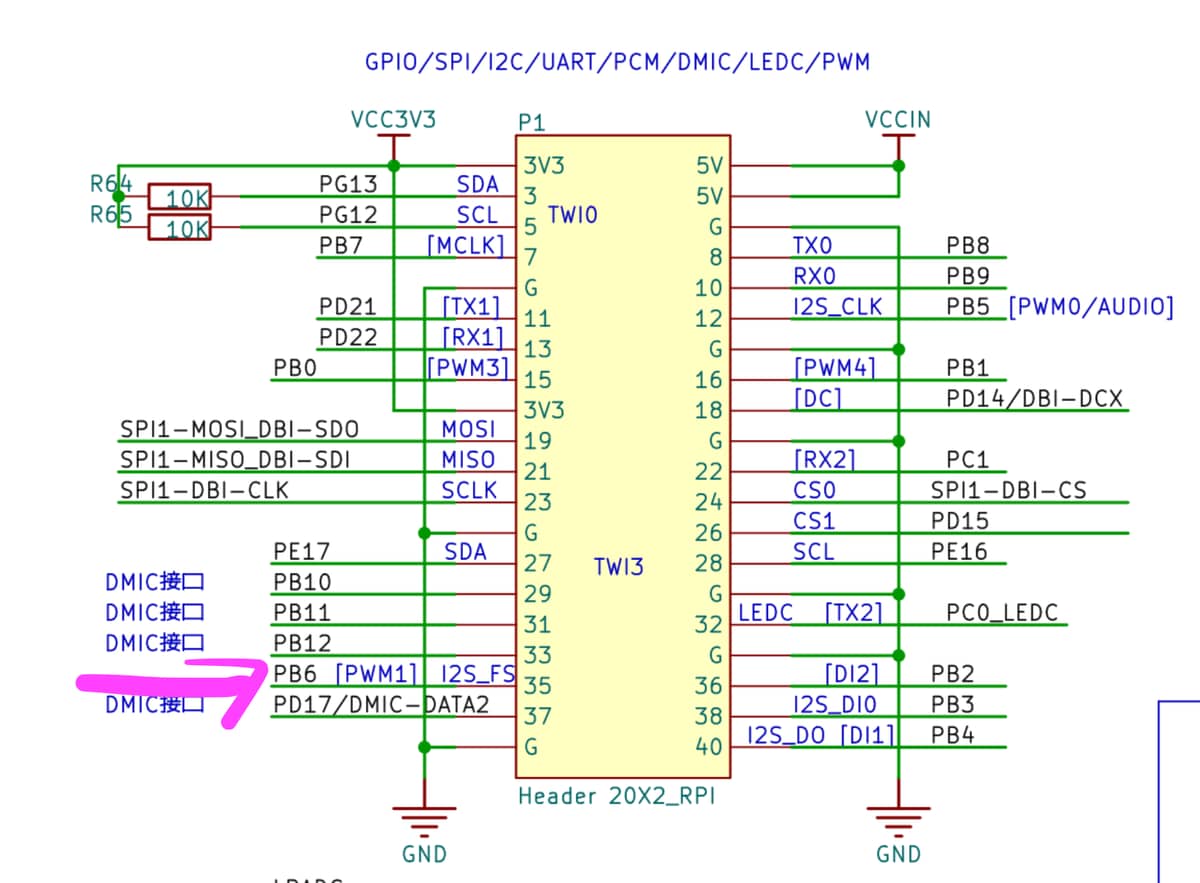
I found the following pin multiplexing table in the official D1 documentation (beware : 1300+ pages)

Further, since this pin should be handled by PB6, I found the relevant register address :

And the bit pattern to configure PB6 to use the PWM1 channel :

My understanding is that I should be able to get the PWM1 channel on PB6 / GPIO38 by setting the register at address 0x02000000 + 0x0030 to the bit pattern 000001010000000000000000 or 0x050000 (since PB6_SELECT is set by using the bits 27 to 24).
I found samples of DTS files online for similar purposes that I tried to modify, some compiling, and some not, but none having any tangible effect towards my goal.
I would greatly appreciate any direction on that matter. Am I looking at the wrong level of abstraction by thinking in terms of bit patterns and registers, and pinmux configuration is instead done at a slightly higher level ?
Best,
Lucas
Where Next?

Trending in Questions




Other Trending Topics


 Latest Nerves Threads
Latest on Elixir Forum
Sponsor Spotlight

Bringing learning, work and compliance together since 1987.
Categories:
Sub Categories:
Forums
Popular Tags
- #ecto
- #liveview
- #troubleshooting
- #learning-elixir
- #library
- #deployment
- #erlang
- #testing
- #genserver
- #mix
- #absinthe
- #remote-other
- #otp
- #plug
- #how-to-question
- #macros
- #postgres
- #elixirconf
- #channels
- #exunit
- #code-sync
- #discussion
- #podcasts
- #javascript
- #onsite
- #dialyzer
- #docker
- #authentication
- #ai
- #umbrella
- #full-time-contract
- #elixirconf-us
- #podcasts-by-brainlid
- #blog-post
- #ecto-query
- #elixir-ls
- #phoenix_html
- #iex
- #graphql
- #genstage
- #websockets
- #supervisor
- #advent-of-code
- #distillery
- #elixirconf-eu
- #processes
- #security
- #api
- #forms
- #performance
Our Sponsors

Build Elixir applications with speed and confidence.

Supporting innovation across the BEAM ecosystem.

We build reliable cloud platforms for business-critical systems.

Catch errors, track performance, monitor hosts and more.

Elixir, Erlang & BEAM conferences from Code Sync. Next: ElixirConf EU 2027

Master modern tools, write cleaner code, and tackle real-world challenges.
Bringing learning, work and compliance together since 1987.

**Building the future of software with AI, trust, and human connection.**

The team behind Membrane, Popcorn, LiveDebugger. Available for hire.

Courses that'll move you from confusion to "Aha, now I get it!"
Showing Posts 1 to 10- Show Best Posts
- Show All (oldest first)
- Show All (newest first)
ConnorRigby
I know it’s been a while since you posted this, but just in case you haven’t figured it out, or if anyone else stumbles upon this in the future, here’s a example of enabling a PWM channel on the t113s. Pwm by ConnorRigby · Pull Request #1 · ConnorRigby/nerves_system_underglow3 · GitHub
it should be the same on the D1. The source file for pinctrl will be in here Making sure you're not a bot!
Lucassifoni
Thanks a lot for these resources, I should be able to leverage them. I’ve put the project on the backburner for a while, but should be getting to it quite soon. .
It’s also very nice to have that kind of samples for more advanced topics on the forum
Lucassifoni
It’s been a while, but I finally have time to dig into this more, I’ll leave a trail of notes here. Feel free to correct me if something is wrong. Resources online are sparse.
A device tree file (like the resource linked above) describes the hardware and peripherals at system build time. It is different from a DTS file made to produce a DTBO file, a runtime overlay re-configuring some of the hardware, that you load with configFS. This first differenciation took me some time.
So, to write a DTS file to reconfigure some hardware, you have to know how your device tree is currently configured. You either wrote it, or a system author wrote it (my situation).
You can get the device tree of a running Nerves system where the dtc binary is present like this :
Then, you can de-compile this system.dtb file to a DTS file, with :
This extracted DTS file is a good starting point to write overlays for a specific system.
Lucassifoni
A bit of grave digging here, but it looks like I failed to get PWM outputs because the driver simply wasn’t mainlined at the time I was working on that.
It still isn’t, from what I can see, but the PWM driver is available at : Making sure you're not a bot! (drivers/pwm/pwm-sun20i.c) and needs
CONFIG_PWM=yandCONFIG_PWM_SUN20I=yThen a small overlay will actually expose the pins through pinmux.
fhunleth
If you’re still using the MangoPi MQ Pro, I really feel like we could update the version of Linux on it and probably bring in PWM. I updated OpenSBI to the latest last week to fix issues found by GCC 15.3, but since the Linux kernel still worked and I’m not a big MangoPi user these days, I didn’t update it. There have been so many updates to RISC-V software components over the past two years that this board might show some performance improvements.
Lucassifoni
I stopped using it at the time after frying the board and switched to a more common one, but I have now restarted trying to use it as a base for a device.
I could try updating the kernel and report if you wish ?
fhunleth
That’s always welcome. Ideally, an unpatched 6.18.x kernel would work. I think if USB gadget networking and WiFi work, then that’s success. I have no idea if that’s a big ask or not. If it does work, then I’d gladly merge the PR. It would be great to get off the unmaintained kernel fork that we’re currently using.
Lucassifoni
I’m on it then.
Lucassifoni
Hey ! If someone does need the PWM outputs of the mangopi to actually come out on the header, you can checkout my branch here : GitHub - Lucassifoni/nerves_system_mangopi_mq_pro at pwm-ability · GitHub
Here is a dynamic overlay that correctly muxes the pins, on top of the 6.18.36 kernel update : nerves_system_mangopi_mq_pro/pwm-7ch-overlay.dts at pwm-ability · Lucassifoni/nerves_system_mangopi_mq_pro · GitHub
For ease of use, you can checkout my two helper libraries, DtsBuddy and Pwmx, described here : Two helper libraries, DtsBuddy and Pwmx
Here is how to get leds blinking on the exposed channels in an iex session :
Lucassifoni
A bit of benchmarking on the mangopi :
This is by using direct File.write! operations on sysfs.
And writing both period and duty cycle takes around 8200us, so it can be driven at ~12Hz
So, this isn’t fast enough at all for robotics, but it is fast enough for a lot of applications and can even provide a low-resolution acceleration curve. For example, I will be able to remove a microcontroller that was between the board and motors on a three-axis motorized table for an interferometry rig.