how can I do lsp-format-buffer run after save buffer?
This is what I have in my Emacs init file:
(add-hook 'elixir-mode-hook
          (lambda ()
            (add-hook 'before-save-hook #'lsp-format-buffer nil t)))
anyone figured out how to get inline heex (via ~H) syntax highlighted?
Not specific to doom, but you can use poly-mode to combine web-mode and elixir-mode to accomplish this:
(use-package
   polymode
  :ensure t
  :mode ("\\.ex\\'" . poly-elixir-web-mode)
  :init (setq web-mode-engines-alist '(("elixir" . "\\.ex\\'")))
  :config
  (define-hostmode poly-elixir-hostmode :mode 'elixir-mode)
  (define-innermode poly-surface-expr-elixir-innermode
    :mode 'web-mode
    :head-matcher (rx line-start (* space) "~H" (= 3 (char "\"'")) line-end)
    :tail-matcher (rx line-start (* space) (= 3 (char "\"'")) line-end)
    :head-mode 'host
    :tail-mode 'host
    :allow-nested nil
    :keep-in-mode 'host
    :fallback-mode 'host)
  (define-polymode poly-elixir-web-mode
    :hostmode 'poly-elixir-hostmode
    :innermodes '(poly-surface-expr-elixir-innermode)))
my full init.el is here if anyone is interested:
https://dotfilehub.com/knoebber/emacs
4 Likes
Doom Emacs now supports tree-sitter. Have restructured my config (Org mode ftw!) and will soon update the topic start post.
4 Likes
Did you manage to make tree-sitter work to correctly syntax highlight HTML code inside ~H ~F and ~L sigils?
Not yet, but that is the main reason the opening post has to be updated as Doom Emacs does not work that well with Phoenix projects.
Due to Emacs not doing great with a professional project I have to work on at a daily basis; I have to postpone my usage of Doom Emacs. As a result I won’t be able to keep the opening post as updated as it should be.
Please drop me a message when you are able to maintain the opening post.
1 Like
I still use CentaurEmacs (even though I already use LunarVim for most of of my development) and it is doing surprisingly well, has good errors and warnings detection, for Elixir and Rust both it does linting with dialyzer and clippy respectively, shows docs on autocomplete and sometimes when you put cursor under a thing.
It works much better than I expected. Even with that I get the occasional lockups for 2-3 secs.
Haven’t checked how well it integrates with Phoenix though. I suspect not well but if you’re curious and have time you could give it a go. It’s based on Doom Emacs.
A bit of a necro, but I’ve been using Doom for a while. And I use Emacs for almost everything - The Way of Emacs .
Been using alchemist since 2016 and just upgraded to use eglot and elixir-ls. It’s much better than alchemist and eglot will ship by default with Emacs 29.
Configuration below:
packages.el
(package! elixir-mode)
(package! eglot)
(package! exunit)
(package! inf-elixir)
config.el
;; eglot configuration
(use-package elixir-mode)
(use-package eglot)
(use-package exunit)

(add-to-list
 'eglot-server-programs
 '(elixir-mode . ("sh" "/home/YOUR_HOME_DIR/.elixir-ls/release/language_server.sh")))

(add-hook
 'elixir-mode-hook
 (lambda ()
   (subword-mode)
   (eglot-ensure)
   (company-mode)
   (flymake-mode)
   (add-hook 'before-save-hook 'eglot-format nil t)
   ))
(setq inf-elixir-project-command "iex -S mix phx.server")
6 Likes
I’ve also been using the Elixir mode with Treesitter support for while now, as Emacs 29 will come with support for it.
I really like it.
2 Likes
I’m using that too, but I can’t make elixir code inside html/heex be correct displayed (with syntax highlighting). Did you figured a way to fix that?
There is no support for that, but there I raised an issue about it. It seems having Elixir with embbeded Heex and Heex with embbeded Elixir at the same time is a bit tricky with their current project structure.
2 Likes
If you are getting some warning like “lsp is scanning 5000 files in current project…consider adding to ignore list”, try adding this to
config.el
A bunch of these directories are now ignored by default.
In my case, adding the following to my config.el was enough to get rid of the warning:
; Elixir: Ignore files which don't need to be watched
; https://emacs-lsp.github.io/lsp-mode/page/file-watchers/
(after! lsp-mode
  (dolist (match
           '("[/\\\\]_build\\'"
             "[/\\\\]deps\\'"))
    (add-to-list 'lsp-file-watch-ignored-directories match)))
3 Likes
I followed this post recently to upgrade my Emacs to 29 finally. Thought I’d post it here. Basically you need to put this in packages.el:
(package! elixir-ts-mode)
And then follow the tutorial about the configuration. Works like a charm. Syntax highlighting in heex files too.
3 Likes
can you send a snippet on how you did it on your config.el?
i’ve tried that and everytime i opened a new project it errored with no language registered for elixir-ts-mode or something like that. 
I just added that line. But there’s also a step from elixir-ts-mode readme, you should run M-x elixir-ts-install-grammar to, well, install the grammar. Maybe that’s what you are missing?
1 Like
I started using emacs version 30 with doom today.
I had the same problem reported above about the “tree-sitter missing language grammar”.
To fix it I pressed Alt + X (called M-x in emacs land) and typed “treesit-ins” to find command treesit-install-language-grammar.
Then I typed elixir and press enter. It said something like “I don’t know what you’re talking about, do you want to do this together, interactively?”. So I said “yes” by typing y and pressing enter.
First of all it wants a github URL. So I google “treesitter elixir language grammar github” and the first result is https://github.com/elixir-lang/tree-sitter-elixir. I paste this in and press enter, then just accept the default answers for everything else. Then tree-sitter just pulls the repo, compiles it and installs the grammar (I guess  ).
).
I thought I was done. I closed emacs and ran doom sync just for sanity. When I re-opened emacs, it complains now about missing heex language grammar.
The same process works again. This time the github URL is https://github.com/phoenixframework/tree-sitter-heex.
TL;DR To fix treesitter missing language grammar, M-x treesit-install-language-grammar, enter “elixir”, paste https://github.com/elixir-lang/tree-sitter-elixir and press Enter 6 or 7 times. Repeat but with “heex” and https://github.com/phoenixframework/tree-sitter-heex.
P.S. Emacs 30 is great. Faster, etc. but the main “win” for me is now strings with # symbol in heex templates do not mess up formatting of the rest of the buffer. This is a tiny thing but a huge win for my state of mind.
5 Likes
I need to correct something I said nearly 3 years ago. I talked about using “universal mode” to run mix test --failed in Doom Emacs. This does not work any more. However, there is a different way. Thanks to the legendary @aymanosman for this info:
The Doom Emacs ExUnit way now is:
press
control + c
and then press
,
This opens a cool window (called a “transient” window) where you can do a bunch of stuff.
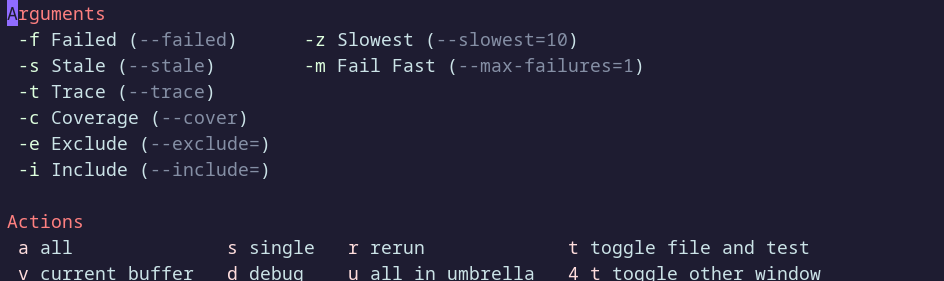
Typing -, f sets the failed flag. Then typing a runs all tests (with that flag).
4 Likes
Provided by GitHub - ananthakumaran/exunit.el: Emacs ExUnit test runner. See the repo readme for more information.
2 Likes






















