<turbo-stream action="append" target="posts_list"><template>    <div class="postbit" id="60370" data-post-id="60370">
  <section>
    <div class="post-wrap">


					<div class="post-header">
		        <div class="user-avatar">
		          <img alt="PeterDavidCarter" src="https://forum.elixirforum.com/user_avatar/forum.elixirforum.com/PeterDavidCarter/120/10109_2.png" width="120" height="120" />
		        </div>
					
						<div class="user-details">
		          <div class="user-name">
		            <h3>
                  PeterDavidCarter
                    <span class="op-star" title="Thread Starter">
                      <img alt="OP" class="op-star-icon" src="/assets/thread-icons/thread-icon-thread-starter-df91e872.png" />
                    </span>
                  </h3>
		          </div>
						
						</div>
					
					</div>

	        <div class="thread-main">
	            <div class="post-body" data-turbo="false">
								<p>Current Brunch config:</p>
<pre><code>javascripts: {
  joinTo: {
    'app.js': /^js\/app/,
    'nav.js': /^js\/navigation/
</code></pre>
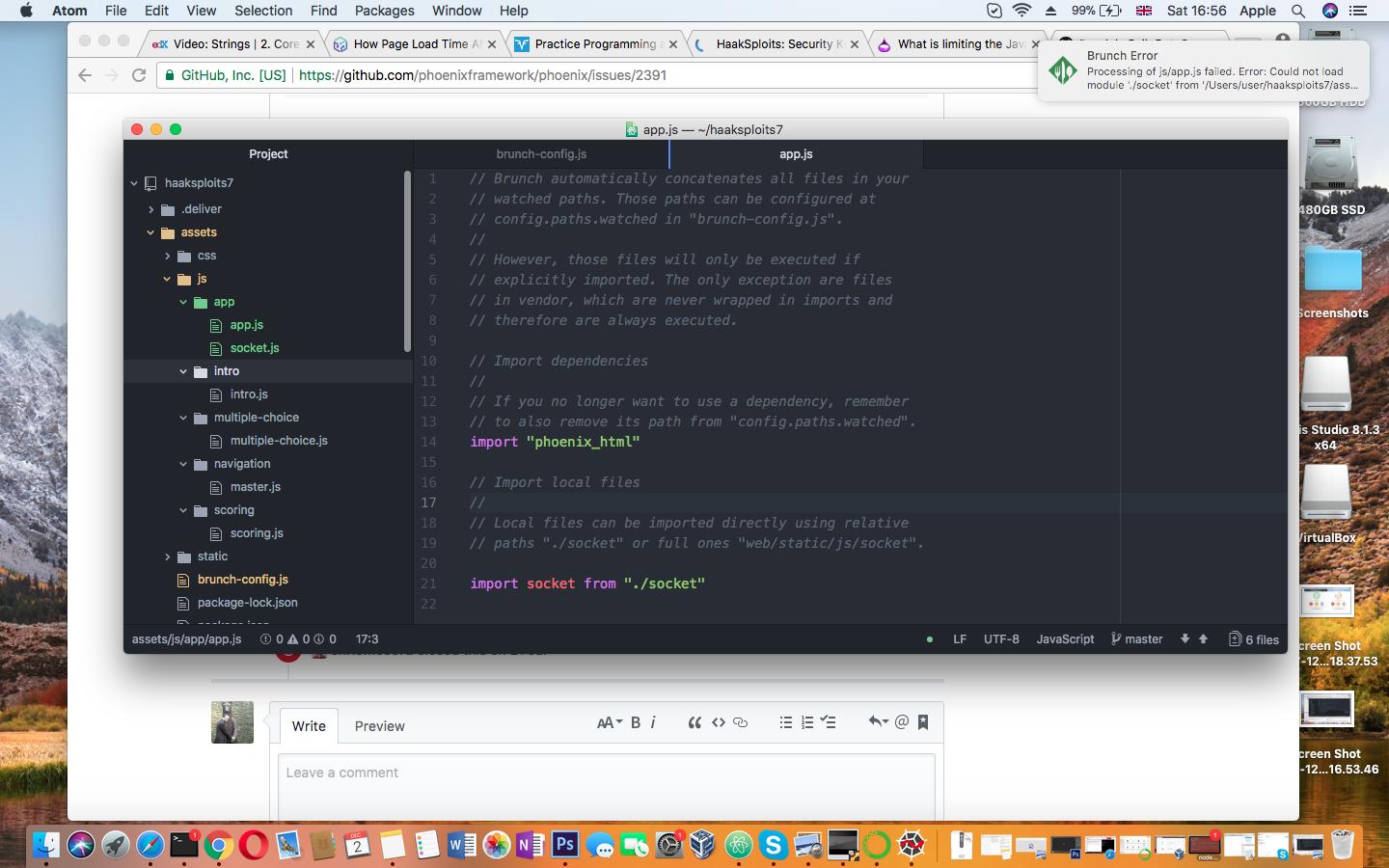
<p>When I move the app.js and socket.js file into an <code>app</code> subdirectory the output of <code>mix phx.server</code> includes:</p>
<pre data-code-wrap="elixir"><code class="lang-elixir">16:47:07 - error: Processing of js/app.js failed. Error: Could not load module './socket' from '/Users/user/haaksploits7/assets/js'. Make sure the file actually exists.
</code></pre>
<p></p><div class="lightbox-wrapper"><a class="lightbox" href="https://forum.elixirforum.com/uploads/default/original/2X/3/3b310e98a97456f5c9d9d8715f7d6d7b2409e97f.jpg" data-download-href="https://forum.elixirforum.com/uploads/default/3b310e98a97456f5c9d9d8715f7d6d7b2409e97f" title="Screen Shot 2017-12-02 at 16.56.53.jpg" rel="nofollow"><img src="https://forum.elixirforum.com/uploads/default/optimized/2X/3/3b310e98a97456f5c9d9d8715f7d6d7b2409e97f_2_690x431.jpg" width="690" height="431" srcset="https://forum.elixirforum.com/uploads/default/optimized/2X/3/3b310e98a97456f5c9d9d8715f7d6d7b2409e97f_2_690x431.jpg, https://forum.elixirforum.com/uploads/default/optimized/2X/3/3b310e98a97456f5c9d9d8715f7d6d7b2409e97f_2_1035x646.jpg 1.5x, https://forum.elixirforum.com/uploads/default/optimized/2X/3/3b310e98a97456f5c9d9d8715f7d6d7b2409e97f_2_1380x862.jpg 2x" data-dominant-color="727275"><div class="meta"><svg class="fa d-icon d-icon-far-image svg-icon" aria-hidden="true"><use href="#far-image"></use></svg><span class="filename">Screen Shot 2017-12-02 at 16.56.53.jpg</span><span class="informations">1440×900 141 KB</span><svg class="fa d-icon d-icon-discourse-expand svg-icon" aria-hidden="true"><use href="#discourse-expand"></use></svg></div></a></div><p></p>
<p>As you can see, the app.js file is in the same location as the socket.js file, so it’s odd that the import statement seems to be parsed, yet either this is not actually the app.js in the js/app directory, or something is going awry with the routing? Particularly, it’s odd that Phoenix/Brunch is telling me the js/app.js file even exists, since it is now located at /js/app/app.js.</p> 
	            </div>

	            <div class="base-line">
	                <div class="thread-counters">
	                    <span class="thread-count count-likes js-likers-trigger" title="Likes" data-post-id="60370" data-batch-url="/posts/batch_likers">
                        0
                      </span>
                      <!-- <span class="thread-count js-solved-indicator" title="Marked as solution"></span> -->
	                </div>
	                <div class="go-to-post">
	                  <a title="Go to post" alt="Go to post" href="https://forum.elixirforum.com/t/what-is-limiting-the-javascript-files-the-phoenix-server-can-see/10517/12">Post #11</a>
	                </div>
	            </div>
              <div id="likers-container-60370" 
                   class="likers-container"
                   data-first-post="false"
                   data-batch-url="/posts/batch_likers">
                   <div class="likers-placeholder" 
                     data-likers-post-id="60370"
                     data-batch-url="/posts/batch_likers">
                  <div class="post-likers"></div>
                </div>
              </div>
	        </div>
			

    </div>

    <div class="triangle-top-right type-standard-post cat-standard-post" title="Post #11"></div>
  </section>
</div>
    <div class="postbit" id="60373" data-post-id="60373">
  <section>
    <div class="post-wrap">


					<div class="post-header">
		        <div class="user-avatar">
		          <img alt="peerreynders" src="https://forum.elixirforum.com/user_avatar/forum.elixirforum.com/peerreynders/120/5826_2.png" width="120" height="120" />
		        </div>
					
						<div class="user-details">
		          <div class="user-name">
		            <h3>
                  peerreynders
                  </h3>
		          </div>
						
						</div>
					
					</div>

	        <div class="thread-main">
	            <div class="post-body" data-turbo="false">
								<pre data-code-wrap="bash"><code class="lang-bash">$ pwd
p13ne/assets/js
$ tree
.
├── app
│   └── socket.js
└── app.js
</code></pre>
<pre data-code-wrap="javascript"><code class="lang-javascript">  files: {
    javascripts: {
      joinTo: {
        "js/app.js": /^js\/app/
</code></pre>
<pre data-code-wrap="javascript"><code class="lang-javascript">import "phoenix_html";

// Import local files
//
// Local files can be imported directly using relative
// paths "./socket" or full ones "web/static/js/socket".

import socket from "./app/socket";
</code></pre> 
	            </div>

	            <div class="base-line">
	                <div class="thread-counters">
	                    <span class="thread-count count-likes js-likers-trigger" title="Likes" data-post-id="60373" data-batch-url="/posts/batch_likers">
                        0
                      </span>
                      <!-- <span class="thread-count js-solved-indicator" title="Marked as solution"></span> -->
	                </div>
	                <div class="go-to-post">
	                  <a title="Go to post" alt="Go to post" href="https://forum.elixirforum.com/t/what-is-limiting-the-javascript-files-the-phoenix-server-can-see/10517/13">Post #12</a>
	                </div>
	            </div>
              <div id="likers-container-60373" 
                   class="likers-container"
                   data-first-post="false"
                   data-batch-url="/posts/batch_likers">
                   <div class="likers-placeholder" 
                     data-likers-post-id="60373"
                     data-batch-url="/posts/batch_likers">
                  <div class="post-likers"></div>
                </div>
              </div>
	        </div>
			

    </div>

    <div class="triangle-top-right type-standard-post cat-standard-post" title="Post #12"></div>
  </section>
</div>
    <div class="postbit" id="60374" data-post-id="60374">
  <section>
    <div class="post-wrap">


					<div class="post-header">
		        <div class="user-avatar">
		          <img alt="PeterDavidCarter" src="https://forum.elixirforum.com/user_avatar/forum.elixirforum.com/PeterDavidCarter/120/10109_2.png" width="120" height="120" />
		        </div>
					
						<div class="user-details">
		          <div class="user-name">
		            <h3>
                  PeterDavidCarter
                    <span class="op-star" title="Thread Starter">
                      <img alt="OP" class="op-star-icon" src="/assets/thread-icons/thread-icon-thread-starter-df91e872.png" />
                    </span>
                  </h3>
		          </div>
						
						</div>
					
					</div>

	        <div class="thread-main">
	            <div class="post-body" data-turbo="false">
								<pre><code>MacBook-Pro:js user$ pwd
/Users/user/haaksploits7/assets/js
MacBook-Pro:js user$ tree
.
├── app
│   ├── app.js
│   └── socket.js
├── intro
│   └── intro.js
├── multiple-choice
│   └── multiple-choice.js
├── navigation
│   └── master.js
└── scoring
    └── scoring.js

5 directories, 6 files
</code></pre>
<p>I also tried deleting all of the JavaScript in the intro.js file, then running the intro again. It works, which makes me suspect caching of some kind, but I have hard reloaded the browser cache, restarted the phoenix server process and even deleted the file in .mix/archive, so I’m not sure what other cache might be responsible, if that is indeed the problem.</p> 
	            </div>

	            <div class="base-line">
	                <div class="thread-counters">
	                    <span class="thread-count count-likes js-likers-trigger" title="Likes" data-post-id="60374" data-batch-url="/posts/batch_likers">
                        0
                      </span>
                      <!-- <span class="thread-count js-solved-indicator" title="Marked as solution"></span> -->
	                </div>
	                <div class="go-to-post">
	                  <a title="Go to post" alt="Go to post" href="https://forum.elixirforum.com/t/what-is-limiting-the-javascript-files-the-phoenix-server-can-see/10517/14">Post #13</a>
	                </div>
	            </div>
              <div id="likers-container-60374" 
                   class="likers-container"
                   data-first-post="false"
                   data-batch-url="/posts/batch_likers">
                   <div class="likers-placeholder" 
                     data-likers-post-id="60374"
                     data-batch-url="/posts/batch_likers">
                  <div class="post-likers"></div>
                </div>
              </div>
	        </div>
			

    </div>

    <div class="triangle-top-right type-standard-post cat-standard-post" title="Post #13"></div>
  </section>
</div>
    <div class="postbit" id="60376" data-post-id="60376">
  <section>
    <div class="post-wrap">


					<div class="post-header">
		        <div class="user-avatar">
		          <img alt="peerreynders" src="https://forum.elixirforum.com/user_avatar/forum.elixirforum.com/peerreynders/120/5826_2.png" width="120" height="120" />
		        </div>
					
						<div class="user-details">
		          <div class="user-name">
		            <h3>
                  peerreynders
                  </h3>
		          </div>
						
						</div>
					
					</div>

	        <div class="thread-main">
	            <div class="post-body" data-turbo="false">
								<p>According to the configuration  <code>app.js</code> and <code>nav.js</code> have to already exist directly under <code>/js</code> (i.e. move <code>app.js</code> up from <code>/js/app</code> (and change the import paths ) and create a <code>/js/nav.js</code>). <code>/js/nav.js</code> <em>may</em> have to import something from <code>/js/navigation</code> in order for brunch to include any of it (though it may be enough for some code referenced by <code>app.js</code> to need it (and not get it because it isn’t in that bundle)).</p>
<p>You can specify multiple subdirectories <a href="http://brunch.io/docs/config#pattern-matching" rel="noopener nofollow ugc">using arrays</a> for the <code>joinTo</code> pattern match.</p> 
	            </div>

	            <div class="base-line">
	                <div class="thread-counters">
	                    <span class="thread-count count-likes js-likers-trigger" title="Likes" data-post-id="60376" data-batch-url="/posts/batch_likers">
                        0
                      </span>
                      <!-- <span class="thread-count js-solved-indicator" title="Marked as solution"></span> -->
	                </div>
	                <div class="go-to-post">
	                  <a title="Go to post" alt="Go to post" href="https://forum.elixirforum.com/t/what-is-limiting-the-javascript-files-the-phoenix-server-can-see/10517/15">Post #14</a>
	                </div>
	            </div>
              <div id="likers-container-60376" 
                   class="likers-container"
                   data-first-post="false"
                   data-batch-url="/posts/batch_likers">
                   <div class="likers-placeholder" 
                     data-likers-post-id="60376"
                     data-batch-url="/posts/batch_likers">
                  <div class="post-likers"></div>
                </div>
              </div>
	        </div>
			

    </div>

    <div class="triangle-top-right type-standard-post cat-standard-post" title="Post #14"></div>
  </section>
</div>
    <div class="postbit" id="60378" data-post-id="60378">
  <section>
    <div class="post-wrap">


					<div class="post-header">
		        <div class="user-avatar">
		          <img alt="PeterDavidCarter" src="https://forum.elixirforum.com/user_avatar/forum.elixirforum.com/PeterDavidCarter/120/10109_2.png" width="120" height="120" />
		        </div>
					
						<div class="user-details">
		          <div class="user-name">
		            <h3>
                  PeterDavidCarter
                    <span class="op-star" title="Thread Starter">
                      <img alt="OP" class="op-star-icon" src="/assets/thread-icons/thread-icon-thread-starter-df91e872.png" />
                    </span>
                  </h3>
		          </div>
						
						</div>
					
					</div>

	        <div class="thread-main">
	            <div class="post-body" data-turbo="false">
								<p>Hhhhmmm. Not sure if it’s that. I just noticed this line in the brunch config:</p>
<pre><code>modules: {
    autoRequire: {
      "js/app.js": ["js/app"]
    }
  },
</code></pre>
<p>I think we might have the culprit…</p> 
	            </div>

	            <div class="base-line">
	                <div class="thread-counters">
	                    <span class="thread-count count-likes js-likers-trigger" title="Likes" data-post-id="60378" data-batch-url="/posts/batch_likers">
                        0
                      </span>
                      <!-- <span class="thread-count js-solved-indicator" title="Marked as solution"></span> -->
	                </div>
	                <div class="go-to-post">
	                  <a title="Go to post" alt="Go to post" href="https://forum.elixirforum.com/t/what-is-limiting-the-javascript-files-the-phoenix-server-can-see/10517/16">Post #15</a>
	                </div>
	            </div>
              <div id="likers-container-60378" 
                   class="likers-container"
                   data-first-post="false"
                   data-batch-url="/posts/batch_likers">
                   <div class="likers-placeholder" 
                     data-likers-post-id="60378"
                     data-batch-url="/posts/batch_likers">
                  <div class="post-likers"></div>
                </div>
              </div>
	        </div>
			

    </div>

    <div class="triangle-top-right type-standard-post cat-standard-post" title="Post #15"></div>
  </section>
</div>
    <div class="postbit" id="60379" data-post-id="60379">
  <section>
    <div class="post-wrap">


					<div class="post-header">
		        <div class="user-avatar">
		          <img alt="PeterDavidCarter" src="https://forum.elixirforum.com/user_avatar/forum.elixirforum.com/PeterDavidCarter/120/10109_2.png" width="120" height="120" />
		        </div>
					
						<div class="user-details">
		          <div class="user-name">
		            <h3>
                  PeterDavidCarter
                    <span class="op-star" title="Thread Starter">
                      <img alt="OP" class="op-star-icon" src="/assets/thread-icons/thread-icon-thread-starter-df91e872.png" />
                    </span>
                  </h3>
		          </div>
						
						</div>
					
					</div>

	        <div class="thread-main">
	            <div class="post-body" data-turbo="false">
								<p>Nope, that’s not it either.</p>
<p>I noticed that in the browser I see this:</p>
<p></p><div class="lightbox-wrapper"><a class="lightbox" href="https://forum.elixirforum.com/uploads/default/original/2X/c/c73b4a80b50773e46d2d9644f3d1b60da50728e8.jpg" data-download-href="https://forum.elixirforum.com/uploads/default/c73b4a80b50773e46d2d9644f3d1b60da50728e8" title="Screen Shot 2017-12-02 at 17.46.22.jpg" rel="nofollow"><img src="https://forum.elixirforum.com/uploads/default/optimized/2X/c/c73b4a80b50773e46d2d9644f3d1b60da50728e8_2_690x513.jpg" width="690" height="513" srcset="https://forum.elixirforum.com/uploads/default/optimized/2X/c/c73b4a80b50773e46d2d9644f3d1b60da50728e8_2_690x513.jpg, https://forum.elixirforum.com/uploads/default/optimized/2X/c/c73b4a80b50773e46d2d9644f3d1b60da50728e8_2_1035x769.jpg 1.5x, https://forum.elixirforum.com/uploads/default/original/2X/c/c73b4a80b50773e46d2d9644f3d1b60da50728e8.jpg 2x" data-dominant-color="CFD5DE"><div class="meta"><svg class="fa d-icon d-icon-far-image svg-icon" aria-hidden="true"><use href="#far-image"></use></svg><span class="filename">Screen Shot 2017-12-02 at 17.46.22.jpg</span><span class="informations">1055×785 91.9 KB</span><svg class="fa d-icon d-icon-discourse-expand svg-icon" aria-hidden="true"><use href="#discourse-expand"></use></svg></div></a></div><p></p>
<p>Yet I’ve deleted all the requires from the app.js file except <code>import socket from "./socket"</code>, so it shouldn’t still be requiring in these additional files, but for some reason it is. Making changes to the brunch file and app.js no-longer seems to affect what I’m seeing in the browser at localhost.</p> 
	            </div>

	            <div class="base-line">
	                <div class="thread-counters">
	                    <span class="thread-count count-likes js-likers-trigger" title="Likes" data-post-id="60379" data-batch-url="/posts/batch_likers">
                        0
                      </span>
                      <!-- <span class="thread-count js-solved-indicator" title="Marked as solution"></span> -->
	                </div>
	                <div class="go-to-post">
	                  <a title="Go to post" alt="Go to post" href="https://forum.elixirforum.com/t/what-is-limiting-the-javascript-files-the-phoenix-server-can-see/10517/17">Post #16</a>
	                </div>
	            </div>
              <div id="likers-container-60379" 
                   class="likers-container"
                   data-first-post="false"
                   data-batch-url="/posts/batch_likers">
                   <div class="likers-placeholder" 
                     data-likers-post-id="60379"
                     data-batch-url="/posts/batch_likers">
                  <div class="post-likers"></div>
                </div>
              </div>
	        </div>
			

    </div>

    <div class="triangle-top-right type-standard-post cat-standard-post" title="Post #16"></div>
  </section>
</div>
    <div class="postbit" id="60381" data-post-id="60381">
  <section>
    <div class="post-wrap">


					<div class="post-header">
		        <div class="user-avatar">
		          <img alt="PeterDavidCarter" src="https://forum.elixirforum.com/user_avatar/forum.elixirforum.com/PeterDavidCarter/120/10109_2.png" width="120" height="120" />
		        </div>
					
						<div class="user-details">
		          <div class="user-name">
		            <h3>
                  PeterDavidCarter
                    <span class="op-star" title="Thread Starter">
                      <img alt="OP" class="op-star-icon" src="/assets/thread-icons/thread-icon-thread-starter-df91e872.png" />
                    </span>
                  </h3>
		          </div>
						
						</div>
					
					</div>

	        <div class="thread-main">
	            <div class="post-body" data-turbo="false">
								<p>Even weirder:</p>
<p></p><div class="lightbox-wrapper"><a class="lightbox" href="https://forum.elixirforum.com/uploads/default/original/2X/6/6f25e05a77c4f2b7d0000b3883a7d1d956dea406.png" data-download-href="https://forum.elixirforum.com/uploads/default/6f25e05a77c4f2b7d0000b3883a7d1d956dea406" title="Screen Shot 2017-12-02 at 17.56.03.png" rel="nofollow"><img src="https://forum.elixirforum.com/uploads/default/optimized/2X/6/6f25e05a77c4f2b7d0000b3883a7d1d956dea406_2_690x463.png" width="690" height="463" srcset="https://forum.elixirforum.com/uploads/default/optimized/2X/6/6f25e05a77c4f2b7d0000b3883a7d1d956dea406_2_690x463.png, https://forum.elixirforum.com/uploads/default/original/2X/6/6f25e05a77c4f2b7d0000b3883a7d1d956dea406.png 1.5x, https://forum.elixirforum.com/uploads/default/original/2X/6/6f25e05a77c4f2b7d0000b3883a7d1d956dea406.png 2x" data-dominant-color="304E46"><div class="meta"><svg class="fa d-icon d-icon-far-image svg-icon" aria-hidden="true"><use href="#far-image"></use></svg><span class="filename">Screen Shot 2017-12-02 at 17.56.03.png</span><span class="informations">1018×684 133 KB</span><svg class="fa d-icon d-icon-discourse-expand svg-icon" aria-hidden="true"><use href="#discourse-expand"></use></svg></div></a></div><p></p>
<p>Note that in Atom (run from the $user account via the command line) the static files folder does not even exist, yet in the terminal they do, making it quite difficult to figure out where these files were being compiled and stored to…</p> 
	            </div>

	            <div class="base-line">
	                <div class="thread-counters">
	                    <span class="thread-count count-likes js-likers-trigger" title="Likes" data-post-id="60381" data-batch-url="/posts/batch_likers">
                        0
                      </span>
                      <!-- <span class="thread-count js-solved-indicator" title="Marked as solution"></span> -->
	                </div>
	                <div class="go-to-post">
	                  <a title="Go to post" alt="Go to post" href="https://forum.elixirforum.com/t/what-is-limiting-the-javascript-files-the-phoenix-server-can-see/10517/18">Post #17</a>
	                </div>
	            </div>
              <div id="likers-container-60381" 
                   class="likers-container"
                   data-first-post="false"
                   data-batch-url="/posts/batch_likers">
                   <div class="likers-placeholder" 
                     data-likers-post-id="60381"
                     data-batch-url="/posts/batch_likers">
                  <div class="post-likers"></div>
                </div>
              </div>
	        </div>
			

    </div>

    <div class="triangle-top-right type-standard-post cat-standard-post" title="Post #17"></div>
  </section>
</div>
    <div class="postbit" id="60387" data-post-id="60387">
  <section>
    <div class="post-wrap">


					<div class="post-header">
		        <div class="user-avatar">
		          <img alt="NobbZ" src="https://forum.elixirforum.com/user_avatar/forum.elixirforum.com/NobbZ/120/27235_2.png" width="120" height="120" />
		        </div>
					
						<div class="user-details">
		          <div class="user-name">
		            <h3>
                  NobbZ
                  </h3>
		          </div>
						
						</div>
					
					</div>

	        <div class="thread-main">
	            <div class="post-body" data-turbo="false">
								<p>Can you please double-check if both, atom and the terminal are on the same folder? Please change a file in atom and <code>cat</code> it in the terminal and check for the change.</p> 
	            </div>

	            <div class="base-line">
	                <div class="thread-counters">
	                    <span class="thread-count count-likes js-likers-trigger" title="Likes" data-post-id="60387" data-batch-url="/posts/batch_likers">
                        0
                      </span>
                      <!-- <span class="thread-count js-solved-indicator" title="Marked as solution"></span> -->
	                </div>
	                <div class="go-to-post">
	                  <a title="Go to post" alt="Go to post" href="https://forum.elixirforum.com/t/what-is-limiting-the-javascript-files-the-phoenix-server-can-see/10517/19">Post #18</a>
	                </div>
	            </div>
              <div id="likers-container-60387" 
                   class="likers-container"
                   data-first-post="false"
                   data-batch-url="/posts/batch_likers">
                   <div class="likers-placeholder" 
                     data-likers-post-id="60387"
                     data-batch-url="/posts/batch_likers">
                  <div class="post-likers"></div>
                </div>
              </div>
	        </div>
			

    </div>

    <div class="triangle-top-right type-standard-post cat-standard-post" title="Post #18"></div>
  </section>
</div>
    <div class="postbit" id="60388" data-post-id="60388">
  <section>
    <div class="post-wrap">


					<div class="post-header">
		        <div class="user-avatar">
		          <img alt="PeterDavidCarter" src="https://forum.elixirforum.com/user_avatar/forum.elixirforum.com/PeterDavidCarter/120/10109_2.png" width="120" height="120" />
		        </div>
					
						<div class="user-details">
		          <div class="user-name">
		            <h3>
                  PeterDavidCarter
                    <span class="op-star" title="Thread Starter">
                      <img alt="OP" class="op-star-icon" src="/assets/thread-icons/thread-icon-thread-starter-df91e872.png" />
                    </span>
                  </h3>
		          </div>
						
						</div>
					
					</div>

	        <div class="thread-main">
	            <div class="post-body" data-turbo="false">
								<p>Yep. Changes persist. There’s also an Elixir error showing in Atom when I load it via the launcher. This error does not appear when Atom is launched via the command line. Atom also fails to launch via the command line intermittently.</p> 
	            </div>

	            <div class="base-line">
	                <div class="thread-counters">
	                    <span class="thread-count count-likes js-likers-trigger" title="Likes" data-post-id="60388" data-batch-url="/posts/batch_likers">
                        0
                      </span>
                      <!-- <span class="thread-count js-solved-indicator" title="Marked as solution"></span> -->
	                </div>
	                <div class="go-to-post">
	                  <a title="Go to post" alt="Go to post" href="https://forum.elixirforum.com/t/what-is-limiting-the-javascript-files-the-phoenix-server-can-see/10517/20">Post #19</a>
	                </div>
	            </div>
              <div id="likers-container-60388" 
                   class="likers-container"
                   data-first-post="false"
                   data-batch-url="/posts/batch_likers">
                   <div class="likers-placeholder" 
                     data-likers-post-id="60388"
                     data-batch-url="/posts/batch_likers">
                  <div class="post-likers"></div>
                </div>
              </div>
	        </div>
			

    </div>

    <div class="triangle-top-right type-last-post cat-last-post" title="Last post!"></div>
  </section>
</div>
</template></turbo-stream><turbo-stream action="replace" target="load-more-container"><template><div id="load-more-container" class="load-more-container">
    <span class="all-loaded">— All posts loaded —</span>
</div></template></turbo-stream>