<turbo-stream action="append" target="posts_list"><template>    <div class="postbit" id="244556" data-post-id="244556">
  <section>
    <div class="post-wrap">


					<div class="post-header">
		        <div class="user-avatar">
		          <img alt="cvkmohan" src="https://forum.elixirforum.com/user_avatar/forum.elixirforum.com/cvkmohan/120/39944_2.png" width="120" height="120" />
		        </div>
					
						<div class="user-details">
		          <div class="user-name">
		            <h3>
                  cvkmohan
                  </h3>
		          </div>
						
						</div>
					
					</div>

	        <div class="thread-main">
	            <div class="post-body" data-turbo="false">
								<p>It is getting merged into <a href="https://github.com/phoenixframework/phoenix_live_view" rel="noopener nofollow ugc">Phoenix LiveView (github.com)</a> Not Elixir. I think it is a significant difference to be highlighted.<br>
I think, in the coming version of Phoenix LiveView - most likely 0.18, it will come built-in - and we should be able to use with zero configuration.<br>
However, till then, I am still using <code>{:heex_formatter, github: "feliperenan/heex_formatter"},</code> in my mix file. My <code>.formatter.exs</code> is like this</p>
<pre data-code-wrap="elixir"><code class="lang-elixir">[
  plugins: [HeexFormatter],
  import_deps: [:ecto, :phoenix],
  inputs: ["*.{heex,ex,exs}", "priv/*/seeds.exs", "{config,lib,test}/**/*.{heex,ex,exs}"],
  subdirectories: ["priv/*/migrations"]
]
</code></pre>
<p>This is working well so far.</p> 
	            </div>

	            <div class="base-line">
	                <div class="thread-counters">
	                    <span class="thread-count count-likes js-likers-trigger" title="Likes" data-post-id="244556" data-batch-url="/posts/batch_likers">
                        1
                      </span>
                      <!-- <span class="thread-count js-solved-indicator" title="Marked as solution"></span> -->
	                </div>
	                <div class="go-to-post">
	                  <a title="Go to post" alt="Go to post" href="https://forum.elixirforum.com/t/how-to-use-phoenix-heex-templates-in-vscode/42461/22">Post #21</a>
	                </div>
	            </div>
              <div id="likers-container-244556" 
                   class="likers-container"
                   data-first-post="false"
                   data-batch-url="/posts/batch_likers">
                   <div class="likers-placeholder" 
                     data-likers-post-id="244556"
                     data-batch-url="/posts/batch_likers">
                  <div class="post-likers"></div>
                </div>
              </div>
	        </div>
			

    </div>

    <div class="triangle-top-right type-standard-post cat-standard-post" title="Post #21"></div>
  </section>
</div>
    <div class="postbit" id="253389" data-post-id="253389">
  <section>
    <div class="post-wrap">


					<div class="post-header">
		        <div class="user-avatar">
		          <img alt="ryanjafari" src="https://forum.elixirforum.com/user_avatar/forum.elixirforum.com/ryanjafari/120/26823_2.png" width="120" height="120" />
		        </div>
					
						<div class="user-details">
		          <div class="user-name">
		            <h3>
                  ryanjafari
                  </h3>
		          </div>
						
						</div>
					
					</div>

	        <div class="thread-main">
	            <div class="post-body" data-turbo="false">
								<p>An update here:</p>
<p>I am on <code>{:phoenix_live_view, "~&gt; 0.17.10"}</code> and the following works to format <code>.heex</code> (as well as <code>.ex, .exs</code>) using <code>mix format</code>:</p>
<pre data-code-wrap="elixir"><code class="lang-elixir"># .formatter.exs
[
  plugins: [Phoenix.LiveView.HTMLFormatter],
  inputs: ["*.{heex,ex,exs}", "priv/*/seeds.exs", "{config,lib,test}/**/*.{heex,ex,exs}"],
  import_deps: [:ecto, :phoenix],
  subdirectories: ["priv/*/migrations"]
]
</code></pre>
<p>Appears that the work has been merged in.</p>
<p>I use <a href="https://marketplace.visualstudio.com/items?itemName=animus-coop.vscode-elixir-mix-formatter" rel="noopener nofollow ugc">Elixir Mix Formatter</a> to trigger <code>mix format</code> on save in VSCode with <code>editor.formatOnSave: true</code> in <code>settings.json</code>. Also:</p>
<pre data-code-wrap="elixir"><code class="lang-elixir">// settings.json
"[elixir]": {
  "editor.defaultFormatter": "animus-coop.vscode-elixir-mix-formatter",
},
"[phoenix-heex]": {
  "editor.defaultFormatter": "animus-coop.vscode-elixir-mix-formatter"
}
</code></pre>
<p>…to ensure the right formatter extension is used for these files.</p>
<p>Have fun!</p> 
	            </div>

	            <div class="base-line">
	                <div class="thread-counters">
	                    <span class="thread-count count-likes js-likers-trigger" title="Likes" data-post-id="253389" data-batch-url="/posts/batch_likers">
                        4
                      </span>
                      <!-- <span class="thread-count js-solved-indicator" title="Marked as solution"></span> -->
	                </div>
	                <div class="go-to-post">
	                  <a title="Go to post" alt="Go to post" href="https://forum.elixirforum.com/t/how-to-use-phoenix-heex-templates-in-vscode/42461/23">Post #22</a>
	                </div>
	            </div>
              <div id="likers-container-253389" 
                   class="likers-container"
                   data-first-post="false"
                   data-batch-url="/posts/batch_likers">
                   <div class="likers-placeholder" 
                     data-likers-post-id="253389"
                     data-batch-url="/posts/batch_likers">
                  <div class="post-likers"></div>
                </div>
              </div>
	        </div>
			

    </div>

    <div class="triangle-top-right type-standard-post cat-standard-post" title="Post #22"></div>
  </section>
</div>
    <div class="postbit" id="253925" data-post-id="253925">
  <section>
    <div class="post-wrap">


					<div class="post-header">
		        <div class="user-avatar">
		          <img alt="ryanjafari" src="https://forum.elixirforum.com/user_avatar/forum.elixirforum.com/ryanjafari/120/26823_2.png" width="120" height="120" />
		        </div>
					
						<div class="user-details">
		          <div class="user-name">
		            <h3>
                  ryanjafari
                  </h3>
		          </div>
						
						</div>
					
					</div>

	        <div class="thread-main">
	            <div class="post-body" data-turbo="false">
								<p>The <a href="https://marketplace.visualstudio.com/items?itemName=animus-coop.vscode-elixir-mix-formatter" rel="noopener nofollow ugc">Elixir Mix Formatter</a> extension can invoke <code>mix format</code> on your project. Configured with <code>.formatter.exs</code> at the project root (need: <code>plugins: [Phoenix.LiveView.HTMLFormatter]</code>). Will format inside of ~H. Have it working right now.</p>
<p>Or simply run <code>mix format</code>.</p>
<p>No IntelliSense tho.</p> 
	            </div>

	            <div class="base-line">
	                <div class="thread-counters">
	                    <span class="thread-count count-likes js-likers-trigger" title="Likes" data-post-id="253925" data-batch-url="/posts/batch_likers">
                        1
                      </span>
                      <!-- <span class="thread-count js-solved-indicator" title="Marked as solution"></span> -->
	                </div>
	                <div class="go-to-post">
	                  <a title="Go to post" alt="Go to post" href="https://forum.elixirforum.com/t/how-to-use-phoenix-heex-templates-in-vscode/42461/24">Post #23</a>
	                </div>
	            </div>
              <div id="likers-container-253925" 
                   class="likers-container"
                   data-first-post="false"
                   data-batch-url="/posts/batch_likers">
                   <div class="likers-placeholder" 
                     data-likers-post-id="253925"
                     data-batch-url="/posts/batch_likers">
                  <div class="post-likers"></div>
                </div>
              </div>
	        </div>
			

    </div>

    <div class="triangle-top-right type-standard-post cat-standard-post" title="Post #23"></div>
  </section>
</div>
    <div class="postbit" id="253957" data-post-id="253957">
  <section>
    <div class="post-wrap">


					<div class="post-header">
		        <div class="user-avatar">
		          <img alt="malloryerik" src="https://forum.elixirforum.com/user_avatar/forum.elixirforum.com/malloryerik/120/29215_2.png" width="120" height="120" />
		        </div>
					
						<div class="user-details">
		          <div class="user-name">
		            <h3>
                  malloryerik
                    <span class="op-star" title="Thread Starter">
                      <img alt="OP" class="op-star-icon" src="/assets/thread-icons/thread-icon-thread-starter-df91e872.png" />
                    </span>
                  </h3>
		          </div>
						
						</div>
					
					</div>

	        <div class="thread-main">
	            <div class="post-body" data-turbo="false">
								<p>You can currently get Tailwind IntelliSense in <code>~H</code> sigil blocks in your <code>.ex</code> and <code>.exs</code> files, and I imagine also Surface <code>.sface</code>.</p>
<p>Just to your <code>settings.json</code>:</p>
<pre><code>"tailwindCSS.includeLanguages": {
    "elixir": "html",
    "surface": "html"
},
</code></pre>
<p>The “html” part is telling Tailwind IntelliSense to treat files with elixir and surface IntelliSense language IDs as html files (css and javascript are the other options.)</p>
<p>Here’s <a href="https://github.com/tailwindlabs/tailwindcss-intellisense#tailwindcssincludelanguages" rel="noopener nofollow ugc">the explanation from Tailwind</a>.</p>
<p><strong>A question.</strong><br>
Last year the Tailwind IntelliSense maintainer was <a href="https://github.com/tailwindlabs/tailwindcss-intellisense/issues/407" rel="noopener nofollow ugc">so kind as to add support</a> for <code>.heex</code> files, so Tailwind IntelliSense works out of the box for <code>.heex</code> files.<br>
Would we want the same support for <code>.ex</code> and <code>.sface</code> files, or would it conflict somehow outside of <code>~H</code> sigil blocks?</p> 
	            </div>

	            <div class="base-line">
	                <div class="thread-counters">
	                    <span class="thread-count count-likes js-likers-trigger" title="Likes" data-post-id="253957" data-batch-url="/posts/batch_likers">
                        1
                      </span>
                      <!-- <span class="thread-count js-solved-indicator" title="Marked as solution"></span> -->
	                </div>
	                <div class="go-to-post">
	                  <a title="Go to post" alt="Go to post" href="https://forum.elixirforum.com/t/how-to-use-phoenix-heex-templates-in-vscode/42461/25">Post #24</a>
	                </div>
	            </div>
              <div id="likers-container-253957" 
                   class="likers-container"
                   data-first-post="false"
                   data-batch-url="/posts/batch_likers">
                   <div class="likers-placeholder" 
                     data-likers-post-id="253957"
                     data-batch-url="/posts/batch_likers">
                  <div class="post-likers"></div>
                </div>
              </div>
	        </div>
			

    </div>

    <div class="triangle-top-right type-standard-post cat-standard-post" title="Post #24"></div>
  </section>
</div>
    <div class="postbit" id="253970" data-post-id="253970">
  <section>
    <div class="post-wrap">


					<div class="post-header">
		        <div class="user-avatar">
		          <img alt="romenigld" src="https://forum.elixirforum.com/user_avatar/forum.elixirforum.com/romenigld/120/6200_2.png" width="120" height="120" />
		        </div>
					
						<div class="user-details">
		          <div class="user-name">
		            <h3>
                  romenigld
                  </h3>
		          </div>
						
						</div>
					
					</div>

	        <div class="thread-main">
	            <div class="post-body" data-turbo="false">
								<p>I recently post this:</p><aside class="quote quote-modified" data-post="1" data-topic="48481">
  <div class="title">
    <div class="quote-controls"></div>
    <img alt="" width="24" height="24" src="https://forum.elixirforum.com/user_avatar/forum.elixirforum.com/romenigld/48/6200_2.png" class="avatar">
    <div class="quote-title__text-content">
      <a href="https://forum.elixirforum.com/t/vscode-custom-user-snippets-for-live-html-heex-templates-not-working/48481" rel="nofollow">VSCode Custom User Snippets For '*_live.html.heex' Templates Not Working</a> <a class="badge-category__wrapper " href="/c/questions-help/questions/53" rel="nofollow"><span data-category-id="53" style="--category-badge-color: #C14BFB; --category-badge-text-color: #000000; --parent-category-badge-color: #C14BFB;" data-parent-category-id="171" data-drop-close="true" class="badge-category --style-square --has-parent" title="Elixir Questions / Help"><span class="badge-category__name">Questions</span></span></a>
    </div>
  </div>
  <blockquote>
    I am trying to use the snippet’s code from the liveview course of the pragprog which I loved to use on the files *_live.html.heex. 
The snippet’s code is working very well ins the the render functions like: 
def render(assigns) do
    ~H"""
    (efor + TAB)
    """
end

but inside the *_live.html.heex files is not working. What I need to do for take this working? 
I have created the snippets code doing inside the VSCode menu: 
Code &gt; Preferences &gt; Configure User Snippets 
and then inside the eli…
  </blockquote>
</aside>

<p>You can watch the <code>settings.json</code> file, for set the <code>phoenix-heex</code> templates .</p> 
	            </div>

	            <div class="base-line">
	                <div class="thread-counters">
	                    <span class="thread-count count-likes js-likers-trigger" title="Likes" data-post-id="253970" data-batch-url="/posts/batch_likers">
                        1
                      </span>
                      <!-- <span class="thread-count js-solved-indicator" title="Marked as solution"></span> -->
	                </div>
	                <div class="go-to-post">
	                  <a title="Go to post" alt="Go to post" href="https://forum.elixirforum.com/t/how-to-use-phoenix-heex-templates-in-vscode/42461/26">Post #25</a>
	                </div>
	            </div>
              <div id="likers-container-253970" 
                   class="likers-container"
                   data-first-post="false"
                   data-batch-url="/posts/batch_likers">
                   <div class="likers-placeholder" 
                     data-likers-post-id="253970"
                     data-batch-url="/posts/batch_likers">
                  <div class="post-likers"></div>
                </div>
              </div>
	        </div>
			

    </div>

    <div class="triangle-top-right type-standard-post cat-standard-post" title="Post #25"></div>
  </section>
</div>
    <div class="postbit" id="266301" data-post-id="266301">
  <section>
    <div class="post-wrap">


					<div class="post-header">
		        <div class="user-avatar">
		          <img alt="rio517" src="https://forum.elixirforum.com/user_avatar/forum.elixirforum.com/rio517/120/20653_2.png" width="120" height="120" />
		        </div>
					
						<div class="user-details">
		          <div class="user-name">
		            <h3>
                  rio517
                  </h3>
		          </div>
						
						</div>
					
					</div>

	        <div class="thread-main">
	            <div class="post-body" data-turbo="false">
								<p>Just to clarify for anyone: to get Tailwind CSS Intellisense for <code>~H</code> sigil blocks in .ex files, you do have to add <code>"surface": "HTML"</code> to your included languages configuration.</p>
<p>I overlooked this when setting up a new dev environment.</p> 
	            </div>

	            <div class="base-line">
	                <div class="thread-counters">
	                    <span class="thread-count count-likes js-likers-trigger" title="Likes" data-post-id="266301" data-batch-url="/posts/batch_likers">
                        1
                      </span>
                      <!-- <span class="thread-count js-solved-indicator" title="Marked as solution"></span> -->
	                </div>
	                <div class="go-to-post">
	                  <a title="Go to post" alt="Go to post" href="https://forum.elixirforum.com/t/how-to-use-phoenix-heex-templates-in-vscode/42461/27">Post #26</a>
	                </div>
	            </div>
              <div id="likers-container-266301" 
                   class="likers-container"
                   data-first-post="false"
                   data-batch-url="/posts/batch_likers">
                   <div class="likers-placeholder" 
                     data-likers-post-id="266301"
                     data-batch-url="/posts/batch_likers">
                  <div class="post-likers"></div>
                </div>
              </div>
	        </div>
			

    </div>

    <div class="triangle-top-right type-standard-post cat-standard-post" title="Post #26"></div>
  </section>
</div>
    <div class="postbit" id="268104" data-post-id="268104">
  <section>
    <div class="post-wrap">


					<div class="post-header">
		        <div class="user-avatar">
		          <img alt="mikeclark" src="https://forum.elixirforum.com/user_avatar/forum.elixirforum.com/mikeclark/120/5163_2.png" width="120" height="120" />
		        </div>
					
						<div class="user-details">
		          <div class="user-name">
		            <h3>
                  mikeclark
                  </h3>
		          </div>
						
						</div>
					
					</div>

	        <div class="thread-main">
	            <div class="post-body" data-turbo="false">
								<p>Here’s <a href="https://pragmaticstudio.com/tutorials/formatting-heex-templates-in-vscode" rel="noopener nofollow ugc">my setup </a> which seems to be working nicely.</p>
<p>Suggested tweaks welcome!</p> 
	            </div>

	            <div class="base-line">
	                <div class="thread-counters">
	                    <span class="thread-count count-likes js-likers-trigger" title="Likes" data-post-id="268104" data-batch-url="/posts/batch_likers">
                        10
                      </span>
                      <!-- <span class="thread-count js-solved-indicator" title="Marked as solution"></span> -->
	                </div>
	                <div class="go-to-post">
	                  <a title="Go to post" alt="Go to post" href="https://forum.elixirforum.com/t/how-to-use-phoenix-heex-templates-in-vscode/42461/28">Post #27</a>
	                </div>
	            </div>
              <div id="likers-container-268104" 
                   class="likers-container"
                   data-first-post="false"
                   data-batch-url="/posts/batch_likers">
                   <div class="likers-placeholder" 
                     data-likers-post-id="268104"
                     data-batch-url="/posts/batch_likers">
                  <div class="post-likers"></div>
                </div>
              </div>
	        </div>
			

    </div>

    <div class="triangle-top-right type-standard-post cat-standard-post" title="Post #27"></div>
  </section>
</div>
    <div class="postbit" id="277439" data-post-id="277439">
  <section>
    <div class="post-wrap">


					<div class="post-header">
		        <div class="user-avatar">
		          <img alt="Neophen" src="https://forum.elixirforum.com/user_avatar/forum.elixirforum.com/Neophen/120/20004_2.png" width="120" height="120" />
		        </div>
					
						<div class="user-details">
		          <div class="user-name">
		            <h3>
                  Neophen
                  </h3>
		          </div>
						
						</div>
					
					</div>

	        <div class="thread-main">
	            <div class="post-body" data-turbo="false">
								<aside class="quote no-group quote-modified" data-username="rio517" data-post="27" data-topic="42461">
<div class="title">
<div class="quote-controls"></div>
<img alt="" width="24" height="24" src="https://forum.elixirforum.com/user_avatar/forum.elixirforum.com/rio517/48/20653_2.png" class="avatar"> rio517:</div>
<blockquote>
<p>“surface”: “HTML”</p>
</blockquote>
</aside>
<p>One important thing for mac os at least, if you’ve installed elixir/erlang with asdf, and asdf is installed via brew, and you launch VS Code through GUI rather than the shell, the elixir-ls extension can be broken.</p>
<p>Workarounds<br>
install single elixir globally<br>
install asdf without brew<br>
always launch VS Code from the terminal that has access to asdf</p> 
	            </div>

	            <div class="base-line">
	                <div class="thread-counters">
	                    <span class="thread-count count-likes js-likers-trigger" title="Likes" data-post-id="277439" data-batch-url="/posts/batch_likers">
                        2
                      </span>
                      <!-- <span class="thread-count js-solved-indicator" title="Marked as solution"></span> -->
	                </div>
	                <div class="go-to-post">
	                  <a title="Go to post" alt="Go to post" href="https://forum.elixirforum.com/t/how-to-use-phoenix-heex-templates-in-vscode/42461/29">Post #28</a>
	                </div>
	            </div>
              <div id="likers-container-277439" 
                   class="likers-container"
                   data-first-post="false"
                   data-batch-url="/posts/batch_likers">
                   <div class="likers-placeholder" 
                     data-likers-post-id="277439"
                     data-batch-url="/posts/batch_likers">
                  <div class="post-likers"></div>
                </div>
              </div>
	        </div>
			

    </div>

    <div class="triangle-top-right type-standard-post cat-standard-post" title="Post #28"></div>
  </section>
</div>
    <div class="postbit" id="316901" data-post-id="316901">
  <section>
    <div class="post-wrap">


					<div class="post-header">
		        <div class="user-avatar">
		          <img alt="Kurisu" src="https://forum.elixirforum.com/user_avatar/forum.elixirforum.com/Kurisu/120/14820_2.png" width="120" height="120" />
		        </div>
					
						<div class="user-details">
		          <div class="user-name">
		            <h3>
                  Kurisu
                  </h3>
		          </div>
						
						</div>
					
					</div>

	        <div class="thread-main">
	            <div class="post-body" data-turbo="false">
								<p>I’ve observed that the feature for folding and unfolding <code>HTML</code> tags isn’t functioning when I’m working with <code>HEEx</code> templates in Visual Studio Code. However, this feature seems to work perfectly fine with standard <code>.html</code> templates.</p>
<p>I’m reaching out to see if anyone could provide some guidance or suggestions on how to enable this feature specifically for <code>HEEx</code> templates. Any assistance would be greatly appreciated. Thank you in advance!</p>
<p>For reference, here are my current settings that have been working well for me, except for the issue mentioned above.</p>
<pre data-code-wrap="elixir"><code class="lang-elixir">{
    "emmet.includeLanguages": {
        "html-eex": "html",
        "phoenix-heex": "html",
        "elixir": "html"
    },
    "tailwindCSS.includeLanguages": {
        "phoenix-heex": "html",
        "elixir": "html"
    }
}
</code></pre> 
	            </div>

	            <div class="base-line">
	                <div class="thread-counters">
	                    <span class="thread-count count-likes js-likers-trigger" title="Likes" data-post-id="316901" data-batch-url="/posts/batch_likers">
                        0
                      </span>
                      <!-- <span class="thread-count js-solved-indicator" title="Marked as solution"></span> -->
	                </div>
	                <div class="go-to-post">
	                  <a title="Go to post" alt="Go to post" href="https://forum.elixirforum.com/t/how-to-use-phoenix-heex-templates-in-vscode/42461/30">Post #29</a>
	                </div>
	            </div>
              <div id="likers-container-316901" 
                   class="likers-container"
                   data-first-post="false"
                   data-batch-url="/posts/batch_likers">
                   <div class="likers-placeholder" 
                     data-likers-post-id="316901"
                     data-batch-url="/posts/batch_likers">
                  <div class="post-likers"></div>
                </div>
              </div>
	        </div>
			

    </div>

    <div class="triangle-top-right type-standard-post cat-standard-post" title="Post #29"></div>
  </section>
</div>
    <div class="postbit" id="316930" data-post-id="316930">
  <section>
    <div class="post-wrap">


					<div class="post-header">
		        <div class="user-avatar">
		          <img alt="Kurisu" src="https://forum.elixirforum.com/user_avatar/forum.elixirforum.com/Kurisu/120/14820_2.png" width="120" height="120" />
		        </div>
					
						<div class="user-details">
		          <div class="user-name">
		            <h3>
                  Kurisu
                  </h3>
		          </div>
						
						</div>
					
					</div>

	        <div class="thread-main">
	            <div class="post-body" data-turbo="false">
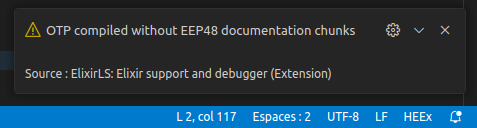
								<p>I’ve noticed that I can fold and unfold <code>HTML</code> tags even in <code>.html.heex</code> files if I act quickly after launching VSCode. However, a few seconds after an alert appears (which you can see in the image below), the functionality of folding and unfolding <code>HTML</code> tags in the editor for <code>HEEx</code> templates becomes unavailable.</p>
<p></p><div class="lightbox-wrapper"><a class="lightbox" href="https://forum.elixirforum.com/uploads/default/original/3X/0/4/0412ce256300240c002539d0f96398ca5edff3b4.png" data-download-href="https://forum.elixirforum.com/uploads/default/0412ce256300240c002539d0f96398ca5edff3b4" title="Capture d’écran du 2024-02-06 17-32-08" rel="nofollow"><img src="https://forum.elixirforum.com/uploads/default/original/3X/0/4/0412ce256300240c002539d0f96398ca5edff3b4.png" alt="Capture d’écran du 2024-02-06 17-32-08" data-base62-sha1="A2coElN47bs22I4nfHl3Atzsby" width="477" height="128"><div class="meta"><svg class="fa d-icon d-icon-far-image svg-icon" aria-hidden="true"><use href="#far-image"></use></svg><span class="filename">Capture d’écran du 2024-02-06 17-32-08</span><span class="informations">477×128 8.84 KB</span><svg class="fa d-icon d-icon-discourse-expand svg-icon" aria-hidden="true"><use href="#discourse-expand"></use></svg></div></a></div><p></p>
<p>As a natural response, I disabled the <code>ElixirLS</code> extension and restarted VSCode. This gave me all the time I needed to fold/hide the content of all the tags with long contents that made the template difficult to read. I should mention that I am in the process of converting a really lengthy template into component bricks to facilitate readability and reuse. But initially, I need to have an overview of the template structure. Otherwise, I wouldn’t need to fold <code>HTML</code> tags in the first place.</p>
<p>In short, disabling <code>ElixirLS</code> helps me for now, and then I can reactivate it to continue my work once I’ve reduced certain blocks of <code>HTML</code> code. Fortunately, they remain as they were once I’ve restarted the editor…</p>
<p>Another thing to note is when saving a very long template for the first time (I copy/paste from downloadable <code>HTML</code> templates), <code>ElixirLS</code> churns for several minutes before finishing formatting. Unfortunately, the outcome of this lengthy process doesn’t quite meet my expectations. For this reason, I resort to using an online <code>HTML</code> code formatting site, but that’s a different story altogether.</p> 
	            </div>

	            <div class="base-line">
	                <div class="thread-counters">
	                    <span class="thread-count count-likes js-likers-trigger" title="Likes" data-post-id="316930" data-batch-url="/posts/batch_likers">
                        0
                      </span>
                      <!-- <span class="thread-count js-solved-indicator" title="Marked as solution"></span> -->
	                </div>
	                <div class="go-to-post">
	                  <a title="Go to post" alt="Go to post" href="https://forum.elixirforum.com/t/how-to-use-phoenix-heex-templates-in-vscode/42461/31">Post #30</a>
	                </div>
	            </div>
              <div id="likers-container-316930" 
                   class="likers-container"
                   data-first-post="false"
                   data-batch-url="/posts/batch_likers">
                   <div class="likers-placeholder" 
                     data-likers-post-id="316930"
                     data-batch-url="/posts/batch_likers">
                  <div class="post-likers"></div>
                </div>
              </div>
	        </div>
			

    </div>

    <div class="triangle-top-right type-standard-post cat-standard-post" title="Post #30"></div>
  </section>
</div>
</template></turbo-stream><turbo-stream action="replace" target="load-more-container"><template><div id="load-more-container" class="load-more-container">
    <a class="load-more-button" data-turbo-stream="true" href="/topics/42461/load_more?page=4">Load more posts (4 remaining)</a>
</div></template></turbo-stream>