<turbo-stream action="append" target="posts_list"><template>    <div class="postbit" id="270794" data-post-id="270794">
  <section>
    <div class="post-wrap">


					<div class="post-header">
		        <div class="user-avatar">
		          <img alt="mplatts" src="https://forum.elixirforum.com/user_avatar/forum.elixirforum.com/mplatts/120/26552_2.png" width="120" height="120" />
		        </div>
					
						<div class="user-details">
		          <div class="user-name">
		            <h3>
                  mplatts
                    <span class="op-star" title="Thread Starter">
                      <img alt="OP" class="op-star-icon" src="/assets/thread-icons/thread-icon-thread-starter-df91e872.png" />
                    </span>
                  </h3>
		          </div>
						
						</div>
					
					</div>

	        <div class="thread-main">
	            <div class="post-body" data-turbo="false">
								<p>Yeah the docs are here: <a href="https://petal.build/components" class="inline-onebox" rel="noopener nofollow ugc">Install</a></p>
<p>Yep that will import all the components into that module (TestPetalLive). It’s easier to put it in your <code>iknow_web.ex</code> file like this:</p>
<pre data-code-wrap="elixir"><code class="lang-elixir">defp html_helpers do
    quote do
      # HTML escaping functionality
      import Phoenix.HTML
      # Core UI components and translation
      import DevAppWeb.CoreComponents
      import DevAppWeb.Gettext

      # Shortcut for generating JS commands
      alias Phoenix.LiveView.JS
      
      use PetalComponents # &lt;-------------------

      # Routes generation with the ~p sigil
      unquote(verified_routes())
    end
  end
</code></pre>
<p>Then for your live view, instead of <code>use Phoenix.LiveView</code>, put <code>use IknowWeb, :live_view</code> and delete the <code>use PetalComponents</code> there. Hope that makes sense.</p> 
	            </div>

	            <div class="base-line">
	                <div class="thread-counters">
	                    <span class="thread-count count-likes js-likers-trigger" title="Likes" data-post-id="270794" data-batch-url="/posts/batch_likers">
                        0
                      </span>
                      <!-- <span class="thread-count js-solved-indicator" title="Marked as solution"></span> -->
	                </div>
	                <div class="go-to-post">
	                  <a title="Go to post" alt="Go to post" href="https://forum.elixirforum.com/t/petal-components-package-a-set-of-tailwind-styled-components-written-in-heex/43633/63">Post #62</a>
	                </div>
	            </div>
              <div id="likers-container-270794" 
                   class="likers-container"
                   data-first-post="false"
                   data-batch-url="/posts/batch_likers">
                   <div class="likers-placeholder" 
                     data-likers-post-id="270794"
                     data-batch-url="/posts/batch_likers">
                  <div class="post-likers"></div>
                </div>
              </div>
	        </div>
			

    </div>

    <div class="triangle-top-right type-standard-post cat-standard-post" title="Post #62"></div>
  </section>
</div>
    <div class="postbit" id="278814" data-post-id="278814">
  <section>
    <div class="post-wrap">


					<div class="post-header">
		        <div class="user-avatar">
		          <img alt="nhoban" src="https://forum.elixirforum.com/user_avatar/forum.elixirforum.com/nhoban/120/25078_2.png" width="120" height="120" />
		        </div>
					
						<div class="user-details">
		          <div class="user-name">
		            <h3>
                  nhoban
                  </h3>
		          </div>
						
						</div>
					
					</div>

	        <div class="thread-main">
	            <div class="post-body" data-turbo="false">
								<h1><a name="p-278814-new-update-v10-1" class="anchor" href="#p-278814-new-update-v10-1" aria-label="Heading link" rel="nofollow"></a>New Update v1.0!</h1>
<p>Configurability is now supported and it’s super easy to override styles globally or as a one-off.</p>
<p>Watch the video:</p><div class="youtube-onebox lazy-video-container" data-video-id="Dg2fDNb85uw" data-video-title="Petal Components v1.0 - Configurability is here!" data-video-start-time="" data-provider-name="youtube">
  <a href="https://www.youtube.com/watch?v=Dg2fDNb85uw" target="_blank" class="video-thumbnail" rel="noopener nofollow ugc">
    <img class="youtube-thumbnail" src="https://img.youtube.com/vi/Dg2fDNb85uw/maxresdefault.jpg" title="Petal Components v1.0 - Configurability is here!" width="690" height="388">
  </a>
</div>
 
	            </div>

	            <div class="base-line">
	                <div class="thread-counters">
	                    <span class="thread-count count-likes js-likers-trigger" title="Likes" data-post-id="278814" data-batch-url="/posts/batch_likers">
                        2
                      </span>
                      <!-- <span class="thread-count js-solved-indicator" title="Marked as solution"></span> -->
	                </div>
	                <div class="go-to-post">
	                  <a title="Go to post" alt="Go to post" href="https://forum.elixirforum.com/t/petal-components-package-a-set-of-tailwind-styled-components-written-in-heex/43633/64">Post #63</a>
	                </div>
	            </div>
              <div id="likers-container-278814" 
                   class="likers-container"
                   data-first-post="false"
                   data-batch-url="/posts/batch_likers">
                   <div class="likers-placeholder" 
                     data-likers-post-id="278814"
                     data-batch-url="/posts/batch_likers">
                  <div class="post-likers"></div>
                </div>
              </div>
	        </div>
			

    </div>

    <div class="triangle-top-right type-standard-post cat-standard-post" title="Post #63"></div>
  </section>
</div>
    <div class="postbit" id="328845" data-post-id="328845">
  <section>
    <div class="post-wrap">


					<div class="post-header">
		        <div class="user-avatar">
		          <img alt="nhoban" src="https://forum.elixirforum.com/user_avatar/forum.elixirforum.com/nhoban/120/25078_2.png" width="120" height="120" />
		        </div>
					
						<div class="user-details">
		          <div class="user-name">
		            <h3>
                  nhoban
                  </h3>
		          </div>
						
						</div>
					
					</div>

	        <div class="thread-main">
	            <div class="post-body" data-turbo="false">
								<h2><a name="p-328845-official-figma-petal-ui-kit-released-1" class="anchor" href="#p-328845-official-figma-petal-ui-kit-released-1" aria-label="Heading link" rel="nofollow"></a>Official Figma Petal UI kit released! <img src="https://forum.elixirforum.com/images/emoji/apple/tada.png?v=15" title=":tada:" class="emoji" alt=":tada:" loading="lazy" width="20" height="20"></h2>
<p><img src="https://res.cloudinary.com/wickedsites/image/upload/q_10/v1716252924/petal_marketing/prod/images/changelog/petal_cover_1_l6jirc.png" alt="Official Petal Figma UI kit released" width="690" height="414"></p>
<p>We’ve released an official Figma UI kit for Petal. This kit includes all the open source and pro components you need to design your app in Figma.</p>
<p><a href="https://www.figma.com/community/file/1374192831096114078/official-petal-ui-kit" rel="noopener nofollow ugc">Preview the Figma UI kit</a></p>
<p>Let us know if you have any thoughts for improvements <img src="https://forum.elixirforum.com/images/emoji/apple/slight_smile.png?v=15" title=":slight_smile:" class="emoji" alt=":slight_smile:" loading="lazy" width="20" height="20"></p> 
	            </div>

	            <div class="base-line">
	                <div class="thread-counters">
	                    <span class="thread-count count-likes js-likers-trigger" title="Likes" data-post-id="328845" data-batch-url="/posts/batch_likers">
                        1
                      </span>
                      <!-- <span class="thread-count js-solved-indicator" title="Marked as solution"></span> -->
	                </div>
	                <div class="go-to-post">
	                  <a title="Go to post" alt="Go to post" href="https://forum.elixirforum.com/t/petal-components-package-a-set-of-tailwind-styled-components-written-in-heex/43633/65">Post #64</a>
	                </div>
	            </div>
              <div id="likers-container-328845" 
                   class="likers-container"
                   data-first-post="false"
                   data-batch-url="/posts/batch_likers">
                   <div class="likers-placeholder" 
                     data-likers-post-id="328845"
                     data-batch-url="/posts/batch_likers">
                  <div class="post-likers"></div>
                </div>
              </div>
	        </div>
			

    </div>

    <div class="triangle-top-right type-standard-post cat-standard-post" title="Post #64"></div>
  </section>
</div>
    <div class="postbit" id="342244" data-post-id="342244">
  <section>
    <div class="post-wrap">


					<div class="post-header">
		        <div class="user-avatar">
		          <img alt="nhoban" src="https://forum.elixirforum.com/user_avatar/forum.elixirforum.com/nhoban/120/25078_2.png" width="120" height="120" />
		        </div>
					
						<div class="user-details">
		          <div class="user-name">
		            <h3>
                  nhoban
                  </h3>
		          </div>
						
						</div>
					
					</div>

	        <div class="thread-main">
	            <div class="post-body" data-turbo="false">
								<h1><a name="p-342244-petal-components-v2-is-now-available-1" class="anchor" href="#p-342244-petal-components-v2-is-now-available-1" aria-label="Heading link" rel="nofollow"></a>Petal Components v2 is now available <img src="https://forum.elixirforum.com/images/emoji/apple/fire.png?v=15" title=":fire:" class="emoji" alt=":fire:" loading="lazy" width="20" height="20"></h1>
<p>We’ve actually sped ahead and are at v2.2.0 already!</p>
<p><img src="https://res.cloudinary.com/wickedsites/image/upload/v1728439636/petal_marketing/global/emails/pc-2.0_otb6zm.png" alt="petal components v2 released" width="690" height="398"></p>
<p>The best news is that we’ve put a11y (accessibility) at the forefront! <img src="https://forum.elixirforum.com/images/emoji/apple/tada.png?v=15" title=":tada:" class="emoji" alt=":tada:" loading="lazy" width="20" height="20"></p>
<p><img src="https://res.cloudinary.com/wickedsites/image/upload/v1726794911/petal_marketing/global/emails/CleanShot_2024-09-20_at_11.13.37_2x_z2gssq.png" alt="a11y support" width="690" height="441"></p>
<h2><a name="p-342244-a11y-support-2" class="anchor" href="#p-342244-a11y-support-2" aria-label="Heading link" rel="nofollow"></a>a11y support</h2>
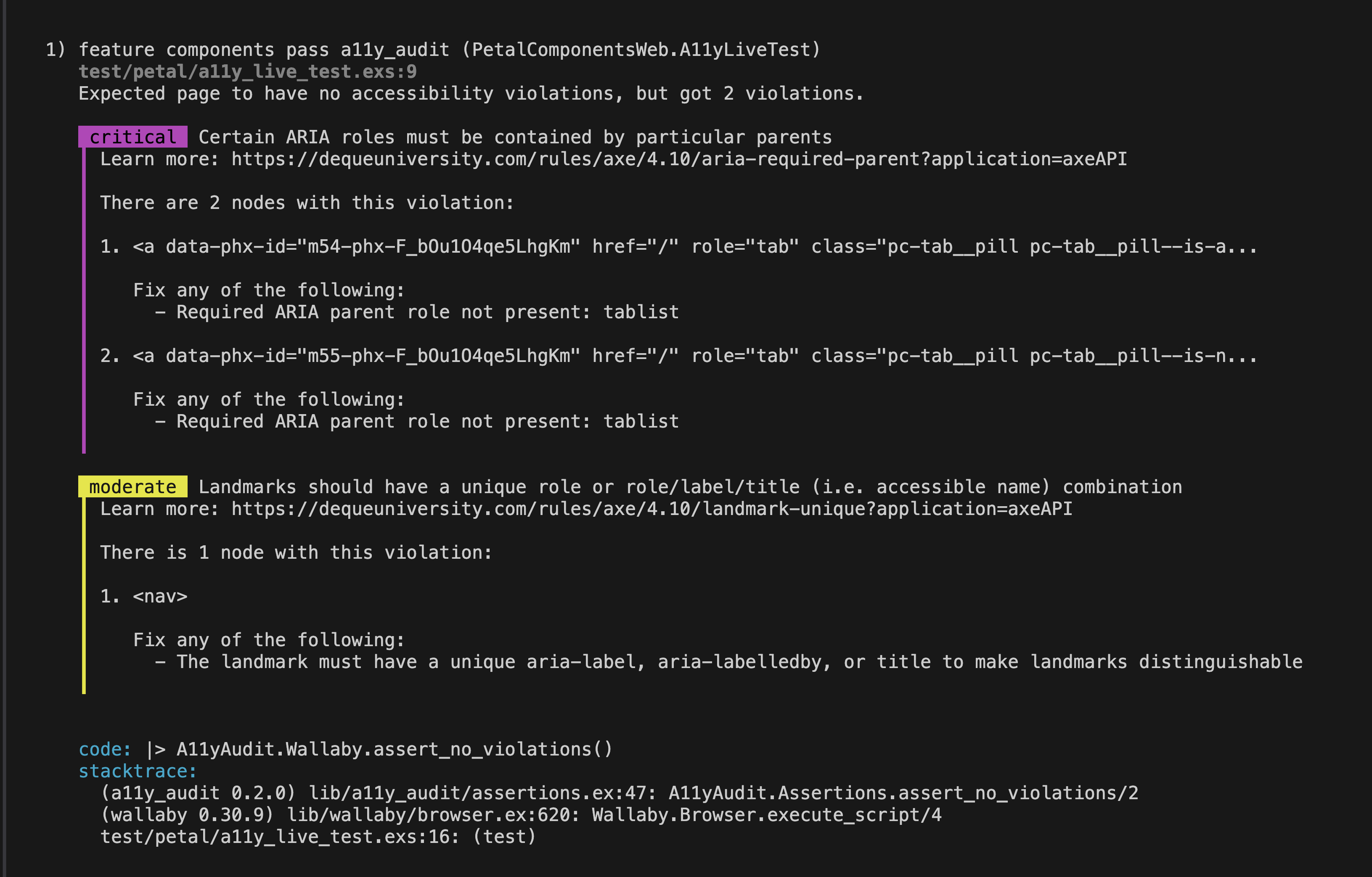
<p>We’ve implemented a test to load a LiveView using all Petal Components and perform an accessibility audit with <code>:a11y_audit</code>.</p>
<p><code>:a11y_audit</code> uses axe-core under the hood - <a href="https://www.deque.com/axe" rel="noopener nofollow ugc">https://www.deque.com/axe</a></p>
<p>The image above shows an instance where you have a violation. We’re happy to say that we’re now passing with flying colours!</p>
<p><img src="https://res.cloudinary.com/wickedsites/image/upload/v1728358308/petal_marketing/global/emails/button_group_1080_swej0r.gif" alt="Button Group" width="690" height="392"></p>
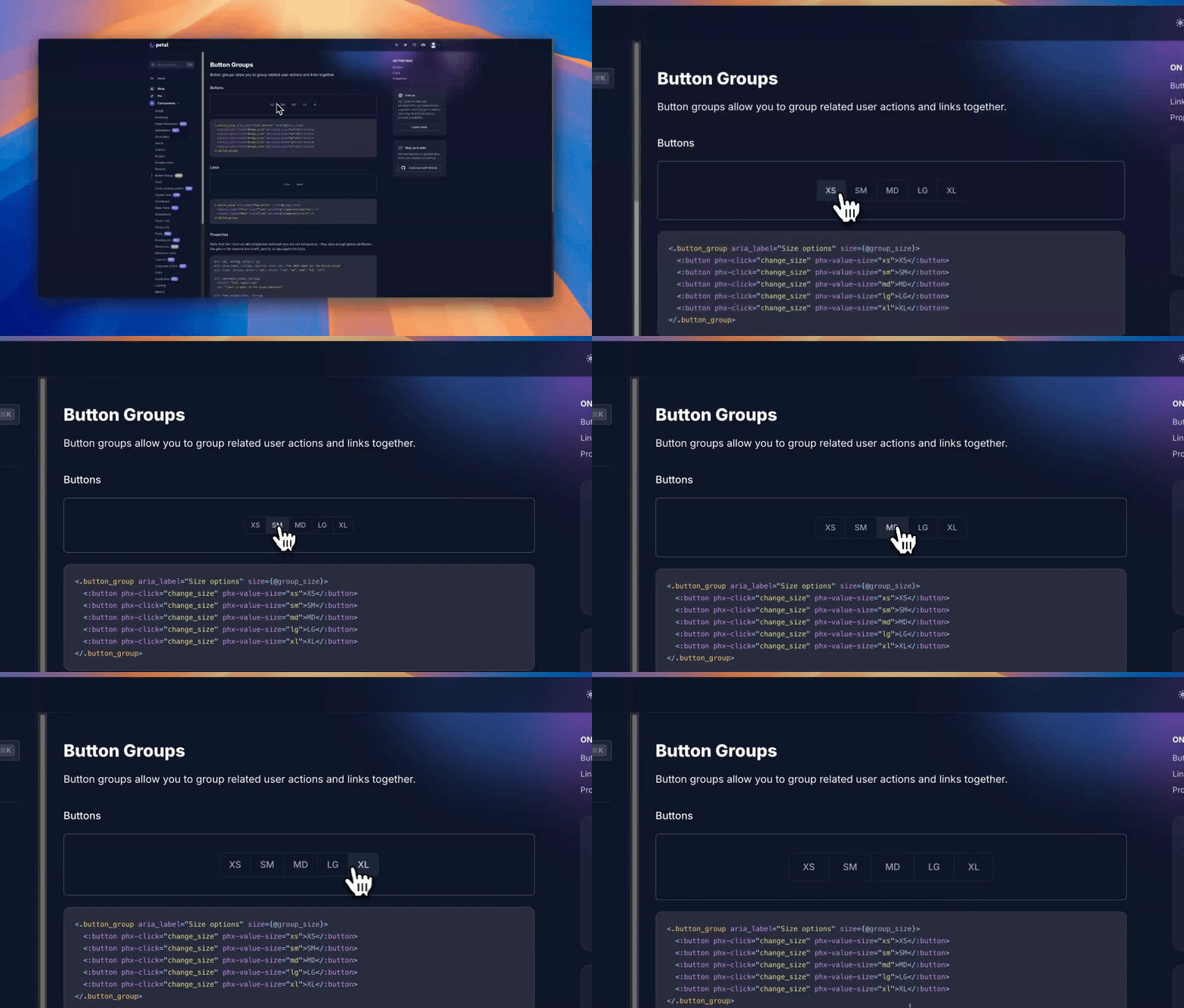
<h2><a name="p-342244-button-group-3" class="anchor" href="#p-342244-button-group-3" aria-label="Heading link" rel="nofollow"></a>Button Group</h2>
<p>This is one we’ve been looking to tick off for a while and glad we could finally get around to do it. We hope you find it useful and appreciate any feedback you may have.</p>
<p><img src="https://res.cloudinary.com/wickedsites/image/upload/v1728358308/petal_marketing/global/emails/skeleton_1080_uayqee.gif" alt="Skeleton" width="564" height="320"></p>
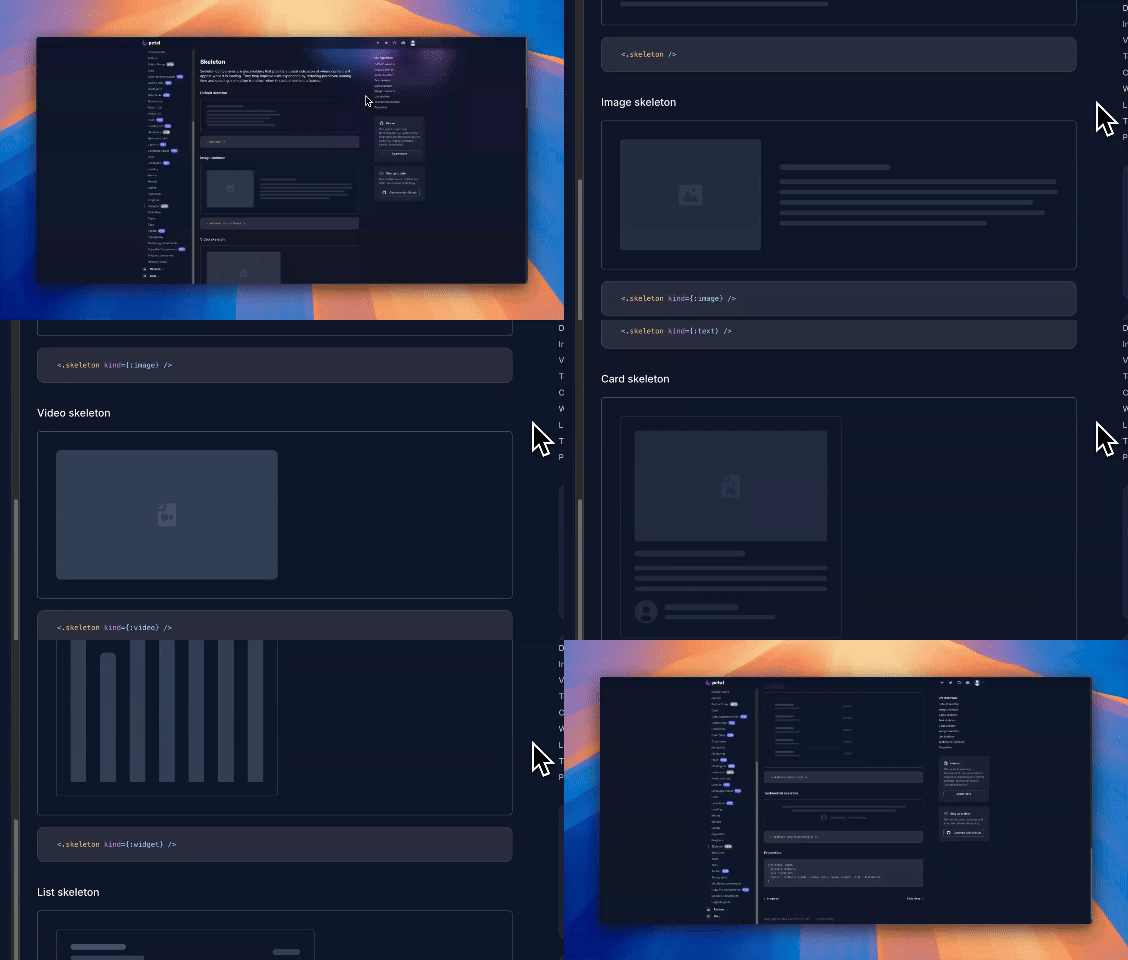
<h2><a name="p-342244-skeleton-4" class="anchor" href="#p-342244-skeleton-4" aria-label="Heading link" rel="nofollow"></a>Skeleton</h2>
<p>Skeletons are placeholders that provide a visual indication of where content will appear while it is loading. They help improve user experience by reducing perceived loading time and creating a smoother transition when the actual content is loaded.</p>
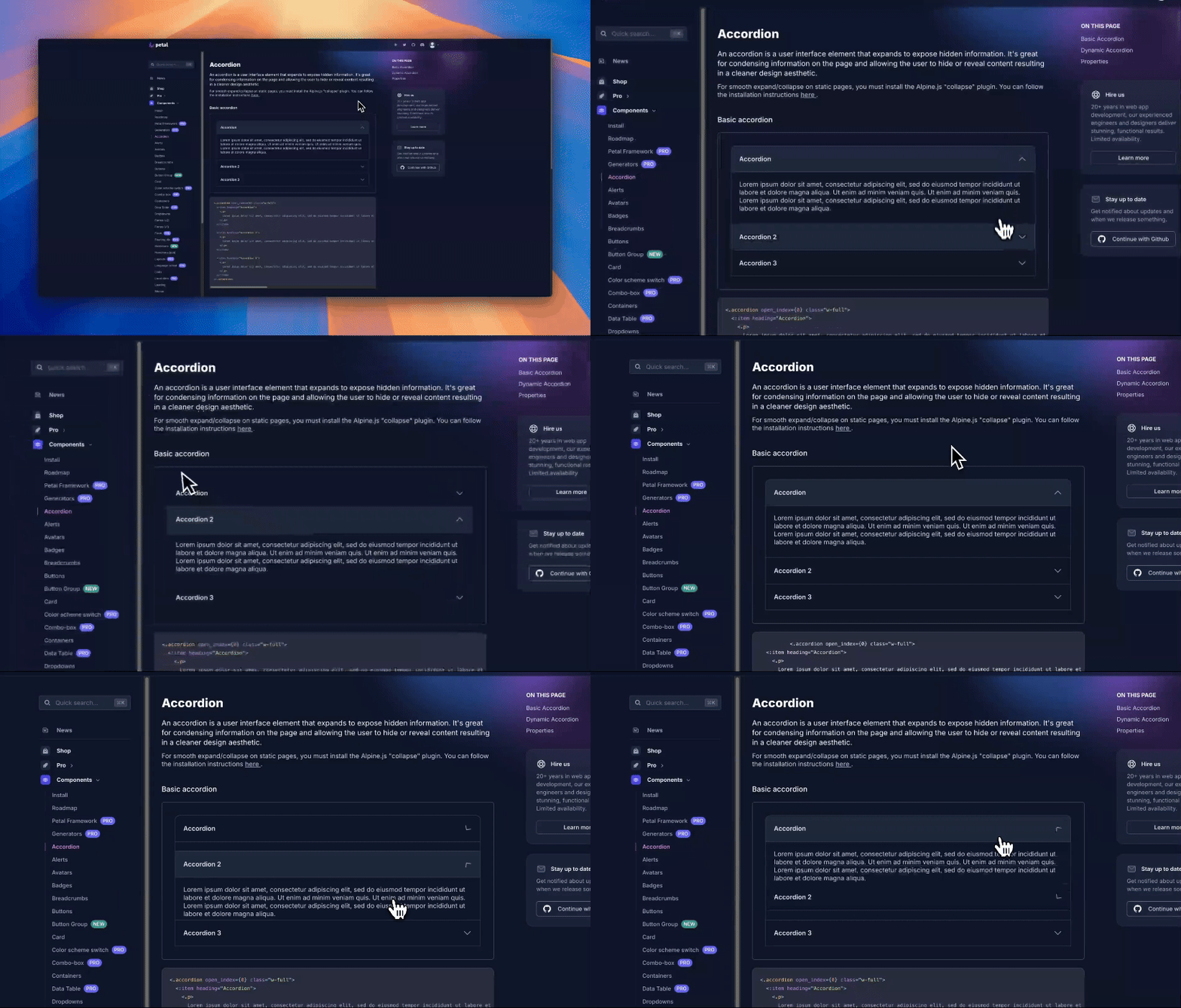
<p><img src="https://res.cloudinary.com/wickedsites/image/upload/v1728358312/petal_marketing/global/emails/accordion_1080_surd5o.gif" alt="Accordion" width="690" height="392"></p>
<h2><a name="p-342244-accordion-5" class="anchor" href="#p-342244-accordion-5" aria-label="Heading link" rel="nofollow"></a>Accordion</h2>
<p>We have now updated accordion so that you can set a particular item to be open at render.</p>
<h2><a name="p-342244-component-requests-6" class="anchor" href="#p-342244-component-requests-6" aria-label="Heading link" rel="nofollow"></a>Component Requests</h2>
<p>If you have any component requests, please create an issue on the Petal Components <a href="https://petal.build/components/roadmap" rel="noopener nofollow ugc">roadmap</a>.</p>
<p><a href="https://petal.build/components" rel="noopener nofollow ugc">View all the components</a>.</p> 
	            </div>

	            <div class="base-line">
	                <div class="thread-counters">
	                    <span class="thread-count count-likes js-likers-trigger" title="Likes" data-post-id="342244" data-batch-url="/posts/batch_likers">
                        3
                      </span>
                      <!-- <span class="thread-count js-solved-indicator" title="Marked as solution"></span> -->
	                </div>
	                <div class="go-to-post">
	                  <a title="Go to post" alt="Go to post" href="https://forum.elixirforum.com/t/petal-components-package-a-set-of-tailwind-styled-components-written-in-heex/43633/66">Post #65</a>
	                </div>
	            </div>
              <div id="likers-container-342244" 
                   class="likers-container"
                   data-first-post="false"
                   data-batch-url="/posts/batch_likers">
                   <div class="likers-placeholder" 
                     data-likers-post-id="342244"
                     data-batch-url="/posts/batch_likers">
                  <div class="post-likers"></div>
                </div>
              </div>
	        </div>
			

    </div>

    <div class="triangle-top-right type-standard-post cat-standard-post" title="Post #65"></div>
  </section>
</div>
    <div class="postbit" id="342260" data-post-id="342260">
  <section>
    <div class="post-wrap">


					<div class="post-header">
		        <div class="user-avatar">
		          <img alt="tcoopman" src="https://forum.elixirforum.com/user_avatar/forum.elixirforum.com/tcoopman/120/8112_2.png" width="120" height="120" />
		        </div>
					
						<div class="user-details">
		          <div class="user-name">
		            <h3>
                  tcoopman
                  </h3>
		          </div>
						
						</div>
					
					</div>

	        <div class="thread-main">
	            <div class="post-body" data-turbo="false">
								<p>I’ve just had a look at this and it looks really nice.</p>
<p>One question I have after playing around in the docs. I noticed that the modal uses a different route. This has 2 downsides/tradeoffs in my opinion:</p>
<ul>
<li>Navigation back in the browser opens the modals again</li>
<li>A roundtrip to the server is needed before the user sees anything</li>
</ul>
<p>I personally don’t like these tradeoffs but it seems you’re fine with them?</p> 
	            </div>

	            <div class="base-line">
	                <div class="thread-counters">
	                    <span class="thread-count count-likes js-likers-trigger" title="Likes" data-post-id="342260" data-batch-url="/posts/batch_likers">
                        1
                      </span>
                      <!-- <span class="thread-count js-solved-indicator" title="Marked as solution"></span> -->
	                </div>
	                <div class="go-to-post">
	                  <a title="Go to post" alt="Go to post" href="https://forum.elixirforum.com/t/petal-components-package-a-set-of-tailwind-styled-components-written-in-heex/43633/67">Post #66</a>
	                </div>
	            </div>
              <div id="likers-container-342260" 
                   class="likers-container"
                   data-first-post="false"
                   data-batch-url="/posts/batch_likers">
                   <div class="likers-placeholder" 
                     data-likers-post-id="342260"
                     data-batch-url="/posts/batch_likers">
                  <div class="post-likers"></div>
                </div>
              </div>
	        </div>
			

    </div>

    <div class="triangle-top-right type-standard-post cat-standard-post" title="Post #66"></div>
  </section>
</div>
    <div class="postbit" id="342968" data-post-id="342968">
  <section>
    <div class="post-wrap">


					<div class="post-header">
		        <div class="user-avatar">
		          <img alt="nhoban" src="https://forum.elixirforum.com/user_avatar/forum.elixirforum.com/nhoban/120/25078_2.png" width="120" height="120" />
		        </div>
					
						<div class="user-details">
		          <div class="user-name">
		            <h3>
                  nhoban
                  </h3>
		          </div>
						
						</div>
					
					</div>

	        <div class="thread-main">
	            <div class="post-body" data-turbo="false">
								<p>Thanks for your feedback!</p>
<p>I believe it follows the same pattern that’s in phx.gen.live.</p>
<p>It’s really a matter of personal preference though - if you want to share a link with the modal, then you can. If you don’t care about that, then you can just keep track of state and patch the page (which could even be client-side only).</p> 
	            </div>

	            <div class="base-line">
	                <div class="thread-counters">
	                    <span class="thread-count count-likes js-likers-trigger" title="Likes" data-post-id="342968" data-batch-url="/posts/batch_likers">
                        0
                      </span>
                      <!-- <span class="thread-count js-solved-indicator" title="Marked as solution"></span> -->
	                </div>
	                <div class="go-to-post">
	                  <a title="Go to post" alt="Go to post" href="https://forum.elixirforum.com/t/petal-components-package-a-set-of-tailwind-styled-components-written-in-heex/43633/68">Post #67</a>
	                </div>
	            </div>
              <div id="likers-container-342968" 
                   class="likers-container"
                   data-first-post="false"
                   data-batch-url="/posts/batch_likers">
                   <div class="likers-placeholder" 
                     data-likers-post-id="342968"
                     data-batch-url="/posts/batch_likers">
                  <div class="post-likers"></div>
                </div>
              </div>
	        </div>
			

    </div>

    <div class="triangle-top-right type-standard-post cat-standard-post" title="Post #67"></div>
  </section>
</div>
    <div class="postbit" id="388765" data-post-id="388765">
  <section>
    <div class="post-wrap">


					<div class="post-header">
		        <div class="user-avatar">
		          <img alt="mplatts" src="https://forum.elixirforum.com/user_avatar/forum.elixirforum.com/mplatts/120/26552_2.png" width="120" height="120" />
		        </div>
					
						<div class="user-details">
		          <div class="user-name">
		            <h3>
                  mplatts
                    <span class="op-star" title="Thread Starter">
                      <img alt="OP" class="op-star-icon" src="/assets/thread-icons/thread-icon-thread-starter-df91e872.png" />
                    </span>
                  </h3>
		          </div>
						
						</div>
					
					</div>

	        <div class="thread-main">
	            <div class="post-body" data-turbo="false">
								<p>Just built a small MCP server for Petal Components.</p>
<p>It exposes every <code>petal_components</code> schema (attrs, slots, defaults, allowed values, docs) to AI agents. Once it’s installed, the AI asks the server “what attrs does <code>&lt;.button&gt;</code> take?” before writing the markup, and you get idiomatic <code>pc_*</code> HEEx by default.</p>
<h2><a name="p-388765-install-1" class="anchor" href="#p-388765-install-1" aria-label="Heading link" rel="nofollow"></a>Install</h2>
<p>One command:</p>
<pre data-code-wrap="elixir"><code class="lang-elixir">claude mcp add petal --transport http https://mcp.petal.build/mcp

</code></pre>
<p>Same URL works in Cursor, Windsurf, Cline… anything that speaks MCP.</p>
<h2><a name="p-388765-what-it-exposes-2" class="anchor" href="#p-388765-what-it-exposes-2" aria-label="Heading link" rel="nofollow"></a>What it exposes</h2>
<p>Two tools:</p>
<ul>
<li>
<p><code>list_components</code> … gets you every component in the library with a one-line summary</p>
</li>
<li>
<p><code>get_component</code> … gets you the full schema for a single one: attrs, types, defaults, allowed values, docs, slots, and a HEEx usage example</p>
</li>
</ul>
<p>So <code>get_component</code> for <code>button</code> returns something like:</p>
<pre data-code-wrap="elixir"><code class="lang-elixir"># PetalComponents.Button.button/1

## Attributes
- `color` (:string) · default: "primary" · values: primary, secondary, info, success, warning, danger, ...
- `disabled` (:boolean) · default: false
- `size` (:string) · default: "md" · values: xs, sm, md, lg, xl

## Slots
- `&lt;:inner_block&gt;`

</code></pre>
<p>The AI writes markup that matches the real API instead of guessing.</p>
<h2><a name="p-388765-how-it-stays-in-sync-3" class="anchor" href="#p-388765-how-it-stays-in-sync-3" aria-label="Heading link" rel="nofollow"></a>How it stays in sync</h2>
<p>Schemas come straight from <code>Phoenix.Component.__components__/0</code> reflection. A tiny Mix script introspects every loaded <code>PetalComponents.*</code> module and emits a JSON snapshot. When a new <code>petal_components</code> ships on Hex, the snapshot regenerates and the server redeploys. So no hand-maintained docs that drift out of date.</p>
<h2><a name="p-388765-links-4" class="anchor" href="#p-388765-links-4" aria-label="Heading link" rel="nofollow"></a>Links</h2>
<ul>
<li>
<p>Live: <a href="https://mcp.petal.build/mcp" rel="noopener nofollow ugc">https://mcp.petal.build/mcp</a></p>
</li>
<li>
<p>Source: <a href="https://github.com/petalframework/petal-components-mcp" rel="noopener nofollow ugc">https://github.com/petalframework/petal-components-mcp</a></p>
</li>
<li>
<p>npm: <code>petal-components-mcp</code></p>
</li>
<li>
<p>Docs: <a href="https://petal.build/components/mcp" rel="noopener nofollow ugc">https://petal.build/components/mcp</a></p>
</li>
</ul> 
	            </div>

	            <div class="base-line">
	                <div class="thread-counters">
	                    <span class="thread-count count-likes js-likers-trigger" title="Likes" data-post-id="388765" data-batch-url="/posts/batch_likers">
                        0
                      </span>
                      <!-- <span class="thread-count js-solved-indicator" title="Marked as solution"></span> -->
	                </div>
	                <div class="go-to-post">
	                  <a title="Go to post" alt="Go to post" href="https://forum.elixirforum.com/t/petal-components-package-a-set-of-tailwind-styled-components-written-in-heex/43633/69">Post #68</a>
	                </div>
	            </div>
              <div id="likers-container-388765" 
                   class="likers-container"
                   data-first-post="false"
                   data-batch-url="/posts/batch_likers">
                   <div class="likers-placeholder" 
                     data-likers-post-id="388765"
                     data-batch-url="/posts/batch_likers">
                  <div class="post-likers"></div>
                </div>
              </div>
	        </div>
			

    </div>

    <div class="triangle-top-right type-last-post cat-last-post" title="Last post!"></div>
  </section>
</div>
</template></turbo-stream><turbo-stream action="replace" target="load-more-container"><template><div id="load-more-container" class="load-more-container">
    <span class="all-loaded">— All posts loaded —</span>
</div></template></turbo-stream>