<turbo-stream action="append" target="posts_list"><template>    <div class="postbit" id="99883" data-post-id="99883">
  <section>
    <div class="post-wrap">


					<div class="post-header">
		        <div class="user-avatar">
		          <img alt="maz" src="https://forum.elixirforum.com/user_avatar/forum.elixirforum.com/maz/120/6075_2.png" width="120" height="120" />
		        </div>
					
						<div class="user-details">
		          <div class="user-name">
		            <h3>
                  maz
                  </h3>
		          </div>
						
						</div>
					
					</div>

	        <div class="thread-main">
	            <div class="post-body" data-turbo="false">
								<p>building on <a class="mention" href="/u/paulanthonywilson" rel="nofollow">@paulanthonywilson</a> 's post, in case you weren’t aware you will need to do a couple other things to get Vue.js “working”</p>
<p>This is my naive implementation, there may be more steps for other features and nuances but this will get something showing up in a browser. Using Phoenix 1.4 RC0:</p>
<p>edit <code>package.json</code>:</p>
<pre data-code-wrap="elixir"><code class="lang-elixir">{
  "repository": {},
  "license": "MIT",
  "scripts": {
    "deploy": "webpack --mode production",
    "watch": "webpack --mode development --watch"
  },
  "dependencies": {
    "phoenix": "file:../deps/phoenix",
    "phoenix_html": "file:../deps/phoenix_html"
  },
  "devDependencies": {
    "@babel/core": "^7.0.0",
    "@babel/preset-env": "^7.0.0",
    "babel-loader": "^8.0.0",
    "copy-webpack-plugin": "^4.5.0",
    "css-loader": "^0.28.10",
    "mini-css-extract-plugin": "^0.4.0",
    "optimize-css-assets-webpack-plugin": "^4.0.0",
    "uglifyjs-webpack-plugin": "^1.2.4",
+    "vue": "^2.5.17",
+    "vue-loader": "^15.4.2",
    "webpack": "4.4.0",
    "webpack-cli": "^2.0.10"
  }
}
</code></pre>
<p><code>cd &lt;project root&gt;</code><br>
<code>cd assets &amp;&amp; npm install &amp;&amp; node node_modules/webpack/bin/webpack.js --mode development</code></p>
<h1><a name="p-99883-this-should-have-npm-add-vue-as-a-dependency-1" class="anchor" href="#p-99883-this-should-have-npm-add-vue-as-a-dependency-1" aria-label="Heading link" rel="nofollow"></a>^^ this should have npm add Vue as a dependency</h1>
<p>in <code>&lt;project root&gt;/assets/js/</code>: add and save new file <code>vue-hello-world.js</code>:</p>
<pre data-code-wrap="elixir"><code class="lang-elixir">import Vue from 'vue'

const helloWorldContainer = document.querySelector("#hello-world-container")

if (helloWorldContainer) {
  new Vue({
    el: "#hello-world-container",
    data() {
      return {
        msg: "Hello World from Vue!"
      }
    }
  });
}  

</code></pre>
<h1><a name="p-99883-we-will-eventually-add-a-hello-world-container-div-tag-2" class="anchor" href="#p-99883-we-will-eventually-add-a-hello-world-container-div-tag-2" aria-label="Heading link" rel="nofollow"></a>^^ we will eventually add a hello-world-container div tag</h1>
<p>in <code>&lt;project root&gt;/assets/js/</code>: edit file <code>app.js</code> and import/glue your <code>vue-hello-world.js</code> to the global app imports at the bottom:</p>
<pre data-code-wrap="elixir"><code class="lang-elixir">// We need to import the CSS so that webpack will load it.
// The MiniCssExtractPlugin is used to separate it out into
// its own CSS file.
import css from "../css/app.css"

// webpack automatically bundles all modules in your
// entry points. Those entry points can be configured
// in "webpack.config.js".
//
// Import dependencies
//
import "phoenix_html"

// Import local files
//
// Local files can be imported directly using relative paths, for example:
// import socket from "./socket"

+ import "./vue-hello-world"
</code></pre>
<p>Open <code>&lt;project root&gt;/templates/page/index.html.eex</code> and add your div:</p>
<pre data-code-wrap="elixir"><code class="lang-elixir">+ &lt;div id="hello-world-container" &gt;
+       &lt;h1&gt;{{ msg }}&lt;/h1&gt;
+ &lt;/div&gt;
&lt;section class="phx-hero"&gt;
  &lt;h1&gt;&lt;%= gettext "Welcome to %{name}!", name: "Phoenix" %&gt;&lt;/h1&gt;
  &lt;p&gt;A productive web framework that&lt;br/&gt;does not compromise speed and maintainability.&lt;/p&gt;
&lt;/section&gt;

&lt;section class="row"&gt;
  &lt;article class="column"&gt;
    &lt;h2&gt;Resources&lt;/h2&gt;
    &lt;ul&gt;
      &lt;li&gt;
        &lt;a href="https://hexdocs.pm/phoenix/overview.html"&gt;Guides &amp;amp; Docs&lt;/a&gt;
      &lt;/li&gt;
      &lt;li&gt;
        &lt;a href="https://github.com/phoenixframework/phoenix"&gt;Source&lt;/a&gt;
      &lt;/li&gt;
      &lt;li&gt;
        &lt;a href="https://github.com/phoenixframework/phoenix/blob/v1.4/CHANGELOG.md"&gt;v1.4 Changelog&lt;/a&gt;
      &lt;/li&gt;
    &lt;/ul&gt;
  &lt;/article&gt;
  &lt;article class="column"&gt;
    &lt;h2&gt;Help&lt;/h2&gt;
    &lt;ul&gt;
      &lt;li&gt;
        &lt;a href="https://forum.elixirforum.com/c/phoenix-forum"&gt;Forum&lt;/a&gt;
      &lt;/li&gt;
      &lt;li&gt;
        &lt;a href="https://webchat.freenode.net/?channels=elixir-lang"&gt;#elixir-lang on Freenode IRC&lt;/a&gt;
      &lt;/li&gt;
      &lt;li&gt;
        &lt;a href="https://twitter.com/elixirphoenix"&gt;Twitter @elixirphoenix&lt;/a&gt;
      &lt;/li&gt;
    &lt;/ul&gt;
  &lt;/article&gt;
&lt;/section&gt;
</code></pre>
<p>From the project root run the app: <code>mix phx.server</code></p>
<p>You should see a webpack log similar to:<br>
<code>[./js/vue-hello-world.js] 275 bytes {./js/app.js} [built]</code></p>
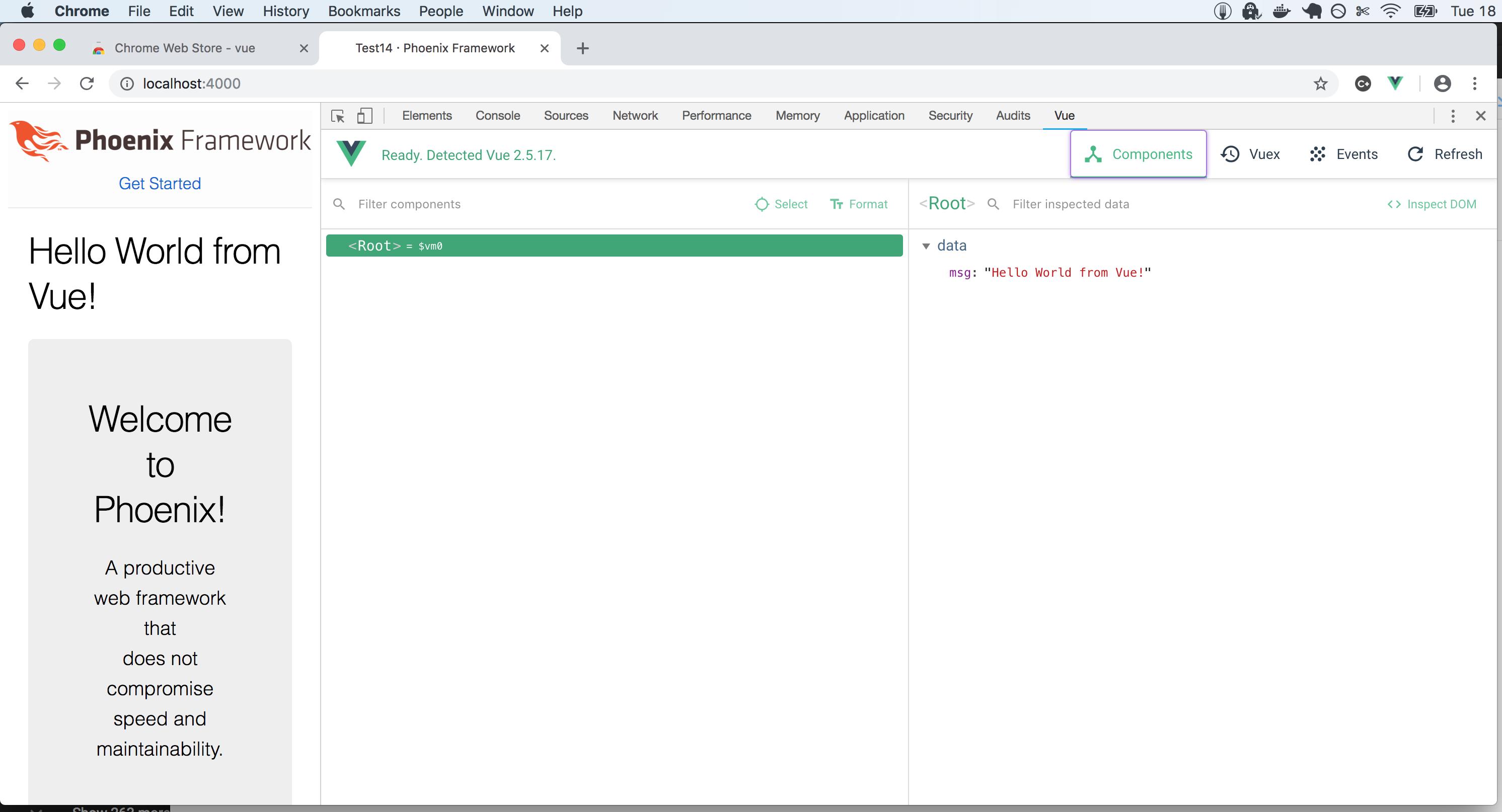
<p>Open localhost:4000. You should see the “Hello World from Vue!” message.</p>
<p>Finally, get the Chrome Vue plugin:</p>
<p></p><div class="lightbox-wrapper"><a class="lightbox" href="https://forum.elixirforum.com/uploads/default/original/2X/3/3d433dda6a8772ca4e10d476ee8387f99d4a958f.jpeg" data-download-href="https://forum.elixirforum.com/uploads/default/3d433dda6a8772ca4e10d476ee8387f99d4a958f" title="40%20PM" rel="nofollow"><img src="https://forum.elixirforum.com/uploads/default/optimized/2X/3/3d433dda6a8772ca4e10d476ee8387f99d4a958f_2_690x373.jpeg" alt="40%20PM" data-base62-sha1="8JXbN5Q9FUbOeK44qLWK1NInL6T" width="690" height="373" srcset="https://forum.elixirforum.com/uploads/default/optimized/2X/3/3d433dda6a8772ca4e10d476ee8387f99d4a958f_2_690x373.jpeg, https://forum.elixirforum.com/uploads/default/optimized/2X/3/3d433dda6a8772ca4e10d476ee8387f99d4a958f_2_1035x559.jpeg 1.5x, https://forum.elixirforum.com/uploads/default/optimized/2X/3/3d433dda6a8772ca4e10d476ee8387f99d4a958f_2_1380x746.jpeg 2x" data-dominant-color="F5F6F6"><div class="meta"><svg class="fa d-icon d-icon-far-image svg-icon" aria-hidden="true"><use href="#far-image"></use></svg><span class="filename">40%20PM</span><span class="informations">2984×1614 170 KB</span><svg class="fa d-icon d-icon-discourse-expand svg-icon" aria-hidden="true"><use href="#discourse-expand"></use></svg></div></a></div><p></p> 
	            </div>

	            <div class="base-line">
	                <div class="thread-counters">
	                    <span class="thread-count count-likes js-likers-trigger" title="Likes" data-post-id="99883" data-batch-url="/posts/batch_likers">
                        9
                      </span>
                      <!-- <span class="thread-count js-solved-indicator" title="Marked as solution"></span> -->
	                </div>
	                <div class="go-to-post">
	                  <a title="Go to post" alt="Go to post" href="https://forum.elixirforum.com/t/how-to-get-phoenix-vuejs-working-together/5108/42">Post #41</a>
	                </div>
	            </div>
              <div id="likers-container-99883" 
                   class="likers-container"
                   data-first-post="false"
                   data-batch-url="/posts/batch_likers">
                   <div class="likers-placeholder" 
                     data-likers-post-id="99883"
                     data-batch-url="/posts/batch_likers">
                  <div class="post-likers"></div>
                </div>
              </div>
	        </div>
			

    </div>

    <div class="triangle-top-right type-standard-post cat-standard-post" title="Post #41"></div>
  </section>
</div>
    <div class="postbit" id="155420" data-post-id="155420">
  <section>
    <div class="post-wrap">


					<div class="post-header">
		        <div class="user-avatar">
		          <img alt="seb5law" src="/assets/icons/user-9f439610.png" width="120" height="120" />
		        </div>
					
						<div class="user-details">
		          <div class="user-name">
		            <h3>
                  seb5law
                  </h3>
		          </div>
						
						</div>
					
					</div>

	        <div class="thread-main">
	            <div class="post-body" data-turbo="false">
								<p>An up to date (September 2019) post about integrating VueJS step by step into a Phoenix application is <a href="https://phxroad.com/guides/add-vue-js-to-phoenix-view/" rel="noopener nofollow ugc">here</a></p> 
	            </div>

	            <div class="base-line">
	                <div class="thread-counters">
	                    <span class="thread-count count-likes js-likers-trigger" title="Likes" data-post-id="155420" data-batch-url="/posts/batch_likers">
                        4
                      </span>
                      <!-- <span class="thread-count js-solved-indicator" title="Marked as solution"></span> -->
	                </div>
	                <div class="go-to-post">
	                  <a title="Go to post" alt="Go to post" href="https://forum.elixirforum.com/t/how-to-get-phoenix-vuejs-working-together/5108/43">Post #42</a>
	                </div>
	            </div>
              <div id="likers-container-155420" 
                   class="likers-container"
                   data-first-post="false"
                   data-batch-url="/posts/batch_likers">
                   <div class="likers-placeholder" 
                     data-likers-post-id="155420"
                     data-batch-url="/posts/batch_likers">
                  <div class="post-likers"></div>
                </div>
              </div>
	        </div>
			

    </div>

    <div class="triangle-top-right type-last-post cat-last-post" title="Last post!"></div>
  </section>
</div>
</template></turbo-stream><turbo-stream action="replace" target="load-more-container"><template><div id="load-more-container" class="load-more-container">
    <span class="all-loaded">— All posts loaded —</span>
</div></template></turbo-stream>