<turbo-stream action="append" target="posts_list"><template>    <div class="postbit" id="294783" data-post-id="294783">
  <section>
    <div class="post-wrap">


					<div class="post-header">
		        <div class="user-avatar">
		          <img alt="codeanpeace" src="https://forum.elixirforum.com/user_avatar/forum.elixirforum.com/codeanpeace/120/10278_2.png" width="120" height="120" />
		        </div>
					
						<div class="user-details">
		          <div class="user-name">
		            <h3>
                  codeanpeace
                  </h3>
		          </div>
						
						</div>
					
					</div>

	        <div class="thread-main">
	            <div class="post-body" data-turbo="false">
								<p>I got it working when using a class based selector as the condition, but not when using an attribute selector as the condition.</p>
<pre data-code-wrap="elixir"><code class="lang-elixir">&lt;.button phx-click={accessible_js_toggle(to: ".target")}&gt;

# these two functions successfully add and remove the `aria-hidden="true"` attribute and `"invisible"` class to the targeted elements
  def accessible_js_toggle_1(js \\ %JS{}, [to: selector]) do
    js
    |&gt; JS.remove_attribute("aria-hidden", to: selector &lt;&gt; "[style*='display: none']")
    |&gt; JS.set_attribute({"aria-hidden", "true"}, to: selector &lt;&gt; ":not([style*='display: none'])")
    |&gt; JS.remove_class("invisible", to: selector &lt;&gt; "[style*='display: none']")
    |&gt; JS.add_class("invisible", to: selector &lt;&gt; ":not([style*='display: none'])")
    |&gt; JS.toggle(to: selector)
  end

  def accessible_js_toggle_2(js \\ %JS{}, [to: selector]) do
    js
    |&gt; JS.remove_attribute("aria-hidden", to: selector &lt;&gt; ".invisible")
    |&gt; JS.set_attribute({"aria-hidden", "true"}, to: selector &lt;&gt; ":not(.invisible)")
    |&gt; JS.remove_class("invisible", to: selector &lt;&gt; ".invisible")
    |&gt; JS.add_class("invisible", to: selector &lt;&gt; ":not(.invisible)")
    |&gt; JS.toggle(to: selector)
  end

  # whereas this function that selects by attribute does not work while toggling
  # if set is after remove, then it only gets set; if remove is after set, then it never gets set
  def accessible_js_toggle_3(js \\ %JS{}, [to: selector]) do
    js
    |&gt; JS.remove_attribute("aria-hidden", to: selector &lt;&gt; "[aria-hidden='true']")
    |&gt; JS.set_attribute({"aria-hidden", "true"}, to: selector &lt;&gt; ":not([aria-hidden='true'])")
    |&gt; JS.toggle(to: selector)
  end
</code></pre>
<p><a href="https://github.com/codeanpeace/live_cal/commit/7561dfce19ffc855478928dff0a6a1bb40b88085" class="onebox" target="_blank" rel="noopener nofollow ugc">https://github.com/codeanpeace/live_cal/commit/7561dfce19ffc855478928dff0a6a1bb40b88085</a></p> 
	            </div>

	            <div class="base-line">
	                <div class="thread-counters">
	                    <span class="thread-count count-likes js-likers-trigger" title="Likes" data-post-id="294783" data-batch-url="/posts/batch_likers">
                        0
                      </span>
                      <!-- <span class="thread-count js-solved-indicator" title="Marked as solution"></span> -->
	                </div>
	                <div class="go-to-post">
	                  <a title="Go to post" alt="Go to post" href="https://forum.elixirforum.com/t/how-to-toggle-two-sets-of-arbitrary-tailwind-classes-for-transitions/57049/12">Post #11</a>
	                </div>
	            </div>
              <div id="likers-container-294783" 
                   class="likers-container"
                   data-first-post="false"
                   data-batch-url="/posts/batch_likers">
                   <div class="likers-placeholder" 
                     data-likers-post-id="294783"
                     data-batch-url="/posts/batch_likers">
                  <div class="post-likers"></div>
                </div>
              </div>
	        </div>
			

    </div>

    <div class="triangle-top-right type-standard-post cat-standard-post" title="Post #11"></div>
  </section>
</div>
    <div class="postbit" id="294865" data-post-id="294865">
  <section>
    <div class="post-wrap">


					<div class="post-header">
		        <div class="user-avatar">
		          <img alt="codeanpeace" src="https://forum.elixirforum.com/user_avatar/forum.elixirforum.com/codeanpeace/120/10278_2.png" width="120" height="120" />
		        </div>
					
						<div class="user-details">
		          <div class="user-name">
		            <h3>
                  codeanpeace
                  </h3>
		          </div>
						
						</div>
					
					</div>

	        <div class="thread-main">
	            <div class="post-body" data-turbo="false">
								<aside class="quote no-group" data-username="codeanpeace" data-post="10" data-topic="57049">
<div class="title">
<div class="quote-controls"></div>
<img alt="" width="24" height="24" src="https://forum.elixirforum.com/user_avatar/forum.elixirforum.com/codeanpeace/48/10278_2.png" class="avatar"> codeanpeace:</div>
<blockquote>
<p>For attributes, try swapping <code>JS.add_class</code> and <code>JS.remove_class</code> into <a class="mention" href="/u/nik" rel="nofollow">@Nik</a>’s workaround re-posted below.</p>
</blockquote>
</aside>
<p>Ahh sorry for any confusion, meant to write swapping in <code>JS.set_attribute</code> and <code>JS.remove_attribute</code>!</p> 
	            </div>

	            <div class="base-line">
	                <div class="thread-counters">
	                    <span class="thread-count count-likes js-likers-trigger" title="Likes" data-post-id="294865" data-batch-url="/posts/batch_likers">
                        0
                      </span>
                      <!-- <span class="thread-count js-solved-indicator" title="Marked as solution"></span> -->
	                </div>
	                <div class="go-to-post">
	                  <a title="Go to post" alt="Go to post" href="https://forum.elixirforum.com/t/how-to-toggle-two-sets-of-arbitrary-tailwind-classes-for-transitions/57049/13">Post #12</a>
	                </div>
	            </div>
              <div id="likers-container-294865" 
                   class="likers-container"
                   data-first-post="false"
                   data-batch-url="/posts/batch_likers">
                   <div class="likers-placeholder" 
                     data-likers-post-id="294865"
                     data-batch-url="/posts/batch_likers">
                  <div class="post-likers"></div>
                </div>
              </div>
	        </div>
			

    </div>

    <div class="triangle-top-right type-standard-post cat-standard-post" title="Post #12"></div>
  </section>
</div>
    <div class="postbit" id="295301" data-post-id="295301">
  <section>
    <div class="post-wrap">


					<div class="post-header">
		        <div class="user-avatar">
		          <img alt="ziinc" src="https://forum.elixirforum.com/user_avatar/forum.elixirforum.com/ziinc/120/40228_2.png" width="120" height="120" />
		        </div>
					
						<div class="user-details">
		          <div class="user-name">
		            <h3>
                  ziinc
                  </h3>
		          </div>
						
						</div>
					
					</div>

	        <div class="thread-main">
	            <div class="post-body" data-turbo="false">
								<p>I would recommend using phoenix_live_react together with headles-ui for rendering interactive components, as handling css transitions in liveview still has much to be desired for anything more complex.</p>
<p><a href="https://github.com/fidr/phoenix_live_react" class="onebox" target="_blank" rel="noopener nofollow ugc">https://github.com/fidr/phoenix_live_react</a></p>
<p>Even then, handling DOM removal transitions of the react node is still quite annoying and would require using LiveView.JS to target the node you’re removing.</p> 
	            </div>

	            <div class="base-line">
	                <div class="thread-counters">
	                    <span class="thread-count count-likes js-likers-trigger" title="Likes" data-post-id="295301" data-batch-url="/posts/batch_likers">
                        0
                      </span>
                      <!-- <span class="thread-count js-solved-indicator" title="Marked as solution"></span> -->
	                </div>
	                <div class="go-to-post">
	                  <a title="Go to post" alt="Go to post" href="https://forum.elixirforum.com/t/how-to-toggle-two-sets-of-arbitrary-tailwind-classes-for-transitions/57049/14">Post #13</a>
	                </div>
	            </div>
              <div id="likers-container-295301" 
                   class="likers-container"
                   data-first-post="false"
                   data-batch-url="/posts/batch_likers">
                   <div class="likers-placeholder" 
                     data-likers-post-id="295301"
                     data-batch-url="/posts/batch_likers">
                  <div class="post-likers"></div>
                </div>
              </div>
	        </div>
			

    </div>

    <div class="triangle-top-right type-standard-post cat-standard-post" title="Post #13"></div>
  </section>
</div>
    <div class="postbit" id="323337" data-post-id="323337">
  <section>
    <div class="post-wrap">


					<div class="post-header">
		        <div class="user-avatar">
		          <img alt="tubedude" src="https://forum.elixirforum.com/user_avatar/forum.elixirforum.com/tubedude/120/33996_2.png" width="120" height="120" />
		        </div>
					
						<div class="user-details">
		          <div class="user-name">
		            <h3>
                  tubedude
                  </h3>
		          </div>
						
						</div>
					
					</div>

	        <div class="thread-main">
	            <div class="post-body" data-turbo="false">
								<p>I’m having a weird behaviour when animating a <a href="https://tailwindui.com/components/application-ui/application-shells/sidebar" rel="noopener nofollow ugc">Tailwind sidebar</a> open/close. Starting from a closed sidebar, I’m able to open it with the animation, and close it with the animation as well. But I can do it only once. After that, whenever I click the open menu, it will appear and animate back to the to closed state.</p>
<p>So the starting state is:</p>
<pre data-code-wrap="elixir"><code class="lang-elixir">&lt;div class="relative z-50 lg:hidden" role="dialog" aria-modal="true" id="off-canvas-menu-mobile" aria-expanded="false" style="display: none;"&gt;
</code></pre>
<p>Once I click to open, the animation triggers, the menu is opened and funcional and the state of the div becomes:</p>
<pre data-code-wrap="elixir"><code class="lang-elixir">&lt;div class="relative z-50 lg:hidden" role="dialog" aria-modal="true" id="off-canvas-menu-mobile" aria-expanded="true" style="display: block;"&gt;
</code></pre>
<p>Once I click to close it, the animation is triggered, the menu is hidden, and the state becomes:</p>
<pre data-code-wrap="elixir"><code class="lang-elixir">&lt;div class="relative z-50 lg:hidden" role="dialog" aria-modal="true" id="off-canvas-menu-mobile" aria-expanded="false" style="display: block;"&gt;
</code></pre>
<p><img src="https://forum.elixirforum.com/uploads/default/original/3X/b/0/b0f9ba9dee14abaccfd5c473030b33ed91e01ea0.gif" alt="Screen Recording 2024-04-06 at 08.49.34" data-base62-sha1="pfB4KEWLL39w0qzc7JUTloSBYvS" width="410" height="228" class="animated"></p>
<p>The code for this is:</p>
<pre data-code-wrap="elixir"><code class="lang-elixir">  defp close_mobile_menu() do
    %JS{}
    # |&gt; JS.hide(to: "#off-canvas-menu-mobile")
    |&gt; JS.transition(
      {"transition ease-in-out duration-300 transform", "translate-x-0", "-translate-x-full"},
      to: "#off-canvas-menu-mobile-inset",
      time: 300
    )
    |&gt; JS.transition({"ease-in-out duration-300", "opacity-100", "opacity-0"},
      to: "#off-canvas-menu-mobile-button",
      time: 300
    )
    |&gt; JS.transition({"transition-opacity ease-linear duration-300", "opacity-100", "opacity-0"},
      to: "#off-canvas-menu-mobile-backdrop",
      time: 300
    )
    |&gt; JS.set_attribute({"aria-expanded", "false"}, to: "#off-canvas-menu-mobile")
  end

  defp open_mobile_menu() do
    %JS{}
    |&gt; JS.show(to: "#off-canvas-menu-mobile")
    |&gt; JS.transition({"transition-opacity ease-linear duration-300", "opacity-0", "opacity-100"},
    to: "#off-canvas-menu-mobile-backdrop",
    time: 300
    )
    |&gt; JS.transition(
      {"transition ease-in-out duration-300 transform", "-translate-x-full", "translate-x-0"},
      to: "#off-canvas-menu-mobile-inset",
      time: 300
    )
    |&gt; JS.transition({"ease-in-out duration-300", "opacity-0", "opacity-100"},
      to: "#off-canvas-menu-mobile-button",
      time: 300
    )
    |&gt; JS.set_attribute({"aria-expanded", "true"}, to: "#off-canvas-menu-mobile")
  end
</code></pre>
<p>First thing to notice is that I’m not using <code>JS.hide</code>, changing or removing the <code>style</code> attribute. Only the <code>aria-expanded</code> is changing. And even so, the menu is getting hidden.<br>
But now, whenever I press to open the menu, it will pop-up in appearance and animate to closed.</p>
<p>The obvious problem here is that I’ve commented out <code>JS.hide</code> on the <code>close_mobile_menu()</code>. But once I add this, the menu will close and open as many times I press the buttons (as expected), but the animation on to the closed state won’t be rendered. The state of the main div will be as follows (closed-&gt;open-&gt;closed):</p>
<pre data-code-wrap="elixir"><code class="lang-elixir">&lt;div class="relative z-50 lg:hidden" role="dialog" aria-modal="true" id="off-canvas-menu-mobile" aria-expanded="false" style="display: none;"&gt;
&lt;div class="relative z-50 lg:hidden" role="dialog" aria-modal="true" id="off-canvas-menu-mobile" aria-expanded="true" style="display: block;"&gt;
&lt;div class="relative z-50 lg:hidden" role="dialog" aria-modal="true" id="off-canvas-menu-mobile" aria-expanded="false" style="display: none;"&gt;
</code></pre>
<p>It appears to me that the animation is rendered, but the div is already hidden. Is there a way to make the events (animation and display state) sequential?<br>
Or am I approaching the solution from the incorrect angle?</p> 
	            </div>

	            <div class="base-line">
	                <div class="thread-counters">
	                    <span class="thread-count count-likes js-likers-trigger" title="Likes" data-post-id="323337" data-batch-url="/posts/batch_likers">
                        0
                      </span>
                      <!-- <span class="thread-count js-solved-indicator" title="Marked as solution"></span> -->
	                </div>
	                <div class="go-to-post">
	                  <a title="Go to post" alt="Go to post" href="https://forum.elixirforum.com/t/how-to-toggle-two-sets-of-arbitrary-tailwind-classes-for-transitions/57049/15">Post #14</a>
	                </div>
	            </div>
              <div id="likers-container-323337" 
                   class="likers-container"
                   data-first-post="false"
                   data-batch-url="/posts/batch_likers">
                   <div class="likers-placeholder" 
                     data-likers-post-id="323337"
                     data-batch-url="/posts/batch_likers">
                  <div class="post-likers"></div>
                </div>
              </div>
	        </div>
			

    </div>

    <div class="triangle-top-right type-standard-post cat-standard-post" title="Post #14"></div>
  </section>
</div>
    <div class="postbit" id="323357" data-post-id="323357">
  <section>
    <div class="post-wrap">


					<div class="post-header">
		        <div class="user-avatar">
		          <img alt="cmo" src="https://forum.elixirforum.com/user_avatar/forum.elixirforum.com/cmo/120/19618_2.png" width="120" height="120" />
		        </div>
					
						<div class="user-details">
		          <div class="user-name">
		            <h3>
                  cmo
                  </h3>
		          </div>
						
						</div>
					
					</div>

	        <div class="thread-main">
	            <div class="post-body" data-turbo="false">
								<p>Try using <code>show</code>, <code>hide</code> etc with the <code>transition</code> option instead of calling <code>JS.transition</code>?</p> 
	            </div>

	            <div class="base-line">
	                <div class="thread-counters">
	                    <span class="thread-count count-likes js-likers-trigger" title="Likes" data-post-id="323357" data-batch-url="/posts/batch_likers">
                        0
                      </span>
                      <!-- <span class="thread-count js-solved-indicator" title="Marked as solution"></span> -->
	                </div>
	                <div class="go-to-post">
	                  <a title="Go to post" alt="Go to post" href="https://forum.elixirforum.com/t/how-to-toggle-two-sets-of-arbitrary-tailwind-classes-for-transitions/57049/16">Post #15</a>
	                </div>
	            </div>
              <div id="likers-container-323357" 
                   class="likers-container"
                   data-first-post="false"
                   data-batch-url="/posts/batch_likers">
                   <div class="likers-placeholder" 
                     data-likers-post-id="323357"
                     data-batch-url="/posts/batch_likers">
                  <div class="post-likers"></div>
                </div>
              </div>
	        </div>
			

    </div>

    <div class="triangle-top-right type-standard-post cat-standard-post" title="Post #15"></div>
  </section>
</div>
    <div class="postbit" id="323393" data-post-id="323393">
  <section>
    <div class="post-wrap">


					<div class="post-header">
		        <div class="user-avatar">
		          <img alt="tubedude" src="https://forum.elixirforum.com/user_avatar/forum.elixirforum.com/tubedude/120/33996_2.png" width="120" height="120" />
		        </div>
					
						<div class="user-details">
		          <div class="user-name">
		            <h3>
                  tubedude
                  </h3>
		          </div>
						
						</div>
					
					</div>

	        <div class="thread-main">
	            <div class="post-body" data-turbo="false">
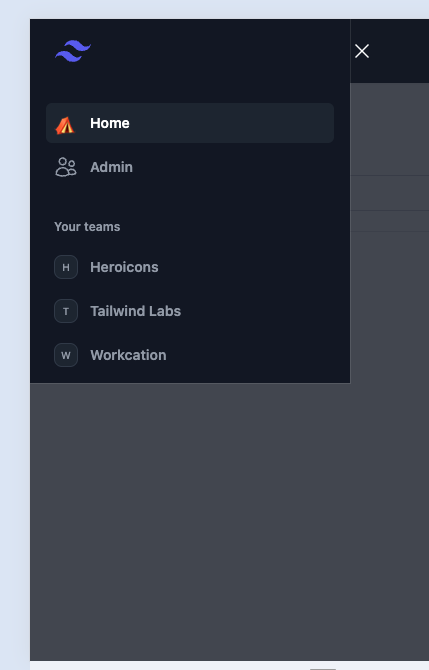
								<p>I tried this at first and the problem I was getting was that the menu showing up cut in half.</p>
<p>(cut in half sidebar)<br>
</p><div class="lightbox-wrapper"><a class="lightbox" href="https://forum.elixirforum.com/uploads/default/original/3X/3/6/3693d620402f4ce5886aa2a4a7234a2b91cc2177.png" data-download-href="https://forum.elixirforum.com/uploads/default/3693d620402f4ce5886aa2a4a7234a2b91cc2177" title="Screenshot 2024-04-07 at 08.05.03" rel="nofollow"><img src="https://forum.elixirforum.com/uploads/default/original/3X/3/6/3693d620402f4ce5886aa2a4a7234a2b91cc2177.png" alt="Screenshot 2024-04-07 at 08.05.03" data-base62-sha1="7MOwkCB6JFg69wrx07rspLqqGzB" width="384" height="600"><div class="meta"><svg class="fa d-icon d-icon-far-image svg-icon" aria-hidden="true"><use href="#far-image"></use></svg><span class="filename">Screenshot 2024-04-07 at 08.05.03</span><span class="informations">429×670 10.4 KB</span><svg class="fa d-icon d-icon-discourse-expand svg-icon" aria-hidden="true"><use href="#discourse-expand"></use></svg></div></a></div><p></p>
<p>The issue was on the <code>style: "display block;"</code>. So I figured I could transition the internal elements without actually tagging them to hide/show. Hence my initial code. But since you recommended I reverted back to show/hide and I tried all <code>display</code> options. The usual suspects (<code>inline</code>, <code>inline-block</code>) did not solve it, but using <a href="https://www.w3schools.com/jsref/prop_style_display.asp" rel="noopener nofollow ugc">flex</a> did the trick to show the sidebar correctly. But I decided not going this route, as I liked having one tag to control the show/hide state, leaving all others to transition only.<br>
For reference the code would be:<br>
<code>JS.show(to: "#menu", transition: {some transition}, display: "flex")</code></p>
<p>And now on the original problem that hiding the menu was not working:<br>
I added a transition bringing down the opacity just a notch (100% to 90%) to the main element and left it on screen being able to show its inner elements transition.</p>
<p>The final code is as follows:</p>
<pre data-code-wrap="elixir"><code class="lang-elixir">  defp close_mobile_menu() do
    %JS{}
    |&gt; JS.transition(
      {"transition ease-in-out duration-300 transform", "translate-x-0", "-translate-x-full"},
      to: "#off-canvas-menu-mobile-inset",
      time: 300
    )
    |&gt; JS.transition(
      {"ease-in-out duration-300", "opacity-100", "opacity-0"},
      to: "#off-canvas-menu-mobile-button",
      time: 300
    )
    |&gt; JS.transition(
      {"transition-opacity ease-linear duration-300", "opacity-100", "opacity-0"},
      to: "#off-canvas-menu-mobile-backdrop",
      time: 300
    )
    |&gt;JS.hide(
      transition: {"transition-opacity ease-linear duration-300", "opacity-100", "opacity-90"},
      to: "#off-canvas-menu-mobile",
      time: 300)
    |&gt; JS.set_attribute({"aria-expanded", "false"}, to: "#off-canvas-menu-mobile")
  end

  defp open_mobile_menu() do
    %JS{}
    |&gt; JS.transition(
      {"transition-opacity ease-linear duration-300", "opacity-0", "opacity-100"},
      to: "#off-canvas-menu-mobile-backdrop",
      time: 300
    )
    |&gt; JS.transition(
      {"transition ease-in-out duration-300 transform", "-translate-x-full", "translate-x-0"},
      to: "#off-canvas-menu-mobile-inset",
      time: 300
    )
    |&gt; JS.transition(
      {"ease-in-out duration-300", "opacity-0", "opacity-100"},
      to: "#off-canvas-menu-mobile-button",
      time: 300
    )
    |&gt; JS.show(
      to: "#off-canvas-menu-mobile",
      time: 300)
  |&gt; JS.set_attribute({"aria-expanded", "true"}, to: "#off-canvas-menu-mobile")
  end
</code></pre>
<p>In other words, thanks <a class="mention" href="/u/cmo" rel="nofollow">@cmo</a> for the push to the right direction.</p> 
	            </div>

	            <div class="base-line">
	                <div class="thread-counters">
	                    <span class="thread-count count-likes js-likers-trigger" title="Likes" data-post-id="323393" data-batch-url="/posts/batch_likers">
                        0
                      </span>
                      <!-- <span class="thread-count js-solved-indicator" title="Marked as solution"></span> -->
	                </div>
	                <div class="go-to-post">
	                  <a title="Go to post" alt="Go to post" href="https://forum.elixirforum.com/t/how-to-toggle-two-sets-of-arbitrary-tailwind-classes-for-transitions/57049/17">Post #16</a>
	                </div>
	            </div>
              <div id="likers-container-323393" 
                   class="likers-container"
                   data-first-post="false"
                   data-batch-url="/posts/batch_likers">
                   <div class="likers-placeholder" 
                     data-likers-post-id="323393"
                     data-batch-url="/posts/batch_likers">
                  <div class="post-likers"></div>
                </div>
              </div>
	        </div>
			

    </div>

    <div class="triangle-top-right type-last-post cat-last-post" title="Last post!"></div>
  </section>
</div>
</template></turbo-stream><turbo-stream action="replace" target="load-more-container"><template><div id="load-more-container" class="load-more-container">
    <span class="all-loaded">— All posts loaded —</span>
</div></template></turbo-stream>