<turbo-stream action="append" target="posts_list"><template>    <div class="postbit" id="313949" data-post-id="313949">
  <section>
    <div class="post-wrap">


					<div class="post-header">
		        <div class="user-avatar">
		          <img alt="Sebb" src="https://forum.elixirforum.com/user_avatar/forum.elixirforum.com/Sebb/120/21818_2.png" width="120" height="120" />
		        </div>
					
						<div class="user-details">
		          <div class="user-name">
		            <h3>
                  Sebb
                  </h3>
		          </div>
						
						</div>
					
					</div>

	        <div class="thread-main">
	            <div class="post-body" data-turbo="false">
								<p>good point. If the strategy of a dedicated phoenix WC-lib would be taken one could add a debug mode in the components that render info for testing into the light-DOM. Could even make testing easier. (“normal” functionality in the shadow, just debug stuff to test agiainst in the light)</p> 
	            </div>

	            <div class="base-line">
	                <div class="thread-counters">
	                    <span class="thread-count count-likes js-likers-trigger" title="Likes" data-post-id="313949" data-batch-url="/posts/batch_likers">
                        0
                      </span>
                      <!-- <span class="thread-count js-solved-indicator" title="Marked as solution"></span> -->
	                </div>
	                <div class="go-to-post">
	                  <a title="Go to post" alt="Go to post" href="https://forum.elixirforum.com/t/adobe-spectrum-2-web-components-with-liveview/60395/32">Post #31</a>
	                </div>
	            </div>
              <div id="likers-container-313949" 
                   class="likers-container"
                   data-first-post="false"
                   data-batch-url="/posts/batch_likers">
                   <div class="likers-placeholder" 
                     data-likers-post-id="313949"
                     data-batch-url="/posts/batch_likers">
                  <div class="post-likers"></div>
                </div>
              </div>
	        </div>
			

    </div>

    <div class="triangle-top-right type-standard-post cat-standard-post" title="Post #31"></div>
  </section>
</div>
    <div class="postbit" id="313951" data-post-id="313951">
  <section>
    <div class="post-wrap">


					<div class="post-header">
		        <div class="user-avatar">
		          <img alt="adw632" src="/assets/icons/user-9f439610.png" width="120" height="120" />
		        </div>
					
						<div class="user-details">
		          <div class="user-name">
		            <h3>
                  adw632
                    <span class="op-star" title="Thread Starter">
                      <img alt="OP" class="op-star-icon" src="/assets/thread-icons/thread-icon-thread-starter-df91e872.png" />
                    </span>
                  </h3>
		          </div>
						
						</div>
					
					</div>

	        <div class="thread-main">
	            <div class="post-body" data-turbo="false">
								<p>Well I’m using carbon as a “product” so my testing is not testing their framework but based on what my app use cases are.</p>
<p>When writing my own custom elements then given my preference for zero boilerplate, it’s just <a href="https://svelte.dev/docs/faq#how-do-i-test-svelte-apps" rel="noopener nofollow ugc">Svelte Component  tests</a> :</p>
<blockquote>
<p>Component Tests: Validating that a Svelte component mounts and interacts as expected throughout its lifecycle requires a tool that provides a Document Object Model (DOM). Components can be compiled (since Svelte is a compiler and not a normal library) and mounted to allow asserting against element structure, listeners, state, and all the other capabilities provided by a Svelte component. Tools for component testing range from an in-memory implementation like jsdom paired with a test runner like Vitest to solutions that leverage an actual browser to provide a visual testing capability such as Playwright or Cypress.</p>
</blockquote>
<p>With Svelte you test components as you normally would any regular svelte component using an <em>import</em> rather than using the custom element tag.</p>
<p>For example:</p>
<pre data-code-wrap="elixir"><code class="lang-elixir">import { render } from "@testing-library/svelte";
import Greeting from "../src/greeting.svelte";

describe("Greeting component", () =&gt; {
  test("should render greeting correctly", () =&gt; {
    const { container } = render(Greeting, {
      props: {
        background: 'blue',
        name: 'Andrew'
      }
  });

    expect(container).toContainHTML('&lt;body&gt;&lt;div&gt;&lt;h2 style="background: blue;"&gt;Hello &lt;p&gt;Andrew&lt;/p&gt;&lt;/h2&gt;&lt;/div&gt;&lt;/body&gt;');
  });
});</code></pre> 
	            </div>

	            <div class="base-line">
	                <div class="thread-counters">
	                    <span class="thread-count count-likes js-likers-trigger" title="Likes" data-post-id="313951" data-batch-url="/posts/batch_likers">
                        0
                      </span>
                      <!-- <span class="thread-count js-solved-indicator" title="Marked as solution"></span> -->
	                </div>
	                <div class="go-to-post">
	                  <a title="Go to post" alt="Go to post" href="https://forum.elixirforum.com/t/adobe-spectrum-2-web-components-with-liveview/60395/33">Post #32</a>
	                </div>
	            </div>
              <div id="likers-container-313951" 
                   class="likers-container"
                   data-first-post="false"
                   data-batch-url="/posts/batch_likers">
                   <div class="likers-placeholder" 
                     data-likers-post-id="313951"
                     data-batch-url="/posts/batch_likers">
                  <div class="post-likers"></div>
                </div>
              </div>
	        </div>
			

    </div>

    <div class="triangle-top-right type-standard-post cat-standard-post" title="Post #32"></div>
  </section>
</div>
    <div class="postbit" id="313952" data-post-id="313952">
  <section>
    <div class="post-wrap">


					<div class="post-header">
		        <div class="user-avatar">
		          <img alt="Sebb" src="https://forum.elixirforum.com/user_avatar/forum.elixirforum.com/Sebb/120/21818_2.png" width="120" height="120" />
		        </div>
					
						<div class="user-details">
		          <div class="user-name">
		            <h3>
                  Sebb
                  </h3>
		          </div>
						
						</div>
					
					</div>

	        <div class="thread-main">
	            <div class="post-body" data-turbo="false">
								<p>But you can’t test the Application like that, right?<br>
How would you test that a component with a specific configuration (hidden in shadow) is rendered using <code>LiveViewTest</code></p> 
	            </div>

	            <div class="base-line">
	                <div class="thread-counters">
	                    <span class="thread-count count-likes js-likers-trigger" title="Likes" data-post-id="313952" data-batch-url="/posts/batch_likers">
                        0
                      </span>
                      <!-- <span class="thread-count js-solved-indicator" title="Marked as solution"></span> -->
	                </div>
	                <div class="go-to-post">
	                  <a title="Go to post" alt="Go to post" href="https://forum.elixirforum.com/t/adobe-spectrum-2-web-components-with-liveview/60395/34">Post #33</a>
	                </div>
	            </div>
              <div id="likers-container-313952" 
                   class="likers-container"
                   data-first-post="false"
                   data-batch-url="/posts/batch_likers">
                   <div class="likers-placeholder" 
                     data-likers-post-id="313952"
                     data-batch-url="/posts/batch_likers">
                  <div class="post-likers"></div>
                </div>
              </div>
	        </div>
			

    </div>

    <div class="triangle-top-right type-standard-post cat-standard-post" title="Post #33"></div>
  </section>
</div>
    <div class="postbit" id="313957" data-post-id="313957">
  <section>
    <div class="post-wrap">


					<div class="post-header">
		        <div class="user-avatar">
		          <img alt="adw632" src="/assets/icons/user-9f439610.png" width="120" height="120" />
		        </div>
					
						<div class="user-details">
		          <div class="user-name">
		            <h3>
                  adw632
                    <span class="op-star" title="Thread Starter">
                      <img alt="OP" class="op-star-icon" src="/assets/thread-icons/thread-icon-thread-starter-df91e872.png" />
                    </span>
                  </h3>
		          </div>
						
						</div>
					
					</div>

	        <div class="thread-main">
	            <div class="post-body" data-turbo="false">
								<p>The strategy is test each component module separately with unit tests to make sure it honors properties, and events handlers passed and renders the correct dom structure and styles. Pretty much what you would do for a LiveView function component, except it’s JS.</p>
<p>This unit testing could also test the component as a custom element across multiple browsers if you think  that your component uses features that may have browser compatibility issues.</p>
<p>The testing of custom elements in your app is basically the same as the integration testing you do when using ul, li, divs, tables and buttons in your markup, your custom elements are just like any other element at that point and treated as a black box.</p>
<p>Beyond the unit testing of a component, I think time is better spent on integration testing of the application.</p> 
	            </div>

	            <div class="base-line">
	                <div class="thread-counters">
	                    <span class="thread-count count-likes js-likers-trigger" title="Likes" data-post-id="313957" data-batch-url="/posts/batch_likers">
                        1
                      </span>
                      <!-- <span class="thread-count js-solved-indicator" title="Marked as solution"></span> -->
	                </div>
	                <div class="go-to-post">
	                  <a title="Go to post" alt="Go to post" href="https://forum.elixirforum.com/t/adobe-spectrum-2-web-components-with-liveview/60395/35">Post #34</a>
	                </div>
	            </div>
              <div id="likers-container-313957" 
                   class="likers-container"
                   data-first-post="false"
                   data-batch-url="/posts/batch_likers">
                   <div class="likers-placeholder" 
                     data-likers-post-id="313957"
                     data-batch-url="/posts/batch_likers">
                  <div class="post-likers"></div>
                </div>
              </div>
	        </div>
			

    </div>

    <div class="triangle-top-right type-standard-post cat-standard-post" title="Post #34"></div>
  </section>
</div>
    <div class="postbit" id="313999" data-post-id="313999">
  <section>
    <div class="post-wrap">


					<div class="post-header">
		        <div class="user-avatar">
		          <img alt="TunkShif" src="https://forum.elixirforum.com/user_avatar/forum.elixirforum.com/TunkShif/120/24198_2.png" width="120" height="120" />
		        </div>
					
						<div class="user-details">
		          <div class="user-name">
		            <h3>
                  TunkShif
                  </h3>
		          </div>
						
						</div>
					
					</div>

	        <div class="thread-main">
	            <div class="post-body" data-turbo="false">
								<aside class="quote no-group" data-username="adw632" data-post="16" data-topic="60395">
<div class="title">
<div class="quote-controls"></div>
<img alt="" width="24" height="24" src="https://forum.elixirforum.com/letter_avatar_proxy/v4/letter/a/9d8465/48.png" class="avatar"> adw632:</div>
<blockquote>
<p>So I believe a really nice headless UI system based on custom elements <em>is</em> within reach.</p>
</blockquote>
</aside>
<p>The idea of headless components based on web components is great, but it is not easy to implement such a component system, at least from what I have tried.</p>
<p>First I want to make it clear that <a href="https://developer.mozilla.org/en-US/docs/Web/API/Web_components" rel="noopener nofollow ugc">Web Component</a> is a set of different technologies which you can use altogether or separately. It consists of three different web apis: custom element, shadow DOM, template and slot</p>
<ul>
<li><a href="https://developer.mozilla.org/en-US/docs/Web/API/Web_components/Using_custom_elements" rel="noopener nofollow ugc">Custom element</a> allows you to define your own HTML tags and associated lifecycle callbacks for the HTML element</li>
<li><a href="https://developer.mozilla.org/en-US/docs/Web/API/Web_components/Using_shadow_DOM" rel="noopener nofollow ugc">Shadow DOM</a> allows you to create an isolated DOM environment separated from the normal DOM (also called the ‘light DOM’). A shadow DOM tree is usually created and attached to a custom element when the element is mounted. Styles in  light DOM won’t leak into the shadow DOM environment and also you cannot use normal styling method (like using CSS selectors targeting a specific class name) won’t apply to the shadow DOM tree content.</li>
<li><a href="https://developer.mozilla.org/en-US/docs/Web/API/Web_components/Using_templates_and_slots" rel="noopener nofollow ugc">Slot API</a> is only available inside a shadow DOM context. It allows you to ‘slot’ light DOM content into the shadow DOM tree.</li>
</ul>
<p>Since they are three different APIs, you can use them combined or just use one of them in your web component .</p>
<p>And here I want to list some major problems I had when I tried to implement a headless and accessible UI component library using web components for Phoenix LiveView.</p>
<h3><a name="p-313999-styling-issues-with-shadow-dom-1" class="anchor" href="#p-313999-styling-issues-with-shadow-dom-1" aria-label="Heading link" rel="nofollow"></a>Styling issues with Shadow DOM</h3>
<p>What <a class="mention" href="/u/sebb" rel="nofollow">@Sebb</a> asked is actually a good question about how styling web components works.</p>
<aside class="quote no-group" data-username="Sebb" data-post="29" data-topic="60395">
<div class="title">
<div class="quote-controls"></div>
<img alt="" width="24" height="24" src="https://forum.elixirforum.com/user_avatar/forum.elixirforum.com/sebb/48/21818_2.png" class="avatar"> Sebb:</div>
<blockquote>
<p>Stupid question: How will those components behave as web-components.<br>
In the docs a button is used like this:</p>
<pre data-code-wrap="elixir"><code class="lang-elixir">&lt;Button.Root
  class="inline-flex h-12 items-center justify-center rounded-input bg-dark
  px-[21px] text-[15px] font-semibold text-background shadow-mini
  hover:bg-dark/95 active:scale-98 active:transition-all"
&gt;
  Click Me
&lt;/Button.Root&gt;
</code></pre>
<p>So its directly styled with tailwind classes. But is this still possible when they are WCs?<br>
Or would I have to create each button-style beforehand (or add some logic to override colors etc)</p>
</blockquote>
</aside>
<p>Let’s first think about how to implement a custom button with web component. In most of these JS UI component libs, take Bits UI as an example, the <code>&lt;Button.Root&gt;Click Me&lt;/Button.Root&gt;</code> component renders just a single button element, the rendered html would look like <code>&lt;button&gt;Click Me&lt;/button&gt;</code>.</p>
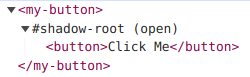
<p>But below is how it usually implemented in most web component UI libs (like <a href="https://shoelace.style/components/button" rel="noopener nofollow ugc">Sholace</a> or <a href="https://web-components.carbondesignsystem.com/?path=%2Fstory%2Fcomponents-button--default" rel="noopener nofollow ugc">Carbon</a>), the actual rendered html would look like:</p>
<pre data-code-wrap="html"><code class="lang-html">&lt;my-button&gt;
  #shadow-root
    &lt;button&gt;Click Me&lt;/button&gt;
&lt;/my-button&gt;
</code></pre>
<p>here is how it looks like inside Chrome DevTools<br>
<img src="https://forum.elixirforum.com/uploads/default/original/3X/2/6/2661c6081155a7ba530243e13ae2bdae91d9fb7a.png" alt="image" data-base62-sha1="5txCBUefBYawXMMfCkmDfTGbypY" width="250" height="77"></p>
<p>The difference is that your actual button element now is being wrapped inside a custom element’s shadow root. You cannot use normal CSS selectors to target the button element, so the following CSS would not work:</p>
<pre data-code-wrap="css"><code class="lang-css">my-button button {
  color: red;
}
</code></pre>
<p>Also, if you’re using tailwindcss to set a bunch of class names on the custom element like <code>&lt;my-button class="text-blue"&gt;&lt;/my-button&gt;</code>, you’re just setting styles for the wrapper element, not on the actual button element inside the shadow root. It won’t work either if you add tailwind class names directly to the button element, because all your tailwind classes live on the light DOM style, and they won’t affect the shadow DOM styles.</p>
<p>Here’s an example and you can check the demo online <a href="https://codesandbox.io/p/sandbox/gallant-rgb-ndczpx?file=%2Findex.html%3A14%2C1" rel="noopener nofollow ugc">here</a>:<br>
<img src="https://forum.elixirforum.com/uploads/default/optimized/3X/0/c/0cc64fc0354073044af6a7e778663cd4d89fbb4d_2_690x48.png" alt="image" data-base62-sha1="1P0BPlrUwm4wp5IvpqpxxLZvDJj" width="690" height="48" srcset="https://forum.elixirforum.com/uploads/default/optimized/3X/0/c/0cc64fc0354073044af6a7e778663cd4d89fbb4d_2_690x48.png, https://forum.elixirforum.com/uploads/default/optimized/3X/0/c/0cc64fc0354073044af6a7e778663cd4d89fbb4d_2_1035x72.png 1.5x, https://forum.elixirforum.com/uploads/default/original/3X/0/c/0cc64fc0354073044af6a7e778663cd4d89fbb4d.png 2x" data-dominant-color="F6F5F8"><br>
The paragraph element and the button element are both inside the shadow DOM, but only the paragraph text color is affected by the <code>text-blue</code> class. That’s because the paragraph inherits color styles from the parent element, but the button element has default text color set by the browser user agent.</p>
<p>So if you want to style an element inside a shadow DOM, you’ll have to use <code>part</code> attribute and <a href="https://developer.mozilla.org/en-US/docs/Web/CSS/::part#syntax" rel="noopener nofollow ugc"><code>::part()</code> CSS selector</a>, so that you can target an element inside shadow DOM. This is what Showlace used to allow some component customization, check the <a href="https://shoelace.style/components/button#styling-buttons" rel="noopener nofollow ugc">Shoelace button customization example</a>.<br>
Other alternatives include using <code>&lt;slot&gt;</code> to slot light DOM element inside shadow DOM, so you can styling the slotted element. Or you can just ditch shadow DOM and just use custom element API, but you won’t be able to use the slot API.</p>
<p>You may ask, what if we just remove the extra <code>&lt;button&gt;</code> element wrapper inside the shadow DOM, and use our custom element as the button container, just like:</p>
<pre data-code-wrap="html"><code class="lang-html">&lt;my-button&gt;
  #shadow-root
    &lt;p&gt;Click Me&lt;/p&gt;
&lt;/my-button&gt;
</code></pre>
<p>Well, then you have to take care of accessibility issues with your own custom button element, since <code>&lt;button&gt;</code> element has default screen reader support and focus management provided by the browser. You will need to add a bunch of ARIA-related attributes to your custom element to make it fully accessible.</p>
<h3><a name="p-313999-not-easy-to-design-a-composable-and-flexible-component-api-2" class="anchor" href="#p-313999-not-easy-to-design-a-composable-and-flexible-component-api-2" aria-label="Heading link" rel="nofollow"></a>Not easy to design a composable and flexible component API</h3>
<p>One thing that I like about headless UI is that they’re very flexible and can be easily composed, but it’s hard to acheive a similar component API design with just web compoennts.</p>
<p>Let’s take the <a href="https://www.bits-ui.com/docs/components/alert-dialog" rel="noopener nofollow ugc">AlertDialog</a> component form Bits UI as an example,</p>
<pre data-code-wrap="html"><code class="lang-html">&lt;AlertDialog.Root&gt;
  &lt;AlertDialog.Trigger /&gt;
  &lt;AlertDialog.Portal&gt;
    &lt;AlertDialog.Overlay /&gt;
    &lt;AlertDialog.Content&gt;
      &lt;AlertDialog.Title /&gt;
      &lt;AlertDialog.Description /&gt;
      &lt;AlertDialog.Cancel /&gt;
      &lt;AlertDialog.Action /&gt;
    &lt;/AlertDialog.Content&gt;
  &lt;/AlertDialog.Portal&gt;
&lt;/AlertDialog.Root&gt;
</code></pre>
<p>How would you map it into a web component? You may think, we can just wrap every component part into a web component, then it would be something like:</p>
<pre data-code-wrap="html"><code class="lang-html">&lt;alert-dialog-root&gt;
  &lt;alert-dialog-trigger&gt;&lt;/alert-dialog-trigger&gt;
  &lt;alert-dialog-overlay&gt;&lt;/alert-dialog-overlay&gt;

  &lt;alert-dialog-content&gt;
    &lt;alert-dialog-title&gt;&lt;/alert-dialog-title&gt;
    &lt;alert-dialog-description&gt;&lt;/alert-dialog-description&gt;
  &lt;/alert-dialog-content&gt;
&lt;/alert-dialog-root&gt;
</code></pre>
<p>But it won’t work that easily, most of those headless UI libs heavily relies on <strong>Context API from the UI framework</strong> to be able to share states for all those component parts.<br>
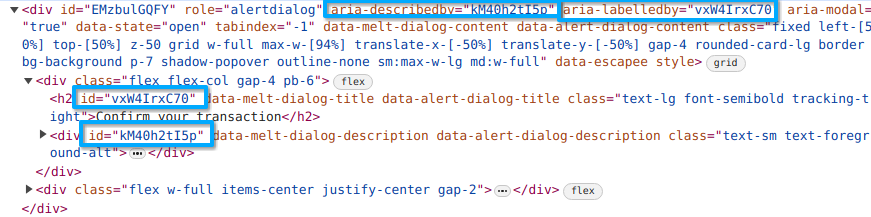
According to the <a href="https://www.w3.org/WAI/ARIA/apg/patterns/alertdialog/" rel="noopener nofollow ugc">WAI-ARIA Guide</a>, the element served as the alert dialog container should have a <code>aria-labelledby</code> attribute associated with the dialog title element id and a <code>aria-describedby</code> attribute associated with the dialog description element id for accessibility,<br>
</p><div class="lightbox-wrapper"><a class="lightbox" href="https://forum.elixirforum.com/uploads/default/original/3X/6/b/6ba48dcb6554c948717886a02ba6a8569bfbeb8b.png" data-download-href="https://forum.elixirforum.com/uploads/default/6ba48dcb6554c948717886a02ba6a8569bfbeb8b" title="image" rel="nofollow"><img src="https://forum.elixirforum.com/uploads/default/optimized/3X/6/b/6ba48dcb6554c948717886a02ba6a8569bfbeb8b_2_690x171.png" alt="image" data-base62-sha1="fmfDX71n9kxJPooui1Dn9sPcncT" width="690" height="171" srcset="https://forum.elixirforum.com/uploads/default/optimized/3X/6/b/6ba48dcb6554c948717886a02ba6a8569bfbeb8b_2_690x171.png, https://forum.elixirforum.com/uploads/default/original/3X/6/b/6ba48dcb6554c948717886a02ba6a8569bfbeb8b.png 1.5x, https://forum.elixirforum.com/uploads/default/original/3X/6/b/6ba48dcb6554c948717886a02ba6a8569bfbeb8b.png 2x" data-dominant-color="E9EDF2"><div class="meta"><svg class="fa d-icon d-icon-far-image svg-icon" aria-hidden="true"><use href="#far-image"></use></svg><span class="filename">image</span><span class="informations">871×217 50 KB</span><svg class="fa d-icon d-icon-discourse-expand svg-icon" aria-hidden="true"><use href="#discourse-expand"></use></svg></div></a></div><p></p>
<p>We don’t set any of these attributes manually since the UI lib did it for us, and this is achieved by the Svelte Context API, so that the parent and child components can share states. But it’s not available cross different web components, as documented in the <a href="https://svelte.dev/docs/custom-elements-api#caveats-and-limitations" rel="noopener nofollow ugc">Custom elements - Caveats and limitations</a> of Svelte API.</p>
<p>So if you want to achieve a similar component API design for web component, it may require some manual JS-side work.</p>
<h3><a name="p-313999-client-side-dom-changes-and-server-side-dom-changes-3" class="anchor" href="#p-313999-client-side-dom-changes-and-server-side-dom-changes-3" aria-label="Heading link" rel="nofollow"></a>Client-Side DOM changes and Server-Side DOM changes</h3>
<p>This what I have talked about in this post: <a href="https://forum.elixirforum.com/t/help-me-choose-between-liveview-and-vue/30001/54" class="inline-onebox" rel="nofollow">Help me choose between LiveView and Vue - #54 by TunkShif</a></p>
<p>Let’s take the <a href="https://www.bits-ui.com/docs/components/switch" rel="noopener nofollow ugc">Switch</a> component form Bits UI as an example now, for accessibility, when the state of a switch component changes, the associated <code>aria-checked</code> attribute in the switch element should also be changed respectively.</p>
<p>If this DOM change is controlled by JS and happens on the client side, then a following LiveView DOM patch will just overwrite the DOM change, making it return back to the original HTML template sent from the server.</p>
<p>Other examples like tooltip, hover card and popup, these components also involves client side DOM changes, you hover on something, and the associated popup element is set to show, and this is controlled by the JS side. You’ll have to use something like LiveView hooks to sync the client side DOM changes with server side chanegs.</p>
<p>So generally speaking, I don’t think web component is a good choice to build lower primitives for headless component that requires flexibility, since it is initially proposed to create element with functionality and styling completely encapsulated.</p>
<p>From my point of view, web component is good for these two cases:</p>
<ul>
<li>Build framework-agnostic design systems. <a href="https://shoelace.style/" rel="noopener nofollow ugc">Shoelace</a> is the best example, and it provides the most customizable component designs.</li>
<li>Encapsulate a single functionality with web component. Like the <a href="https://github.com/arkadiuszwojcik/lit-google-map" rel="noopener nofollow ugc">lit-google-map</a>, <a href="https://github.com/nolanlawson/emoji-picker-element" rel="noopener nofollow ugc">emoji-picker-element</a>, <a href="https://github.com/giscus/giscus-component" rel="noopener nofollow ugc">giscus-component</a>.</li>
</ul>
<p>And finally, in my opinion, the biggest obstacle to build an accessible component library for LiveView is that, to build components with rich interactions and full accessibility like keyboard navigation, focus management, typeahead support and popup anchor position, and also taking browser differences into consideration, JavaScript is unavoidable. But once we’re managing DOM states from the client side, it finally falls into fighting with synchronizing client-side states with LiveView DOM patch.</p>
<p>This is a really long thread, and I just want to share some of my own experience with Web Components and LiveView. Thanks for your patience if you’re watching to the end. <img src="https://forum.elixirforum.com/images/emoji/apple/slightly_smiling_face.png?v=15" title=":slightly_smiling_face:" class="emoji" alt=":slightly_smiling_face:" loading="lazy" width="20" height="20"></p> 
	            </div>

	            <div class="base-line">
	                <div class="thread-counters">
	                    <span class="thread-count count-likes js-likers-trigger" title="Likes" data-post-id="313999" data-batch-url="/posts/batch_likers">
                        12
                      </span>
                      <!-- <span class="thread-count js-solved-indicator" title="Marked as solution"></span> -->
	                </div>
	                <div class="go-to-post">
	                  <a title="Go to post" alt="Go to post" href="https://forum.elixirforum.com/t/adobe-spectrum-2-web-components-with-liveview/60395/36">Post #35</a>
	                </div>
	            </div>
              <div id="likers-container-313999" 
                   class="likers-container"
                   data-first-post="false"
                   data-batch-url="/posts/batch_likers">
                   <div class="likers-placeholder" 
                     data-likers-post-id="313999"
                     data-batch-url="/posts/batch_likers">
                  <div class="post-likers"></div>
                </div>
              </div>
	        </div>
			

    </div>

    <div class="triangle-top-right type-most-liked cat-most-liked" title="One of the top 3 liked posts in this thread!"></div>
  </section>
</div>
    <div class="postbit" id="314004" data-post-id="314004">
  <section>
    <div class="post-wrap">


					<div class="post-header">
		        <div class="user-avatar">
		          <img alt="Sebb" src="https://forum.elixirforum.com/user_avatar/forum.elixirforum.com/Sebb/120/21818_2.png" width="120" height="120" />
		        </div>
					
						<div class="user-details">
		          <div class="user-name">
		            <h3>
                  Sebb
                  </h3>
		          </div>
						
						</div>
					
					</div>

	        <div class="thread-main">
	            <div class="post-body" data-turbo="false">
								<p>great summary of the problem! thank you.</p>
<aside class="quote no-group" data-username="TunkShif" data-post="36" data-topic="60395">
<div class="title">
<div class="quote-controls"></div>
<img alt="" width="24" height="24" src="https://forum.elixirforum.com/user_avatar/forum.elixirforum.com/tunkshif/48/24198_2.png" class="avatar"> TunkShif:</div>
<blockquote>
<p>We don’t set any of these attributes manually since the UI lib did it for us, and this is achieved by the Svelte Context API, so that the parent and child components can share states.</p>
</blockquote>
</aside>
<p>In solid it is possible to use the context api with WCs, see <a href="https://www.solidjs.com/guides/getting-started#web-components" rel="noopener nofollow ugc">https://www.solidjs.com/guides/getting-started#web-components</a><br>
As svelte is adopting signals, this may change in svelte 5.</p>
<aside class="quote no-group" data-username="TunkShif" data-post="36" data-topic="60395">
<div class="title">
<div class="quote-controls"></div>
<img alt="" width="24" height="24" src="https://forum.elixirforum.com/user_avatar/forum.elixirforum.com/tunkshif/48/24198_2.png" class="avatar"> TunkShif:</div>
<blockquote>
<p>If this DOM change is controlled by JS and happens on the client side, then a following LiveView DOM patch will just overwrite the DOM change, making it return back to the original HTML template sent from the server.</p>
</blockquote>
</aside>
<p>This is true for all WCs (independent of them being headless), right?<br>
And not only true for aria-stuff.<br>
Does that mean we have to build a set of hooks around every component just to fix that?<br>
That can’t be true (hopefully).</p> 
	            </div>

	            <div class="base-line">
	                <div class="thread-counters">
	                    <span class="thread-count count-likes js-likers-trigger" title="Likes" data-post-id="314004" data-batch-url="/posts/batch_likers">
                        0
                      </span>
                      <!-- <span class="thread-count js-solved-indicator" title="Marked as solution"></span> -->
	                </div>
	                <div class="go-to-post">
	                  <a title="Go to post" alt="Go to post" href="https://forum.elixirforum.com/t/adobe-spectrum-2-web-components-with-liveview/60395/37">Post #36</a>
	                </div>
	            </div>
              <div id="likers-container-314004" 
                   class="likers-container"
                   data-first-post="false"
                   data-batch-url="/posts/batch_likers">
                   <div class="likers-placeholder" 
                     data-likers-post-id="314004"
                     data-batch-url="/posts/batch_likers">
                  <div class="post-likers"></div>
                </div>
              </div>
	        </div>
			

    </div>

    <div class="triangle-top-right type-standard-post cat-standard-post" title="Post #36"></div>
  </section>
</div>
    <div class="postbit" id="314016" data-post-id="314016">
  <section>
    <div class="post-wrap">


					<div class="post-header">
		        <div class="user-avatar">
		          <img alt="TunkShif" src="https://forum.elixirforum.com/user_avatar/forum.elixirforum.com/TunkShif/120/24198_2.png" width="120" height="120" />
		        </div>
					
						<div class="user-details">
		          <div class="user-name">
		            <h3>
                  TunkShif
                  </h3>
		          </div>
						
						</div>
					
					</div>

	        <div class="thread-main">
	            <div class="post-body" data-turbo="false">
								<aside class="quote no-group" data-username="Sebb" data-post="37" data-topic="60395">
<div class="title">
<div class="quote-controls"></div>
<img alt="" width="24" height="24" src="https://forum.elixirforum.com/user_avatar/forum.elixirforum.com/sebb/48/21818_2.png" class="avatar"> Sebb:</div>
<blockquote>
<p>This is true for all WCs (independent of them being headless), right?</p>
</blockquote>
</aside>
<p>Yes, this is true not only for web components, but for all DOM changes manipulated by JavaScript. Because this is how LiveView works.</p>
<p>For example, for the following LiveView, if we assign the initial count to 0, and increment the count when “inc” event is triggered,</p>
<pre data-code-wrap="elixir"><code class="lang-elixir">def render(assigns) do
~H"""
&lt;button id="counter" phx-click="inc"&gt;&lt;%= @count %&gt;&lt;/button&gt;
"""
end
</code></pre>
<p>First, the LiveView mounts, and sent the initial rendered html:</p>
<pre data-code-wrap="html"><code class="lang-html">&lt;button id="counter" phx-click="inc"&gt;0&lt;/button&gt;
</code></pre>
<p>Then, if you use client side JavaScript to make changes to the DOM node, like <code>document.querySelector("#counter").dataset.count = "0"</code>, the current rendered DOM node in your browser will change to:</p>
<pre data-code-wrap="html"><code class="lang-html">&lt;button id="counter" phx-click="inc" data-count="0"&gt;0&lt;/button&gt;
</code></pre>
<p>Then, if you click the button and send an “inc” event to the server, the server side received the event and update the new assigned count to 1, the LiveView rerenders on the server, getting the following HTML:</p>
<pre data-code-wrap="html"><code class="lang-html">&lt;button id="counter" phx-click="inc"&gt;1&lt;/button&gt;
</code></pre>
<p>And then it is sent to the browser, going through a DOM patch process. So LiveView is not aware of your previous client side changes, your previous changes get lost.</p>
<p>After JS commands were added to LiveView, you can use JS command to set attributes. Those attributes set by JS Command will be persisted through DOM Patch. Here is a simple explanation on how it works: <a href="https://forum.elixirforum.com/t/how-to-turn-my-client-side-dom-manipulations-into-dom-patch-aware-manipulations/52421/3" class="inline-onebox" rel="nofollow">How to turn my client-side DOM manipulations into DOM-patch aware manipulations? - #3 by TunkShif</a></p>
<p>Another way is to use LiveView hooks, you’re supposed to synchronize these changes in the <code>updated()</code> callback.</p>
<p>Also, you can fully ignore LiveView DOM Patch on a specific element by adding <code>phx-update="ignore"</code> to it, as described in <a href="https://hexdocs.pm/phoenix_live_view/dom-patching.html" rel="noopener nofollow ugc">https://hexdocs.pm/phoenix_live_view/dom-patching.html</a></p>
<p>And LiveView DOM patch is implemented using <a href="https://github.com/patrick-steele-idem/morphdom" rel="noopener nofollow ugc">morphdom</a> lib, there’s a lower level morphdom callback option that you can set when initializing LiveSocket. Like this example showing in <a href="https://hexdocs.pm/phoenix_live_view/js-interop.html#client-hooks-via-phx-hook" class="inline-onebox" rel="noopener nofollow ugc">JavaScript interoperability — Phoenix LiveView v1.2.5</a> ,</p>
<blockquote>
<p>For example, the following option could be used to guarantee that some attributes set on the client-side are kept intact:</p>
</blockquote>
<pre data-code-wrap="js"><code class="lang-js">onBeforeElUpdated(from, to){
  for (const attr of from.attributes){
    if (attr.name.startsWith("data-js-")){
      to.setAttribute(attr.name, attr.value);
    }
  }
}
</code></pre>
<p>Also, this is how AlpineJS integration achieved</p> 
	            </div>

	            <div class="base-line">
	                <div class="thread-counters">
	                    <span class="thread-count count-likes js-likers-trigger" title="Likes" data-post-id="314016" data-batch-url="/posts/batch_likers">
                        2
                      </span>
                      <!-- <span class="thread-count js-solved-indicator" title="Marked as solution"></span> -->
	                </div>
	                <div class="go-to-post">
	                  <a title="Go to post" alt="Go to post" href="https://forum.elixirforum.com/t/adobe-spectrum-2-web-components-with-liveview/60395/38">Post #37</a>
	                </div>
	            </div>
              <div id="likers-container-314016" 
                   class="likers-container"
                   data-first-post="false"
                   data-batch-url="/posts/batch_likers">
                   <div class="likers-placeholder" 
                     data-likers-post-id="314016"
                     data-batch-url="/posts/batch_likers">
                  <div class="post-likers"></div>
                </div>
              </div>
	        </div>
			

    </div>

    <div class="triangle-top-right type-standard-post cat-standard-post" title="Post #37"></div>
  </section>
</div>
    <div class="postbit" id="314021" data-post-id="314021">
  <section>
    <div class="post-wrap">


					<div class="post-header">
		        <div class="user-avatar">
		          <img alt="TunkShif" src="https://forum.elixirforum.com/user_avatar/forum.elixirforum.com/TunkShif/120/24198_2.png" width="120" height="120" />
		        </div>
					
						<div class="user-details">
		          <div class="user-name">
		            <h3>
                  TunkShif
                  </h3>
		          </div>
						
						</div>
					
					</div>

	        <div class="thread-main">
	            <div class="post-body" data-turbo="false">
								<aside class="quote no-group" data-username="Sebb" data-post="37" data-topic="60395">
<div class="title">
<div class="quote-controls"></div>
<img alt="" width="24" height="24" src="https://forum.elixirforum.com/user_avatar/forum.elixirforum.com/sebb/48/21818_2.png" class="avatar"> Sebb:</div>
<blockquote>
<p>In solid it is possible to use the context api with WCs, see <a href="https://www.solidjs.com/guides/getting-started#web-components" rel="noopener nofollow ugc">https://www.solidjs.com/guides/getting-started#web-components</a><br>
As svelte is adopting signals, this may change in svelte 5.</p>
</blockquote>
</aside>
<p>Svelte actually has context support for web components. But the problem here is that, the same context is not available across different web components. And this is true for SolidJS as well.<br>
Lit just stabilized their context API for web components, though. <a href="https://lit.dev/docs/data/context/" class="inline-onebox" rel="noopener nofollow ugc">Context – Lit</a></p> 
	            </div>

	            <div class="base-line">
	                <div class="thread-counters">
	                    <span class="thread-count count-likes js-likers-trigger" title="Likes" data-post-id="314021" data-batch-url="/posts/batch_likers">
                        1
                      </span>
                      <!-- <span class="thread-count js-solved-indicator" title="Marked as solution"></span> -->
	                </div>
	                <div class="go-to-post">
	                  <a title="Go to post" alt="Go to post" href="https://forum.elixirforum.com/t/adobe-spectrum-2-web-components-with-liveview/60395/39">Post #38</a>
	                </div>
	            </div>
              <div id="likers-container-314021" 
                   class="likers-container"
                   data-first-post="false"
                   data-batch-url="/posts/batch_likers">
                   <div class="likers-placeholder" 
                     data-likers-post-id="314021"
                     data-batch-url="/posts/batch_likers">
                  <div class="post-likers"></div>
                </div>
              </div>
	        </div>
			

    </div>

    <div class="triangle-top-right type-standard-post cat-standard-post" title="Post #38"></div>
  </section>
</div>
    <div class="postbit" id="314037" data-post-id="314037">
  <section>
    <div class="post-wrap">


					<div class="post-header">
		        <div class="user-avatar">
		          <img alt="superchris" src="https://forum.elixirforum.com/user_avatar/forum.elixirforum.com/superchris/120/23484_2.png" width="120" height="120" />
		        </div>
					
						<div class="user-details">
		          <div class="user-name">
		            <h3>
                  superchris
                  </h3>
		          </div>
						
						</div>
					
					</div>

	        <div class="thread-main">
	            <div class="post-body" data-turbo="false">
								<p>Wow what a great and active thread! I’ll try to reply to a few posts at once.</p>
<p>Thanks <a class="mention" href="/u/tunkshif" rel="nofollow">@TunkShif</a> that’s a really long and well thought out post. There’s still a lot of problems to solve, no doubt about it. I think my choice to lean into Web Components really comes down to embracing the web platform and trusting that these problems will get solved over time, rather than trying to invent our own solution that will only apply to our community. I’ve absolutely seen encouraging things happen with things like shadow parts coming along and being rapidly adopted, even if it is imperfect. I haven’t had adequate time to dig into adopted stylesheets, but this might be another styling avenue to investigate.</p>
<p>For your pint <a class="mention" href="/u/sebb" rel="nofollow">@Sebb</a> about changing things in the DOM getting stepped on by LiveView, thats a pretty good reason to keep your components dumb. If they only render their state and dispatch events to LiveView, it becomes easier to avoid problems like this.</p>
<p>And lastly on testing. <a class="mention" href="/u/dblack" rel="nofollow">@dblack</a> I am still, sadly relying on my fork of wallaby. I have kept it up to date somewhat recently, but I really need to work with <a class="mention" href="/u/mhanberg" rel="nofollow">@mhanberg</a> to get it across the finish line. The fault is entirely mine, I just need to get a few more things addressed and I feel optimistic it can be merged. Thanks for a reminder :). For testing the web components themselves in isolation I have had great success with <a href="https://modern-web.dev/docs/test-runner/overview/" rel="noopener nofollow ugc">@web/test-runner</a>. Its worth checking out if you haven’t.</p> 
	            </div>

	            <div class="base-line">
	                <div class="thread-counters">
	                    <span class="thread-count count-likes js-likers-trigger" title="Likes" data-post-id="314037" data-batch-url="/posts/batch_likers">
                        5
                      </span>
                      <!-- <span class="thread-count js-solved-indicator" title="Marked as solution"></span> -->
	                </div>
	                <div class="go-to-post">
	                  <a title="Go to post" alt="Go to post" href="https://forum.elixirforum.com/t/adobe-spectrum-2-web-components-with-liveview/60395/40">Post #39</a>
	                </div>
	            </div>
              <div id="likers-container-314037" 
                   class="likers-container"
                   data-first-post="false"
                   data-batch-url="/posts/batch_likers">
                   <div class="likers-placeholder" 
                     data-likers-post-id="314037"
                     data-batch-url="/posts/batch_likers">
                  <div class="post-likers"></div>
                </div>
              </div>
	        </div>
			

    </div>

    <div class="triangle-top-right type-standard-post cat-standard-post" title="Post #39"></div>
  </section>
</div>
    <div class="postbit" id="314038" data-post-id="314038">
  <section>
    <div class="post-wrap">


					<div class="post-header">
		        <div class="user-avatar">
		          <img alt="Sebb" src="https://forum.elixirforum.com/user_avatar/forum.elixirforum.com/Sebb/120/21818_2.png" width="120" height="120" />
		        </div>
					
						<div class="user-details">
		          <div class="user-name">
		            <h3>
                  Sebb
                  </h3>
		          </div>
						
						</div>
					
					</div>

	        <div class="thread-main">
	            <div class="post-body" data-turbo="false">
								<aside class="quote no-group" data-username="TunkShif" data-post="38" data-topic="60395">
<div class="title">
<div class="quote-controls"></div>
<img alt="" width="24" height="24" src="https://forum.elixirforum.com/user_avatar/forum.elixirforum.com/tunkshif/48/24198_2.png" class="avatar"> TunkShif:</div>
<blockquote>
<p><code>&lt;button id="counter" phx-click="inc" data-count="0"&gt;0&lt;/button&gt;</code></p>
</blockquote>
</aside>
<p>I understand that this will be killed by LV.<br>
But what about state held in a variable inside the component?</p>
<aside class="quote no-group" data-username="TunkShif" data-post="38" data-topic="60395">
<div class="title">
<div class="quote-controls"></div>
<img alt="" width="24" height="24" src="https://forum.elixirforum.com/user_avatar/forum.elixirforum.com/tunkshif/48/24198_2.png" class="avatar"> TunkShif:</div>
<blockquote>
<p>Those attributes set by JS Command will be persisted through DOM Patch</p>
</blockquote>
</aside>
<p>So it should be possible to create LV-aware-web-components that store their internal state just like that (“sticky”)…?</p>
<aside class="quote no-group" data-username="TunkShif" data-post="39" data-topic="60395">
<div class="title">
<div class="quote-controls"></div>
<img alt="" width="24" height="24" src="https://forum.elixirforum.com/user_avatar/forum.elixirforum.com/tunkshif/48/24198_2.png" class="avatar"> TunkShif:</div>
<blockquote>
<p>But the problem here is that, the same context is not available across different web components. And this is true for SolidJS as well.</p>
</blockquote>
</aside>
<p>Are 100% sure? If I remember correctly if a parent creates a context all childs can use it, but its a long time ago I looked into solid.</p> 
	            </div>

	            <div class="base-line">
	                <div class="thread-counters">
	                    <span class="thread-count count-likes js-likers-trigger" title="Likes" data-post-id="314038" data-batch-url="/posts/batch_likers">
                        0
                      </span>
                      <!-- <span class="thread-count js-solved-indicator" title="Marked as solution"></span> -->
	                </div>
	                <div class="go-to-post">
	                  <a title="Go to post" alt="Go to post" href="https://forum.elixirforum.com/t/adobe-spectrum-2-web-components-with-liveview/60395/41">Post #40</a>
	                </div>
	            </div>
              <div id="likers-container-314038" 
                   class="likers-container"
                   data-first-post="false"
                   data-batch-url="/posts/batch_likers">
                   <div class="likers-placeholder" 
                     data-likers-post-id="314038"
                     data-batch-url="/posts/batch_likers">
                  <div class="post-likers"></div>
                </div>
              </div>
	        </div>
			

    </div>

    <div class="triangle-top-right type-standard-post cat-standard-post" title="Post #40"></div>
  </section>
</div>
</template></turbo-stream><turbo-stream action="replace" target="load-more-container"><template><div id="load-more-container" class="load-more-container">
    <a class="load-more-button" data-turbo-stream="true" href="/topics/60395/load_more?page=5">Load more posts (9 remaining)</a>
</div></template></turbo-stream>