<turbo-stream action="append" target="posts_list"><template>    <div class="postbit" id="356466" data-post-id="356466">
  <section>
    <div class="post-wrap">


					<div class="post-header">
		        <div class="user-avatar">
		          <img alt="tozz" src="/assets/icons/user-9f439610.png" width="120" height="120" />
		        </div>
					
						<div class="user-details">
		          <div class="user-name">
		            <h3>
                  tozz
                  </h3>
		          </div>
						
						</div>
					
					</div>

	        <div class="thread-main">
	            <div class="post-body" data-turbo="false">
								<p>I’ve been doing CSS since back in the days when it was paramount to debug selector performance, just using bare element tags were considered slow. I would say I’m one of the few people on the planet who actually like CSS <img src="https://forum.elixirforum.com/images/emoji/apple/smiley.png?v=15" title=":smiley:" class="emoji" alt=":smiley:" loading="lazy" width="20" height="20"></p>
<p>But yes, Tailwind might not actually be that great a fit for LiveView, I do like the tooling though, but you can’t have it all.</p> 
	            </div>

	            <div class="base-line">
	                <div class="thread-counters">
	                    <span class="thread-count count-likes js-likers-trigger" title="Likes" data-post-id="356466" data-batch-url="/posts/batch_likers">
                        0
                      </span>
                      <!-- <span class="thread-count js-solved-indicator" title="Marked as solution"></span> -->
	                </div>
	                <div class="go-to-post">
	                  <a title="Go to post" alt="Go to post" href="https://forum.elixirforum.com/t/liveview-performance-problems-morphdom-taking-up-to-1500ms-to-patch-updates/69408/42">Post #41</a>
	                </div>
	            </div>
              <div id="likers-container-356466" 
                   class="likers-container"
                   data-first-post="false"
                   data-batch-url="/posts/batch_likers">
                   <div class="likers-placeholder" 
                     data-likers-post-id="356466"
                     data-batch-url="/posts/batch_likers">
                  <div class="post-likers"></div>
                </div>
              </div>
	        </div>
			

    </div>

    <div class="triangle-top-right type-standard-post cat-standard-post" title="Post #41"></div>
  </section>
</div>
    <div class="postbit" id="356467" data-post-id="356467">
  <section>
    <div class="post-wrap">


					<div class="post-header">
		        <div class="user-avatar">
		          <img alt="derek-zhou" src="https://forum.elixirforum.com/user_avatar/forum.elixirforum.com/derek-zhou/120/19943_2.png" width="120" height="120" />
		        </div>
					
						<div class="user-details">
		          <div class="user-name">
		            <h3>
                  derek-zhou
                  </h3>
		          </div>
						
						</div>
					
					</div>

	        <div class="thread-main">
	            <div class="post-body" data-turbo="false">
								<aside class="quote no-group" data-username="tozz" data-post="38" data-topic="69408">
<div class="title">
<div class="quote-controls"></div>
<img alt="" width="24" height="24" src="https://forum.elixirforum.com/letter_avatar_proxy/v4/letter/t/a8b319/48.png" class="avatar"> tozz:</div>
<blockquote>
<pre data-code-wrap="elixir"><code class="lang-elixir">  def fa_icon(assigns) do
    ~H"""
    {App.Components.SVGIconLibrary.icon("fontawesome", @category, @name, class: @class)}
    """
  end
</code></pre>
</blockquote>
</aside>
<p>Would it help if you write instead:</p>
<pre data-code-wrap="elixir"><code class="lang-elixir">  def fa_icon(assigns) do
    App.Components.SVGIconLibrary.icon("fontawesome", assigns.category, assigns.name, class: assigns.class)
  end
</code></pre> 
	            </div>

	            <div class="base-line">
	                <div class="thread-counters">
	                    <span class="thread-count count-likes js-likers-trigger" title="Likes" data-post-id="356467" data-batch-url="/posts/batch_likers">
                        0
                      </span>
                      <!-- <span class="thread-count js-solved-indicator" title="Marked as solution"></span> -->
	                </div>
	                <div class="go-to-post">
	                  <a title="Go to post" alt="Go to post" href="https://forum.elixirforum.com/t/liveview-performance-problems-morphdom-taking-up-to-1500ms-to-patch-updates/69408/43">Post #42</a>
	                </div>
	            </div>
              <div id="likers-container-356467" 
                   class="likers-container"
                   data-first-post="false"
                   data-batch-url="/posts/batch_likers">
                   <div class="likers-placeholder" 
                     data-likers-post-id="356467"
                     data-batch-url="/posts/batch_likers">
                  <div class="post-likers"></div>
                </div>
              </div>
	        </div>
			

    </div>

    <div class="triangle-top-right type-standard-post cat-standard-post" title="Post #42"></div>
  </section>
</div>
    <div class="postbit" id="356468" data-post-id="356468">
  <section>
    <div class="post-wrap">


					<div class="post-header">
		        <div class="user-avatar">
		          <img alt="Schultzer" src="https://forum.elixirforum.com/user_avatar/forum.elixirforum.com/Schultzer/120/4339_2.png" width="120" height="120" />
		        </div>
					
						<div class="user-details">
		          <div class="user-name">
		            <h3>
                  Schultzer
                  </h3>
		          </div>
						
						</div>
					
					</div>

	        <div class="thread-main">
	            <div class="post-body" data-turbo="false">
								<p>Awesome, selector performance have become less of an issue today, your biggest problem will come from layout shift and repainting, and then we come back to thinking about how you construct your HTML and CSS.</p>
<p>classes are still superior, but you want to mix in a little bit of attribute selectors for anything dynamic.</p> 
	            </div>

	            <div class="base-line">
	                <div class="thread-counters">
	                    <span class="thread-count count-likes js-likers-trigger" title="Likes" data-post-id="356468" data-batch-url="/posts/batch_likers">
                        0
                      </span>
                      <!-- <span class="thread-count js-solved-indicator" title="Marked as solution"></span> -->
	                </div>
	                <div class="go-to-post">
	                  <a title="Go to post" alt="Go to post" href="https://forum.elixirforum.com/t/liveview-performance-problems-morphdom-taking-up-to-1500ms-to-patch-updates/69408/44">Post #43</a>
	                </div>
	            </div>
              <div id="likers-container-356468" 
                   class="likers-container"
                   data-first-post="false"
                   data-batch-url="/posts/batch_likers">
                   <div class="likers-placeholder" 
                     data-likers-post-id="356468"
                     data-batch-url="/posts/batch_likers">
                  <div class="post-likers"></div>
                </div>
              </div>
	        </div>
			

    </div>

    <div class="triangle-top-right type-standard-post cat-standard-post" title="Post #43"></div>
  </section>
</div>
    <div class="postbit" id="356469" data-post-id="356469">
  <section>
    <div class="post-wrap">


					<div class="post-header">
		        <div class="user-avatar">
		          <img alt="josevalim" src="https://forum.elixirforum.com/user_avatar/forum.elixirforum.com/josevalim/120/1787_2.png" width="120" height="120" />
		        </div>
					
						<div class="user-details">
		          <div class="user-name">
		            <h3>
                  josevalim
                  </h3>
		          </div>
						
			          <div class="user-title">
									<span>Creator of Elixir</span>
			          </div>
						</div>
					
					</div>

	        <div class="thread-main">
	            <div class="post-body" data-turbo="false">
								<aside class="quote no-group" data-username="tozz" data-post="38" data-topic="69408">
<div class="title">
<div class="quote-controls"></div>
<img alt="" width="24" height="24" src="https://forum.elixirforum.com/letter_avatar_proxy/v4/letter/t/a8b319/48.png" class="avatar"> tozz:</div>
<blockquote>
<p>There’s also some strange things that happen that you would think shouldn’t. I have this super trivial components as an example.</p>
</blockquote>
</aside>
<p>A component will not even be invoked in the first place if the assigns you pass to it have not changed. So its assigns either changed or you are inside a comprehension.</p>
<p>However, I would say rendering a SVG like that is an anti-pattern. You should embed it like Phoenix deals with hero-icons or pick another strategy. Otherwise, even if you cache or make it work with change tracking, if you need to render it in 10 different places, it will still be sent in 10 different places (regardless if you are using LiveView or any other web framework).</p> 
	            </div>

	            <div class="base-line">
	                <div class="thread-counters">
	                    <span class="thread-count count-likes js-likers-trigger" title="Likes" data-post-id="356469" data-batch-url="/posts/batch_likers">
                        1
                      </span>
                      <!-- <span class="thread-count js-solved-indicator" title="Marked as solution"></span> -->
	                </div>
	                <div class="go-to-post">
	                  <a title="Go to post" alt="Go to post" href="https://forum.elixirforum.com/t/liveview-performance-problems-morphdom-taking-up-to-1500ms-to-patch-updates/69408/45">Post #44</a>
	                </div>
	            </div>
              <div id="likers-container-356469" 
                   class="likers-container"
                   data-first-post="false"
                   data-batch-url="/posts/batch_likers">
                   <div class="likers-placeholder" 
                     data-likers-post-id="356469"
                     data-batch-url="/posts/batch_likers">
                  <div class="post-likers"></div>
                </div>
              </div>
	        </div>
			

    </div>

    <div class="triangle-top-right type-standard-post cat-standard-post" title="Post #44"></div>
  </section>
</div>
    <div class="postbit" id="356473" data-post-id="356473">
  <section>
    <div class="post-wrap">


					<div class="post-header">
		        <div class="user-avatar">
		          <img alt="tozz" src="/assets/icons/user-9f439610.png" width="120" height="120" />
		        </div>
					
						<div class="user-details">
		          <div class="user-name">
		            <h3>
                  tozz
                  </h3>
		          </div>
						
						</div>
					
					</div>

	        <div class="thread-main">
	            <div class="post-body" data-turbo="false">
								<p>The way heroicons does it in Phoenix is pretty terrible imo, bloating the css with a lot of unused binary data (if I recall correctly, it was a long time ago I stopped using them), I want to be able to do css fills and group/path animations <img src="https://forum.elixirforum.com/images/emoji/apple/slight_smile.png?v=15" title=":slight_smile:" class="emoji" alt=":slight_smile:" loading="lazy" width="20" height="20"><br>
Also the icon is mostly irrelevant, nobody except me does it like that, the other stuff is a lot more common. It was more to show the pitfall of components and how they get resent even when nothing has changed.</p>
<p>But yes, it’s in a comprehension, but what isn’t, so much of everything we do that has to do with rendering is render more than one item of a kind. In React you’re expected to help keep track using the special ”key” prop and if you don’t, well it’s not great <img src="https://forum.elixirforum.com/images/emoji/apple/sweat_smile.png?v=15" title=":sweat_smile:" class="emoji" alt=":sweat_smile:" loading="lazy" width="20" height="20"></p> 
	            </div>

	            <div class="base-line">
	                <div class="thread-counters">
	                    <span class="thread-count count-likes js-likers-trigger" title="Likes" data-post-id="356473" data-batch-url="/posts/batch_likers">
                        0
                      </span>
                      <!-- <span class="thread-count js-solved-indicator" title="Marked as solution"></span> -->
	                </div>
	                <div class="go-to-post">
	                  <a title="Go to post" alt="Go to post" href="https://forum.elixirforum.com/t/liveview-performance-problems-morphdom-taking-up-to-1500ms-to-patch-updates/69408/46">Post #45</a>
	                </div>
	            </div>
              <div id="likers-container-356473" 
                   class="likers-container"
                   data-first-post="false"
                   data-batch-url="/posts/batch_likers">
                   <div class="likers-placeholder" 
                     data-likers-post-id="356473"
                     data-batch-url="/posts/batch_likers">
                  <div class="post-likers"></div>
                </div>
              </div>
	        </div>
			

    </div>

    <div class="triangle-top-right type-standard-post cat-standard-post" title="Post #45"></div>
  </section>
</div>
    <div class="postbit" id="356474" data-post-id="356474">
  <section>
    <div class="post-wrap">


					<div class="post-header">
		        <div class="user-avatar">
		          <img alt="manhvu" src="https://forum.elixirforum.com/user_avatar/forum.elixirforum.com/manhvu/120/39832_2.png" width="120" height="120" />
		        </div>
					
						<div class="user-details">
		          <div class="user-name">
		            <h3>
                  manhvu
                  </h3>
		          </div>
						
						</div>
					
					</div>

	        <div class="thread-main">
	            <div class="post-body" data-turbo="false">
								<p>From your problem I think it came from LiveView process (server side) than Morphdom (client). From your question &amp; your info I think too much dynamic content for LiveView process calculate diff HTML to push to client.<br>
I have solved a quite similar case with stock list (It can run to 10_000 items - Each item has about 5-7 DOM need to update, almost browser can handle is 5_000 - 7_000 items, Firefox is still run more but Chrome is not!).<br>
For an other case, I need to add a list static Items (then using pagination, map content to HTML element &amp; hide unused items) because each HTML element has a lot of data need to render that take time for LiveView process render if I use dynamic generate list.</p>
<p>For your case I think better you use stream + LiveComponent + cache data changed before assign to LiveView’s socket.</p>
<p>From my experience I think need to find a way to optimize dynamic content for kind of render HTML from enumerable type like list/map.</p>
<p>I have small guide to share with you I hope it can help you<br>
<a href="https://dev.to/manhvanvu/phoenix-liveview-optimization-guide-3gkj" rel="noopener nofollow ugc">LiveView optimization guide</a> and <a href="https://www.youtube.com/watch?v=_MlSDbnKRoA" rel="noopener nofollow ugc">video</a> I shared about stock list.</p> 
	            </div>

	            <div class="base-line">
	                <div class="thread-counters">
	                    <span class="thread-count count-likes js-likers-trigger" title="Likes" data-post-id="356474" data-batch-url="/posts/batch_likers">
                        0
                      </span>
                      <!-- <span class="thread-count js-solved-indicator" title="Marked as solution"></span> -->
	                </div>
	                <div class="go-to-post">
	                  <a title="Go to post" alt="Go to post" href="https://forum.elixirforum.com/t/liveview-performance-problems-morphdom-taking-up-to-1500ms-to-patch-updates/69408/47">Post #46</a>
	                </div>
	            </div>
              <div id="likers-container-356474" 
                   class="likers-container"
                   data-first-post="false"
                   data-batch-url="/posts/batch_likers">
                   <div class="likers-placeholder" 
                     data-likers-post-id="356474"
                     data-batch-url="/posts/batch_likers">
                  <div class="post-likers"></div>
                </div>
              </div>
	        </div>
			

    </div>

    <div class="triangle-top-right type-standard-post cat-standard-post" title="Post #46"></div>
  </section>
</div>
    <div class="postbit" id="356496" data-post-id="356496">
  <section>
    <div class="post-wrap">


					<div class="post-header">
		        <div class="user-avatar">
		          <img alt="tmbb" src="/assets/icons/user-9f439610.png" width="120" height="120" />
		        </div>
					
						<div class="user-details">
		          <div class="user-name">
		            <h3>
                  tmbb
                    <span class="op-star" title="Thread Starter">
                      <img alt="OP" class="op-star-icon" src="/assets/thread-icons/thread-icon-thread-starter-df91e872.png" />
                    </span>
                  </h3>
		          </div>
						
						</div>
					
					</div>

	        <div class="thread-main">
	            <div class="post-body" data-turbo="false">
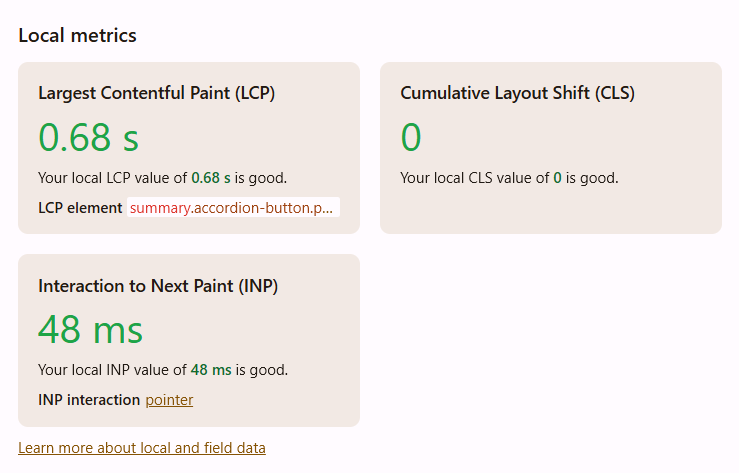
								<p>When I have the time, I plan on writing a reproducible example, but just for reference, I’ve just written a prototype in VueJS using <a href="https://github.com/vuejs/petite-vue" class="inline-onebox" rel="noopener nofollow ugc">GitHub - vuejs/petite-vue: 6kb subset of Vue optimized for progressive enhancement · GitHub</a>. I haven’t implemented client-side validations yet, which certainly will slow down things a little (but the elixir validation was usually below 1ms), but I’m getting very good performance with 600 nested inputs when I edit a form field or create a new nested input. The following is from Chrome’s performance indicators:</p>
<p></p><div class="lightbox-wrapper"><a class="lightbox" href="https://forum.elixirforum.com/uploads/default/original/3X/0/9/0939428d4fb1f94db6fce44239e57898e20c6f22.png" data-download-href="https://forum.elixirforum.com/uploads/default/0939428d4fb1f94db6fce44239e57898e20c6f22" title="image" rel="nofollow"><img src="https://forum.elixirforum.com/uploads/default/original/3X/0/9/0939428d4fb1f94db6fce44239e57898e20c6f22.png" alt="image" data-base62-sha1="1jAYwkbfz2cz5YjLtgOBXEF7hKy" width="690" height="441" data-dominant-color="F3EDEB"><div class="meta"><svg class="fa d-icon d-icon-far-image svg-icon" aria-hidden="true"><use href="#far-image"></use></svg><span class="filename">image</span><span class="informations">739×473 20.9 KB</span><svg class="fa d-icon d-icon-discourse-expand svg-icon" aria-hidden="true"><use href="#discourse-expand"></use></svg></div></a></div><p></p>
<p>I know that without seeng thea actualy code it doesn’t mean much, but so far I’m very happy, especially because <code>petite-vue</code> uses the actual rendered DOM as a template at runtime, and it does so rather efficiently, which allows me to avoid a JS build step if I want to. So it does not complicated my assets pipeline more than it needs to.</p> 
	            </div>

	            <div class="base-line">
	                <div class="thread-counters">
	                    <span class="thread-count count-likes js-likers-trigger" title="Likes" data-post-id="356496" data-batch-url="/posts/batch_likers">
                        0
                      </span>
                      <!-- <span class="thread-count js-solved-indicator" title="Marked as solution"></span> -->
	                </div>
	                <div class="go-to-post">
	                  <a title="Go to post" alt="Go to post" href="https://forum.elixirforum.com/t/liveview-performance-problems-morphdom-taking-up-to-1500ms-to-patch-updates/69408/48">Post #47</a>
	                </div>
	            </div>
              <div id="likers-container-356496" 
                   class="likers-container"
                   data-first-post="false"
                   data-batch-url="/posts/batch_likers">
                   <div class="likers-placeholder" 
                     data-likers-post-id="356496"
                     data-batch-url="/posts/batch_likers">
                  <div class="post-likers"></div>
                </div>
              </div>
	        </div>
			

    </div>

    <div class="triangle-top-right type-standard-post cat-standard-post" title="Post #47"></div>
  </section>
</div>
    <div class="postbit" id="356528" data-post-id="356528">
  <section>
    <div class="post-wrap">


					<div class="post-header">
		        <div class="user-avatar">
		          <img alt="tmbb" src="/assets/icons/user-9f439610.png" width="120" height="120" />
		        </div>
					
						<div class="user-details">
		          <div class="user-name">
		            <h3>
                  tmbb
                    <span class="op-star" title="Thread Starter">
                      <img alt="OP" class="op-star-icon" src="/assets/thread-icons/thread-icon-thread-starter-df91e872.png" />
                    </span>
                  </h3>
		          </div>
						
						</div>
					
					</div>

	        <div class="thread-main">
	            <div class="post-body" data-turbo="false">
								<p>An example of the form built with VueJS: <a href="https://codepen.io/Tiago-Barroso-the-builder/full/gbOarMY" rel="noopener nofollow ugc">https://codepen.io/Tiago-Barroso-the-builder/full/gbOarMY</a></p>
<p>You have a <strong>table</strong>, which contains a number of <strong>columns</strong>. Columns can have one of several types, and to avoid problems with data invalidation if the user changes the type of a column, once chosen, the type of the column is fixed and can’t be changed. This is reflected in the UI. You can delete a column and replace it by another with the same name and a differnt type, though. If you create a column of type <em>choice</em>, you will get the ability of creating <strong>choices</strong> for that column. This will add to the form a list of choices, for which you can input the name and code. In the same column, choice names and codes should be unique, but this isn’t checked yet. I have not yet implemented moving choices up or down in the list yet. Column names should be unique, and this is indeed checked (and feedback is given to the user in case of validation errors).</p>
<p>The following static webpage creates in Javascript the following data, which is then displayed by the very minimalist VueJS component (build using Bootstrap classes):</p>
<ul>
<li>1 table</li>
<li>600 columns, to which you can add more columns (above or below the current column) and which can be reordered using the <em>Move up</em> and <em>Move down</em> buttons. I could have added a drag and drop interface (there are many such interfaces compatible with VueJS), but I think that it would be very confusing and the current approach of moving columns with buttons is more suitable for big and complex forms</li>
<li>One out of each 10 columns (column nr 6, 16, 26, etc.) will have type choice and will have been populated with 60 choices. I don’t expect more than that number of choices for real use</li>
<li>3 out of 3 columns will be populated without a type so that you can play with selecting the column type</li>
</ul>
<p>The performance metrics are quite good. The initial page rendering taks aboute 2.5s, which is long but acceptable as a one-time cost. The content paint time (the time from any interaction to the DOM refresh) isn &lt; 50ms. It’s totally imperceptible and it doesn’t nead any client-server communication.</p>
<p>The main things I lose here are internationalization (I’ll probably have to serialize the messages into some kind of JSNO object and pick it up by javascript so that I can have proper internationalization) and the “built-in” validation of Ecto changesets - It tried to make my Javascript state map clolsely to Ecto changesets, but I couldn’t make it work in a way that was eficient. When I send the JS state to the server to persist the table I’ll have to strip it of UI concerns and ,re-validate it with changesets.</p>
<p>Field validation is <em>ad hoc</em>: when possible, I validate the field directly inside the form so that everything is as local as possible. To validate unique constraints, I actually intercept the input change and then set the errors of that field and of other fields imperatively in a way that’s captured by VueJS. This is probably a bit more complex than it should be, but it works well and is efficient.</p>
<p>I don’t think this is possible with LiveView’s current approach, but it’s probably the upper bound of what one can get without manipulating the DOM directly at a very low level. Maybe <a class="mention" href="/u/josevalim" rel="nofollow">@josevalim</a> could weigh in on whether LiveView’s approach could ever get somehwat close to these numbers.</p>
<p>It makes me think that an interesting approach would be to have shared state between VueJS and a Phoenix channel so that the channel could receive events from the web browser and then sen events back. Sharing a state could be done by forcing the state to be a map of JSON-serializable objects. Mutations could be sent as JSON patches back and forth to minimize data transfer costs, or directly using JS operations, such as <code>Array.splice()</code>, which according to the VueJS docs lead to very efficient array mutations. The big question is whether it would be worth it to abstract this somehow or whether it’s better to build an <em>ad hoc</em> component like I deed.</p>
<p>I can see how a customized channel implementation with shared state in the form json patches could help client-to-server communication with minimal data transfer could lead to something very similar to LiveView with better performance characteristics. The only question is whether one should try to compile HEEx components to VueJS or just bite the bulet and write components using the VueJS template language, which is quite simple. I’d have to think of an interface for stateful input validation, as Changesets don’t seem very ergonomic for that purpose.</p> 
	            </div>

	            <div class="base-line">
	                <div class="thread-counters">
	                    <span class="thread-count count-likes js-likers-trigger" title="Likes" data-post-id="356528" data-batch-url="/posts/batch_likers">
                        1
                      </span>
                      <!-- <span class="thread-count js-solved-indicator" title="Marked as solution"></span> -->
	                </div>
	                <div class="go-to-post">
	                  <a title="Go to post" alt="Go to post" href="https://forum.elixirforum.com/t/liveview-performance-problems-morphdom-taking-up-to-1500ms-to-patch-updates/69408/49">Post #48</a>
	                </div>
	            </div>
              <div id="likers-container-356528" 
                   class="likers-container"
                   data-first-post="false"
                   data-batch-url="/posts/batch_likers">
                   <div class="likers-placeholder" 
                     data-likers-post-id="356528"
                     data-batch-url="/posts/batch_likers">
                  <div class="post-likers"></div>
                </div>
              </div>
	        </div>
			

    </div>

    <div class="triangle-top-right type-standard-post cat-standard-post" title="Post #48"></div>
  </section>
</div>
    <div class="postbit" id="356538" data-post-id="356538">
  <section>
    <div class="post-wrap">


					<div class="post-header">
		        <div class="user-avatar">
		          <img alt="josevalim" src="https://forum.elixirforum.com/user_avatar/forum.elixirforum.com/josevalim/120/1787_2.png" width="120" height="120" />
		        </div>
					
						<div class="user-details">
		          <div class="user-name">
		            <h3>
                  josevalim
                  </h3>
		          </div>
						
			          <div class="user-title">
									<span>Creator of Elixir</span>
			          </div>
						</div>
					
					</div>

	        <div class="thread-main">
	            <div class="post-body" data-turbo="false">
								<aside class="quote no-group" data-username="tmbb" data-post="49" data-topic="69408">
<div class="title">
<div class="quote-controls"></div>
<img alt="" width="24" height="24" src="https://forum.elixirforum.com/letter_avatar_proxy/v4/letter/t/77aa72/48.png" class="avatar"> tmbb:</div>
<blockquote>
<p>I can see how a customized channel implementation with shared state in the form json patches could help client-to-server communication with minimal data transfer could lead to something very similar to LiveView with better performance characteristics.</p>
</blockquote>
</aside>
<p>You can take a look at LiveState: <a href="https://hexdocs.pm/live_state/" class="inline-onebox" rel="nofollow">live_state v0.9.0 — Documentation</a> - but double check if it does perform patches for you.</p>
<p>After seeing your description (1 table, 600 columns, one of 10 with 60 choices), that in itself is at least 3600 + 540 entries! Tracking ~4k values at once will indeed require large payloads unless you fine-tune it. I would still argue for a workflow where you work with columns individually. I’d have to look at a repro to see how much we could optimize in LiveView though.</p> 
	            </div>

	            <div class="base-line">
	                <div class="thread-counters">
	                    <span class="thread-count count-likes js-likers-trigger" title="Likes" data-post-id="356538" data-batch-url="/posts/batch_likers">
                        3
                      </span>
                      <!-- <span class="thread-count js-solved-indicator" title="Marked as solution"></span> -->
	                </div>
	                <div class="go-to-post">
	                  <a title="Go to post" alt="Go to post" href="https://forum.elixirforum.com/t/liveview-performance-problems-morphdom-taking-up-to-1500ms-to-patch-updates/69408/50">Post #49</a>
	                </div>
	            </div>
              <div id="likers-container-356538" 
                   class="likers-container"
                   data-first-post="false"
                   data-batch-url="/posts/batch_likers">
                   <div class="likers-placeholder" 
                     data-likers-post-id="356538"
                     data-batch-url="/posts/batch_likers">
                  <div class="post-likers"></div>
                </div>
              </div>
	        </div>
			

    </div>

    <div class="triangle-top-right type-standard-post cat-standard-post" title="Post #49"></div>
  </section>
</div>
    <div class="postbit" id="356545" data-post-id="356545">
  <section>
    <div class="post-wrap">


					<div class="post-header">
		        <div class="user-avatar">
		          <img alt="tmbb" src="/assets/icons/user-9f439610.png" width="120" height="120" />
		        </div>
					
						<div class="user-details">
		          <div class="user-name">
		            <h3>
                  tmbb
                    <span class="op-star" title="Thread Starter">
                      <img alt="OP" class="op-star-icon" src="/assets/thread-icons/thread-icon-thread-starter-df91e872.png" />
                    </span>
                  </h3>
		          </div>
						
						</div>
					
					</div>

	        <div class="thread-main">
	            <div class="post-body" data-turbo="false">
								<aside class="quote group-livebook_core_team" data-username="josevalim" data-post="50" data-topic="69408">
<div class="title">
<div class="quote-controls"></div>
<img alt="" width="24" height="24" src="https://forum.elixirforum.com/user_avatar/forum.elixirforum.com/josevalim/48/1787_2.png" class="avatar"> josevalim:</div>
<blockquote>
<p>After seeing your description (1 table, 600 columns, one of 10 with 60 choices), that in itself is at least 3600 + 540 entries!</p>
</blockquote>
</aside>
<p>That monster form is just an extreme stress test, not something I actually expect users to actually build.</p>
<aside class="quote group-livebook_core_team" data-username="josevalim" data-post="50" data-topic="69408">
<div class="title">
<div class="quote-controls"></div>
<img alt="" width="24" height="24" src="https://forum.elixirforum.com/user_avatar/forum.elixirforum.com/josevalim/48/1787_2.png" class="avatar"> josevalim:</div>
<blockquote>
<p>Tracking ~4k values at once will indeed require large payloads unless you fine-tune it.</p>
</blockquote>
</aside>
<p>Sure, but again, don’t take this as a real workload.~~</p>
<aside class="quote group-livebook_core_team" data-username="josevalim" data-post="50" data-topic="69408">
<div class="title">
<div class="quote-controls"></div>
<img alt="" width="24" height="24" src="https://forum.elixirforum.com/user_avatar/forum.elixirforum.com/josevalim/48/1787_2.png" class="avatar"> josevalim:</div>
<blockquote>
<p>I would still argue for a workflow where you work with columns individually.</p>
</blockquote>
</aside>
<p>Because the nested inputs are collapsible, you can collapse everything you’re not working with and ignore it. IMO it’s a good compromise and I like it a lot for my purposes.</p>
<aside class="quote group-livebook_core_team" data-username="josevalim" data-post="50" data-topic="69408">
<div class="title">
<div class="quote-controls"></div>
<img alt="" width="24" height="24" src="https://forum.elixirforum.com/user_avatar/forum.elixirforum.com/josevalim/48/1787_2.png" class="avatar"> josevalim:</div>
<blockquote>
<p>I’d have to look at a repro to see how much we could optimize in LiveView though.</p>
</blockquote>
</aside>
<p>Actually, I don’t think the current LiveView way of working is compatible with large forms however much you optimize it. The current paradigm assumes a form will be submitted (the message even uses URL encoding for the form values, like it would be in a POST request, which is very wasteful in terms of space) on any value change (possibly with throttling, of course). While one can (and should!) throttle the input so that it’s not sent everey keypress, things become more complicated when you’re adding or deleting new inputs to a nested form. The way the liveview guides suggest it should work is by using checkboxes disguised as buttons (and that’s how I implemented it).</p>
<p>One easy optimization would be to discourage that approach and encourage sending custom events which cause the application to create, delete or reorder the nested inputs using (possibly nested streams). I confess I didn’t look into this approach, as if I’m willing to do imperative manipulation on the DOM (which is basically what streams do) and to forego the simplicity of doing <code>%Schema{} &gt;&gt;&gt; %Changeset{errors: ...}</code>, I guess I’d rather take things client-side.</p>
<p>I wonder if LiveView should store something like a tuple <code>{original_schema, last_changeset, attrs = %{}}</code> where you keep the constant <code>schema</code> and add the mutations to the <code>attrs</code> using JSON patches (or something like that) and upon input validation you build a changeset with <code>new_changeset = Repo.change_schema(original_schema, attrs)</code> and then create a <code>changeset_diff</code> (the diff could contain errors in parts of the form far away from the ones ) which you send down the wire so that the form knows how to update itself, including updating the errors.</p>
<p>Or maybe a completely new concept is needed to replace changesets, IDK.</p>
<aside class="quote group-livebook_core_team quote-modified" data-username="josevalim" data-post="50" data-topic="69408">
<div class="title">
<div class="quote-controls"></div>
<img alt="" width="24" height="24" src="https://forum.elixirforum.com/user_avatar/forum.elixirforum.com/josevalim/48/1787_2.png" class="avatar"> josevalim:</div>
<blockquote>
<p>You can take a look at LiveState: <a href="https://hexdocs.pm/live_state/" rel="noopener nofollow ugc">live_state v0.8.2 — Documentation</a> - but double check if it does perform patches for you.</p>
</blockquote>
</aside>
<p>It seems interesting, especially with something like this: <a href="https://github.com/launchscout/live-templates" class="inline-onebox" rel="noopener nofollow ugc">GitHub - launchscout/live-templates: The live-template element connects a template to a state provider · GitHub</a>. I think I could implement a VueJS “frontend” inspired by something like that. It doesn’t do JSON diffs, though. It just sends the whole state. But again, that’s something that could be modified.</p>
<p>Regarding the JSON diffs: if we’re only talking about client-server communication (that is, 2 player communication) and most events go from client to server and back and the order of events is guaranteed, I think that something like JSON Patch (which has an Elixir implementation: <a href="https://hexdocs.pm/jsonpatch/readme.html" class="inline-onebox" rel="noopener nofollow ugc">Jsonpatch — Jsonpatch v2.3.1</a>, and probably 10 million JS implementations) would be enough, and one wouldn’t need to worry about distributed system problems. The only problem with that is whether it would play nice with the way VueJS expects the state to be mutated: especially for arrays/lists, VueJS expects arrays to be mutated with specific functions, like <code>Array.splice()</code>.</p>
<p>Another way would be to create a <code>%ClientState{}</code> object which can only be mutated with an interface that can compile to those JS functions. Something like this, in case we want all state change to be driven by the client:</p>
<pre data-code-wrap="elixir"><code class="lang-elixir">def handle_action("my_event", very_minimal_payload, old_state, socket) do
  # Client state which we keep in memory
  old_state = %SharedState{
    client_state:
      "root" =&gt; {
        "name" =&gt; "Current Root Name"
        "children" =&gt; [
          %{"name" =&gt; name1, "description" =&gt; descr1},
          %{"name" =&gt; name2, "description" =&gt; descr2},
          %{"name" =&gt; name3, "description" =&gt; descr3},
          %{"name" =&gt; name4, "description" =&gt; descr4},
        ]
      },
    # Optional state you might want to persist in the server
    server_state: %{}
    # List of operations, applied in order, to send down the wire.
    # This is reset each time the event is handled.
    delta: [],
    # List of actions to support undo/redo

  }

  new_state =
    old_state
    # Change the value in a map; efficient for VueJS mutation tracker
    |&gt; SharedState.put(["root", "name"], "New Root Name")
    |&gt; SharedState.delete(["root", "children"], 0)
    |&gt; SharedState.insert(["root", "children"], 1, = %{"name" =&gt; n, "description" =&gt; d})
    # Move the item towards the beginning of the list
    |&gt; SharedState.swap_with_previous(["root", "children"], _item_index = 1)
    # Move the item towards the beginning of the list
    |&gt; SharedState.swap_with_next(["root", "children"], _item_index = 4)
    # Fancy functionality to support undo/redo; probably should be optional
    |&gt; SharedState.commit("my_event")

  # Return the new client state.
  # If we want to be able to send events from the server, then the state should
  # live in a process or in an ETS table (gated by a process to ensure linearized edits).
  # In that case, the `SharedState.commit/1` would be required, or even something
  # more complex with transactions to guarantee that concurrent edits have a stable order.
  {:ok, new_state, socket}
end
</code></pre>
<p>Or if we want both the server and the client to edit the same state, with fancy transactions that lock the state:</p>
<pre data-code-wrap="elixir"><code class="lang-elixir">def handle_action("my_event", very_minimal_payload, socket) do
  dead_state =
    # Locks the state for the duration of this specific Channel/LiveView/whatever
    SharedState.transaction(state_id, [action: "action_name_for_undo"], fn old_state -&gt;
      old_state
      # Change the value in a map; efficient for VueJS mutation tracker
      |&gt; SharedState.put(["root", "name"], "New Root Name")
      |&gt; SharedState.delete(["root", "children"], 0)
      |&gt; SharedState.insert(["root", "children"], 1, = %{"name" =&gt; n, "description" =&gt; d})
      # Move the item towards the beginning of the list
      |&gt; SharedState.swap_with_previous(["root", "children"], _item_index = 1)
      # Move the item towards the beginning of the list
      |&gt; SharedState.swap_with_next(["root", "children"], _item_index = 4)
    end)

  # Send the deltas to the client
  SharedState.send_deltas(socket, dead_state)

  {:ok, socket}
end

</code></pre> 
	            </div>

	            <div class="base-line">
	                <div class="thread-counters">
	                    <span class="thread-count count-likes js-likers-trigger" title="Likes" data-post-id="356545" data-batch-url="/posts/batch_likers">
                        0
                      </span>
                      <!-- <span class="thread-count js-solved-indicator" title="Marked as solution"></span> -->
	                </div>
	                <div class="go-to-post">
	                  <a title="Go to post" alt="Go to post" href="https://forum.elixirforum.com/t/liveview-performance-problems-morphdom-taking-up-to-1500ms-to-patch-updates/69408/51">Post #50</a>
	                </div>
	            </div>
              <div id="likers-container-356545" 
                   class="likers-container"
                   data-first-post="false"
                   data-batch-url="/posts/batch_likers">
                   <div class="likers-placeholder" 
                     data-likers-post-id="356545"
                     data-batch-url="/posts/batch_likers">
                  <div class="post-likers"></div>
                </div>
              </div>
	        </div>
			

    </div>

    <div class="triangle-top-right type-standard-post cat-standard-post" title="Post #50"></div>
  </section>
</div>
</template></turbo-stream><turbo-stream action="replace" target="load-more-container"><template><div id="load-more-container" class="load-more-container">
    <a class="load-more-button" data-turbo-stream="true" href="/topics/69408/load_more?page=6">Load more posts (5 remaining)</a>
</div></template></turbo-stream>