
tj0
I have been running 1.15 locally for a while and 1.14 in production. I just upgraded production to 1.15.7 and noticed that the “code” size is different between dev/prod. I’m not sure what the expected behaviour is nor do I know what “code” memory means. I’m naively assuming it’s the size of the beam file AST in memory? Is this supposed to be static based on the deploy size or something else entirely? Erlang manual says:
The total amount of memory currently allocated for Erlang code. This memory is part of the memory presented as system memory.
So I would have assumed prod < dev actually. Anyone have any idea why this is different between dev / prod? Screenshots below.
Locally, 1.15.7 and OTP 26 gives 30MB of code size.
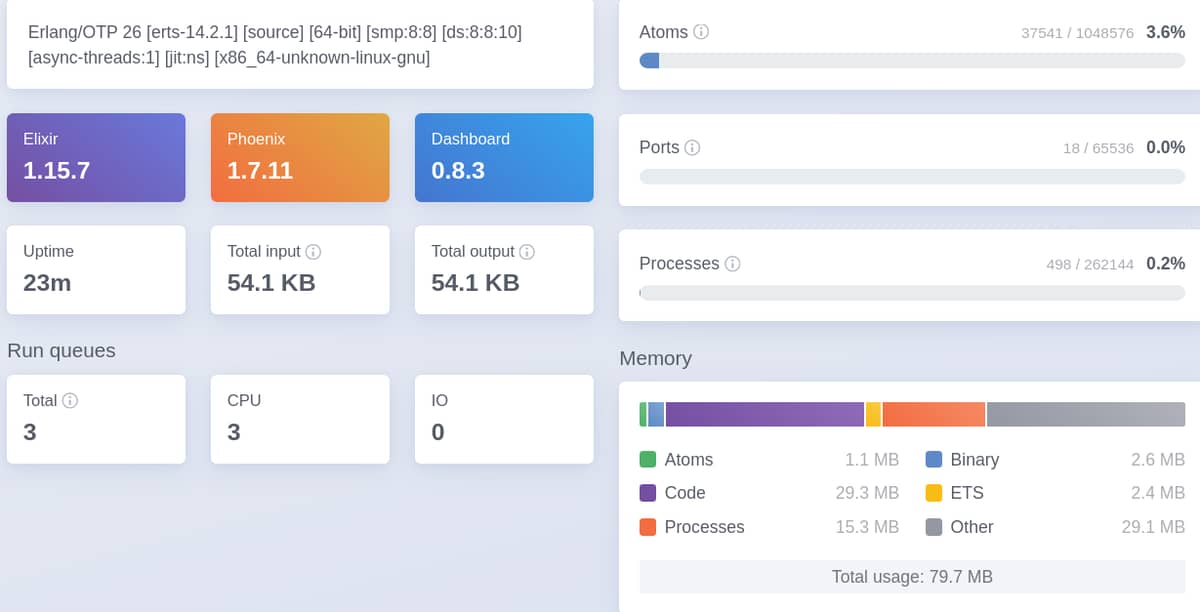
But on production, we have 48MB of code in memory.

Edit:
Also, a sidenote, trying to search for what memory code netted me this awesome post by @hauleth 
Also, an interesting note about binary memory:
Where Next?

Trending in Questions


Other Trending Topics



Latest on Elixir Forum
Sponsor Spotlight

Build Elixir applications with speed and confidence.
Categories:
Sub Categories:
Forums
Popular Tags
- #ecto
- #liveview
- #troubleshooting
- #learning-elixir
- #library
- #deployment
- #erlang
- #testing
- #genserver
- #mix
- #absinthe
- #remote-other
- #otp
- #plug
- #how-to-question
- #macros
- #postgres
- #elixirconf
- #channels
- #exunit
- #discussion
- #code-sync
- #podcasts
- #javascript
- #onsite
- #dialyzer
- #docker
- #authentication
- #ai
- #umbrella
- #full-time-contract
- #podcasts-by-brainlid
- #ecto-query
- #blog-post
- #elixirconf-us
- #elixir-ls
- #phoenix_html
- #iex
- #graphql
- #genstage
- #websockets
- #supervisor
- #advent-of-code
- #distillery
- #processes
- #elixirconf-eu
- #api
- #forms
- #security
- #performance
Our Sponsors
Build Elixir applications with speed and confidence.

Supporting innovation across the BEAM ecosystem.

We build reliable cloud platforms for business-critical systems.

Error tracking, logs, uptime, and Just Enough APM. Built for developers.

Elixir, Erlang & BEAM conferences from Code Sync - join us in 2026!

Bringing learning, work and compliance together since 1987.

**Building the future of software with AI, trust, and human connection.**

The deployment platform built for Elixir: PaaS ease, VPS control.

The team behind Membrane, Popcorn, LiveDebugger. Available for hire.

Courses that'll move you from confusion to "Aha, now I get it!"
Showing Posts 1 to 7- Show Best Posts
- Show All (oldest first)
- Show All (newest first)
LostKobrakai
Releases default to preloading all modules, mix defaults to loading modules on demand to increase startup performance in favor of slightly slower first time response when a new module is used. That‘s likely the difference you see between prod and dev.
tj0
Thanks, I did not realize that.
says code preloading is enabled by default, but there doesn’t seem to be a way to disable it?
I’m trying to tune the base memory configuration to be as low as possible, “code” should probably be 30MB even after loading everything, not 50MB.
LostKobrakai
If you want to lower memory footprint you likely want to cut out what you don’t need – not disable preloading. What you actually need will eventually be loaded, so your footprint wouldn’t actually get smaller.
tj0
True. Perhaps my assumptions are wrong again.
I am assuming that it loads only the required functions dynamically. The example given to show why to preload was for Enum.map.
1.15 enabled code pruning, so I also assume that is the function, not module level?
Then on disk the beam files only take 30MB, but code. taking 50MB.
Suffice to say, I don’t understand the internals.
josevalim
Search for
RELEASE_MODEin the docs.interactivemode was slower to boot but that’s not necessarily the case from Erlang/OTP 26.LostKobrakai
There is no automatic prunning of modules or functions. The feature added in 1.15 is around code paths, which brings mix projects closer to how releases are built by excluding everything but explicit dependencies mostly to otp applications. Previously all of OTP would be available for loading on demand.
To get a smaller codebase you’d need to lessen the (number of) applications you depend on, as there’s also nothing manual for pruning code at the module or function level.
tj0
Thank you @LostKobrakai @josevalim .
Code path pruning
I had skipped a rather important word when reading about code path pruning.
Code memory usage
Turns out running
mix release.initcreatesrel/env.sh.eexwhich has theRELEASE_MODEoption right at the top . I migrated from distillery, so it wasn’t obvious what I was looking for. Anyone starting off with a fresh project would easily find this option.rel/env.sh.eex
Also, this may not affect startup time in OTP 26.
Final results
Using interactive mode after going thru all the routes has reduced the memory:
Production is running at 23MB right now, but I expect it will grow to at least 30MB. Embedded mode which preloads everything had code memory usage at 48MB. Super-helpful when running on lower memory nodes. A MB saved is a MB earned.