
MarioFlach
Hello,
I want to share a project I’ve been working on for a while:
https://github.com/almightycouch/gitgud
Background
Some time ago I came across a talk: How we scaled git lab for a 30k employee company.
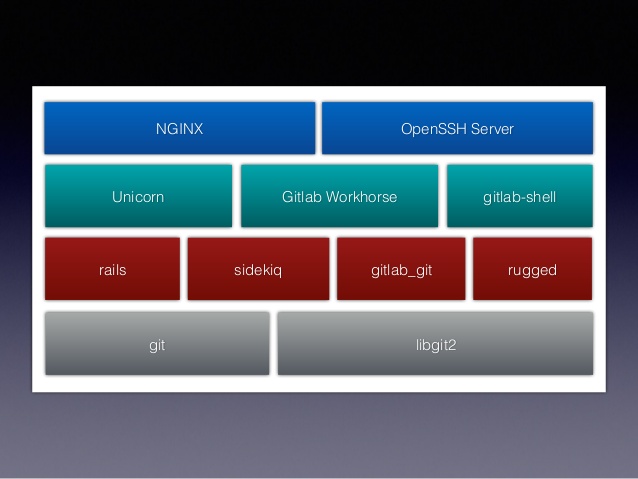
(basic overview of the system architecture)
The presentation was about how the team at git-lab solved scaling issues on their platform. After a few slides I wondered how this could be approached with languages like Erlang and Elixir.
After some moments of reflection, I had it! A basic concept on how things could fit together:
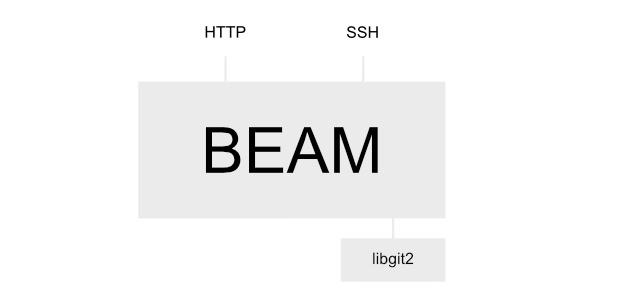
(joke aside, that’s pretty much what I came with
 )
)
Building blocks
Erlang/Elixir and OTP provide a lot of building blocks to power a scalable Git platform. The idea was to use nothing but Elixir and libgit2.
So here’s a more detailed overview of the architecture:
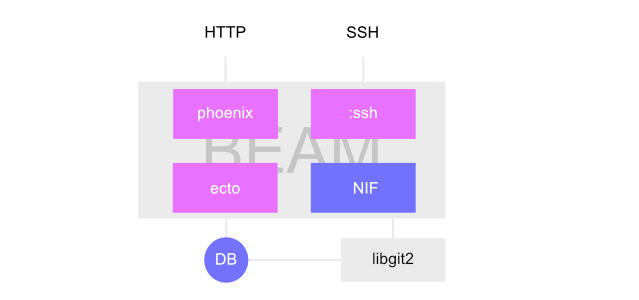
- Phoenix does multiple things
- handles incoming Git HTTP commands.
- renders HTML for browsing users, repositories, etc.
- provides a basic GraphQL API for alternative clients (mobiles, etc).
- SSH server implements
:ssh_daemon_channelto handle Git SSH commands. - Ecto stores application data such as users, repositories, etc.
Authentication
A really nice thing about :ssh is that it provides support for authentication via password and public/private keys out of the box:
- Password based authentication is supported both for HTTP and SSH.
- Users can provide one or more SSH public keys to authenticate with.
NIFs / libgit2
If you are not familiar with libgit2, it’s a C written implementation of the Git core methods and functions. One very unique feature of the library is that you can provide your own storage backend. Which means you can plugin you own distributed K/V database instead of writing everything to the filesystem.
I heavily used code from the Erlang :geef library, refactored a good part and added a bunch of missing functions. Check the Elixir module and the C bindings.
Git transfer protocol & Packfile format
This is the fun part of the project  .
.
libgit2 does not support server side commands, it only focuses on the client implementation. In the first iteration I cheated and used Ports to execute git-upload-pack and git-receive-pack. It worked well, both for SSH and HTTP.
But I wanted to have more control over the process (hooks, etc.) and having to depend on git only for the transfer protocol was a shame…
So I started digging in the protocol internals, docs. I worked with a lot of different network protocols in my career (medical field, DICOM, HL7, etc) but I must admit, the Git transfer protocol and the Git Packfile format was a quiet heavy sh**t to grasp.
- It has lots of different binary optimisations.
- It uses zlib to inflate chunks but only gives you the resulting size of the deflated data so I had to come with my own zlib C implementation.
- The transfer protocol’s differs depending on the transport protocol.
- Documentation is,
hard to find,scarce, well hmm.
Its currently quiet messy, but have a look here for implementation details.
Project state
Still a proof of concept, it’s working but still. Almost no tests so unexpected things my happen.
If you are interested, download the code and give it a try. PR are very welcome.
Where Next?

Trending in Discussions




Other Trending Topics


Latest on Elixir Forum
Sponsor Spotlight

Master modern tools, write cleaner code, and tackle real-world challenges with Manning books, videos, and courses. Start building today.
Categories:
Sub Categories:
Forums
Popular Tags
- #ecto
- #liveview
- #troubleshooting
- #learning-elixir
- #library
- #deployment
- #erlang
- #testing
- #genserver
- #mix
- #absinthe
- #remote-other
- #otp
- #plug
- #how-to-question
- #macros
- #postgres
- #elixirconf
- #channels
- #exunit
- #discussion
- #code-sync
- #podcasts
- #javascript
- #onsite
- #dialyzer
- #docker
- #authentication
- #ai
- #umbrella
- #full-time-contract
- #podcasts-by-brainlid
- #ecto-query
- #blog-post
- #elixirconf-us
- #elixir-ls
- #phoenix_html
- #iex
- #graphql
- #genstage
- #websockets
- #supervisor
- #advent-of-code
- #distillery
- #processes
- #elixirconf-eu
- #api
- #forms
- #security
- #performance
Our Sponsors

Build Elixir applications with speed and confidence.

Supporting innovation across the BEAM ecosystem.

We build reliable cloud platforms for business-critical systems.

Catch errors, track performance, monitor hosts and more.

Error tracking, logs, uptime, and Just Enough APM. Built for developers.

Practical resources that improve the lives of professional developers.

Producing high quality Elixir screencasts since 2017.

The deployment platform built for Elixir: PaaS ease, VPS control.

The team behind Membrane, Popcorn, LiveDebugger. Available for hire.

Courses that'll move you from confusion to "Aha, now I get it!"
Showing Posts 1 to 10- Show Best Posts
- Show All (oldest first)
- Show All (newest first)
nsuchy
Wow this project looks impressive - would you be willing to collaborate with me? I’m new to elixir development and would love to contribute to your project in what-ever way possible
cmkarlsson
Well done! This looks great. I’ve had the thought myself on implementing GitHub in elixir.
For me GitLab picked the completely wrong tool for the job. Just look at the stack! And everytime they have a release everyone complains about performance problems. No wonder!
I’ll definitely give this a go.
EDIT: Translated to Swedish the name is : Git God.
Linuus
Nice! I planned something similar a year ago but had a baby instead and never got started
OvermindDL1
Hah, that’s awesome! ^.^
Actually, have you read this:
The original website is down but it exists on archive.org, but he took egitd (the github back-end git server, originally made in erlang) that github screwed up on pretty bad, and with a few minor changes he gets it blazing fast (though by then github already rewrote it in C++ or whatever). ^.^
MarioFlach
Thanks, have a look at the issues. PRs are also welcome.
MarioFlach
I’m not familiar at all with git-lab but the presentation is pretty old (2016), as a growing business they might have changed things a lot in the last years.
MarioFlach
I assume it’s the Github repo here: mojombo/egitd.
I came across this during development but I does not implement the Git transfer protocol, it uses Ports to execute
gitand only support thegit://transport protocol. It’s basically a wrapper aroundgit.My project is quiet different because not only the transport (SSH/HTTP) is written in Elixir, but also the transfer protocol (where most implementations I came across used to call
git-uploack-packandgit-receive-packand only pipe data in-between).I did quiet a lot of code searching to find out how to implement several gotchas related to the Git protocol and the Packfile format. Only implementations I could found were in C, Haskell and O-Caml.
OvermindDL1
No I don’t think it was that one, that looks significantly different than what I think I remember seeing (though it’s been near-on a decade now)… >.>
But yes, implementing it internally to allow for maximum concurrency is definitely the way to go.
EDIT: Make sure to benchmark the speed. As an example, the transfer speed (of even a dead-simple
git clone ...) is DREADFULLY slow for gitlab compared to github. Cloning some large projects on gitlab takes over an hour compared to ~5m for github. The linux kernel is a great test of cloning speeds if you want something to benchmark.sorentwo
Thanks for the links, I’ve never seen those articles before and they look like a great read.
I was aware of the existence of egit and the Erlang history, though I wasn’t sure why they abandoned it. From what I recall they switched to straight Unicorn to handle all of the requests.
yurko
Thanks for sharing, that’s really impressive work! Do you have an idea of how long (in man-days) it took you to get it done?