
rodloboz
I’ve started working on a new library to run SQL queries and do basic business intelligence.
Think “Blazer for Elixir.”
Currently it features a SQL explorer + saved queries + schema browser — mounted right inside your Phoenix app. Supports both Posgresql and SQLite (multiple data source repos).
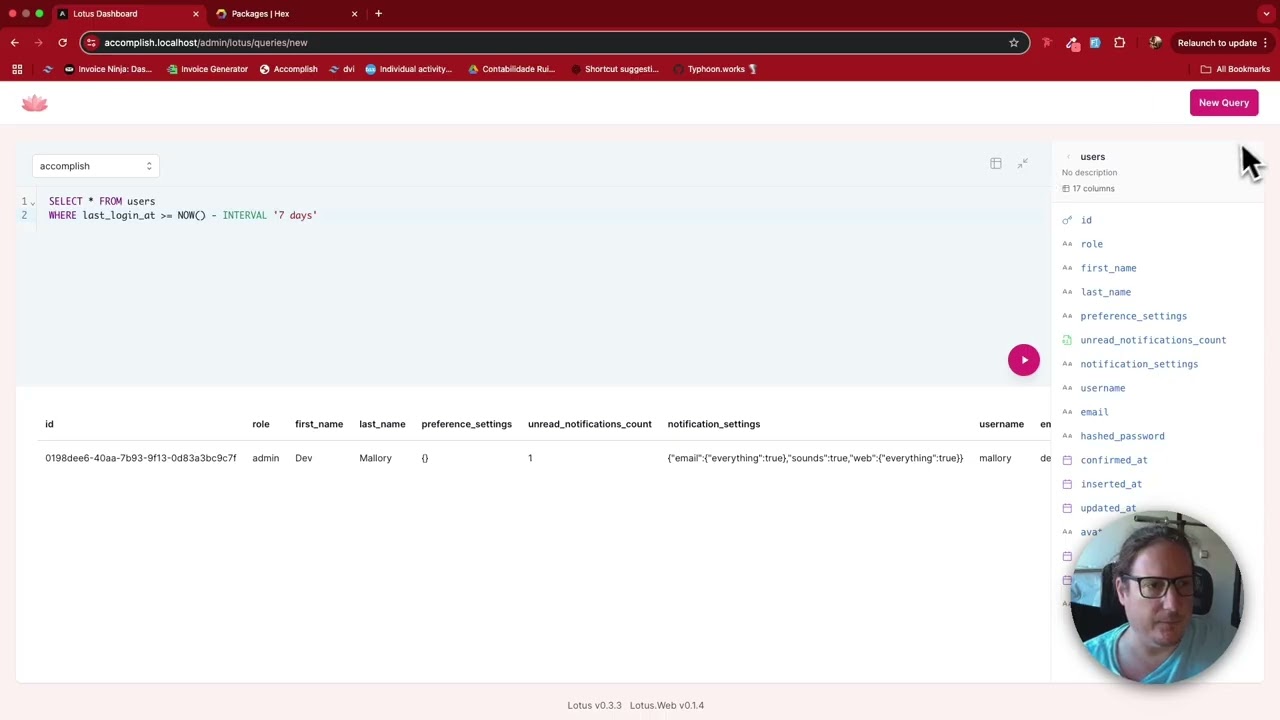
It can be used as standalone or with the web UI (separate repos):
Where Next?

Trending in Announcing


Other Trending Topics





Latest on Elixir Forum
Sponsor Spotlight

Producing high quality Elixir screencasts since 2017.
Categories:
Sub Categories:
Forums
Popular Tags
- #ecto
- #liveview
- #troubleshooting
- #learning-elixir
- #library
- #deployment
- #erlang
- #testing
- #genserver
- #mix
- #absinthe
- #remote-other
- #otp
- #plug
- #how-to-question
- #macros
- #postgres
- #elixirconf
- #channels
- #exunit
- #discussion
- #code-sync
- #podcasts
- #javascript
- #onsite
- #dialyzer
- #docker
- #authentication
- #umbrella
- #ai
- #full-time-contract
- #podcasts-by-brainlid
- #ecto-query
- #blog-post
- #elixirconf-us
- #elixir-ls
- #phoenix_html
- #iex
- #graphql
- #genstage
- #websockets
- #supervisor
- #advent-of-code
- #distillery
- #processes
- #elixirconf-eu
- #api
- #forms
- #security
- #metaprogramming
Our Sponsors

Build Elixir applications with speed and confidence.

Supporting innovation across the BEAM ecosystem.

We build reliable cloud platforms for business-critical systems.

Catch errors, track performance, monitor hosts and more.

Error tracking, logs, uptime, and Just Enough APM. Built for developers.

Practical resources that improve the lives of professional developers.

Bringing learning, work and compliance together since 1987.
Producing high quality Elixir screencasts since 2017.

The team behind Membrane, Popcorn, LiveDebugger. Available for hire.

Courses that'll move you from confusion to "Aha, now I get it!"
Showing Posts 51 to 42- Show Best Posts
- Show All (oldest first)
- Show All (newest first)
rodloboz
Lotus and Lotus Web v1 are finally out.
I meant to release this earlier, but for the last 5 months I didn’t have time for the project. I finally managed to push it across the line.
This is not a drop-in upgrade. Lotus is no longer only SQL on Ecto repos. Supporting non-SQL data sources needed some big changes to the core: config keys, function names, middleware payloads and a couple of DB columns all moved. There is an upgrading to v1 guide that goes step by step. Please read it before you bump the version.
Every data source now sits behind one adapter behaviour. Postgres, MySQL and SQLite are built in, and there are two new adapters in separate packages:
Other features included in the release worth mentioning:
Full changelogs: lotus · lotus_web
Lotus also has a new home at lotusbi.com, and a new GitHub org with all the repos.
Questions and feedback are welcome here.
rodloboz
Hey everyone! Really excited about this one! Our latest versions of Lotus and Lotus Web make up the biggest Lotus release yet.
AI Assistant
We added a bunch of new AI capabilities on top of the multi-turn conversations from the previous release:
{{variable}}and[[optional clause]]syntax, so it can generate parameterized queries with the right variable types and input widgets out of the box.On the provider side, we now support way more LLMs — OpenAI, Anthropic, Google, Groq, Mistral, and anything else ReqLLM supports. BYOK as always.
16 chart types
We expanded the visualization options significantly: bar, horizontal bar, line, area, combo (dual-axis), scatter, bubble, histogram, heatmap, pie, donut, funnel, waterfall, KPI card, trend, gauge, progress bar,
and sparkline. The picker is now organized by category (Charts, Distribution, Part of Whole, Single Value) which makes it easier to find what you need.
Interactive results
Query results are no longer just a static table:
These are applied as CTEs on top of your query, so the original SQL stays untouched.
Dashboard filters
Dashboards now support interactive filter widgets — dropdowns, date pickers, text inputs, date ranges. You map them to query variables per card, and they reflect in URL query parameters so filtered views are bookmarkable and shareable. Works on both the editor and public dashboards.
We also redesigned the website to better showcase all the new features — check it out at lotus.typhoon.works with demo videos of the main capabilities.
And we now have a Discord if you want to chat, ask questions, or share what you’re building: discord.gg/qnvcdjvw
We’ve been getting issues and PRs from people using Lotus in production and it’s been incredibly motivating. We’d love more of that — whether it’s bug reports, feature ideas, or contributions. Come help us shape where this goes.
https://github.com/typhoonworks/lotus
https://github.com/typhoonworks/lotus_web
rodloboz
Just playing with the Lotus AI Assistant, with typos and all, and it unlocks such power moves for when you want to do visualizations!
The AI Assistant understands Lotus Queries and Lotus Variables (for easy query and inputs+widget generation) but it has no awareness of the visualizations. But it’s still helpful to give a rough description of the kind of viz we want to see and it will give you a usable query
rodloboz
Thanks for the suggestion! While Lotus is primarily focused on read-only analytics and reporting, this actually aligns with something we already had in the codebase but wasn’t properly exposed.
Lotus already had a
read_onlyoption that flowed through to the database adapters, but the application-level SQL validation was ignoring it — so it was effectively broken. We’ve now fixed that and promoted it to a first-class config option.Starting from main (will be in the next release), you can set it globally:
This disables the application-level deny list for INSERT, UPDATE, DELETE, DDL, etc. — both for
Lotus.run_sql/Lotus.run_querycalls and through the Lotus Web UI.Single-statement validation and table visibility rules still apply.
You can also override it per-call (on the
lotuslib) without changing the global config:The AI query generator also respects this — when read_only: false is configured, it will generate write queries when asked.
sezaru
Maybe this is out of scope for your project, but I was wondering if you could add an option to allow write queries to work in lotus.
Basically the idea would be to have it only enabled in dev so it can also help development in general instead of the user having to use psql, or some other third party sql ui.
rodloboz
I’ve added support for multiple values in variables via multi select dropdown or a new freeform input that adds selected values as chip tags
Tag input
Multi select dropdown
Released in:
Lotus v0.14.0 GitHub - elixir-lotus/lotus: Embeddable business intelligence engine for Elixir — SQL editor, dashboards, charts, and AI query generation that mount directly in your Phoenix app. · GitHub
Lotus Web v0.13.0 GitHub - elixir-lotus/lotus_web: LiveView-powered BI interface for Phoenix — SQL editor, dashboards, charts, and AI query assistant. No separate deployment needed. · GitHub
rodloboz
Wow that’s amazing. Thanks for the feedback
I wonder if there is something that can be done to get right in one shot
frankdugan3
I had a tough query to write today that used JSON aggregates and multiple subqueries, so I got to test out the new AI chat flow. It worked out great, had a working query after about 3 error corrections!
rodloboz
Currently Lotus doesn’t have built-in variable constraints or per-user variable injection. By design, Lotus doesn’t manage its own users or roles — it relies on the host application for authentication, and assumes that anyone with access to the dashboard is a trusted user. So there’s no built-in mechanism to restrict what different users can do once they’re in.
That said, I can see the value in both of these:
Neither is on the roadmap right now, but they’re both interesting ideas. If you’d like to see either of these, please open a feature request at Issues · elixir-lotus/lotus · GitHub
It helps me understand what people actually need and prioritize accordingly.
ghannam80
Can we restrict the values of variables the normal users can set? for example usually you do not want to allow long running queries on certain databases through the date range period? Another example , if we have filtering per some columnon user profile such as the institution or tenant he/she belong to ?