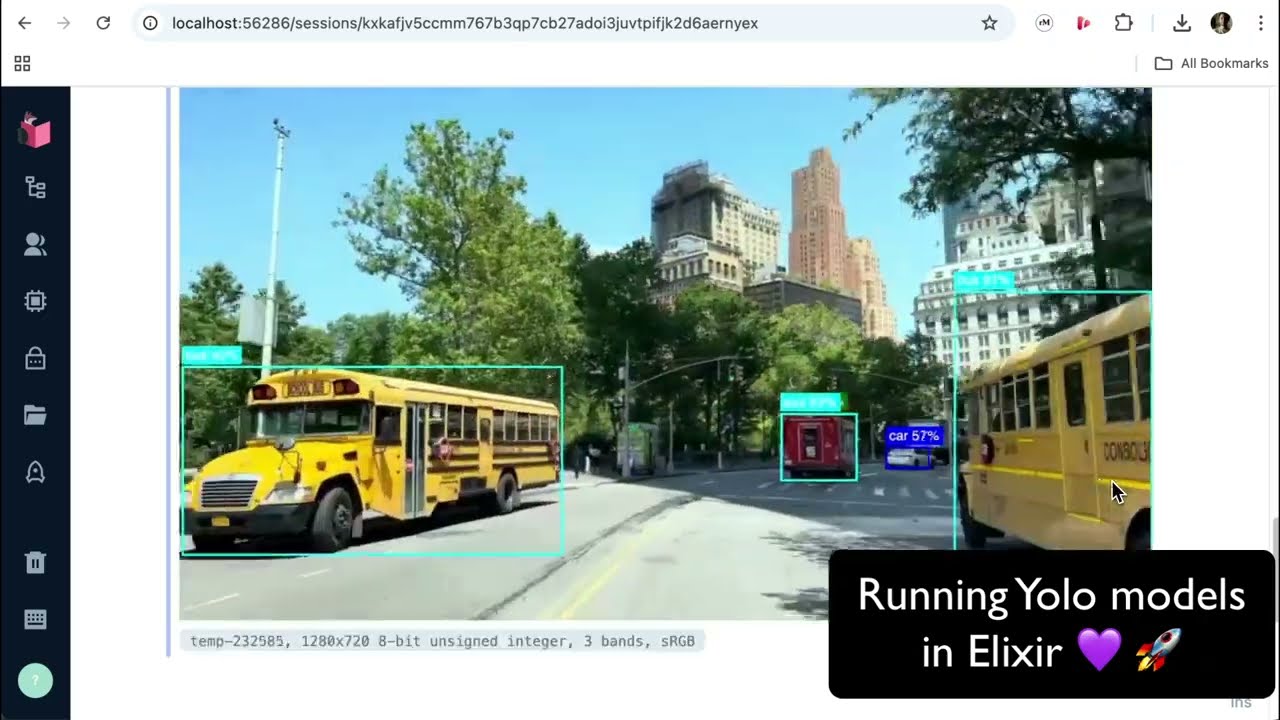
I’m excited to introduce my first Elixir library: YOLO, a library designed to make real-time object detection accessible and efficient within the Elixir ecosystem. Whether you’re working on a hobby project or a production-grade application, this library provides a simple way to integrate the power of YOLO (You Only Look Once) object detection.
What is YOLO?
YOLO is a state-of-the-art system for detecting objects in images or videos. It is widely used for applications like monitoring, automation, and robotics due to its balance of speed and accuracy. YOLO enables developers to use YOLO models seamlessly in Elixir, with a focus on ease of use and extensibility.
Key Features
Speed: Optimized for real-time performance, processing an image. with the YoloV8n model, to a list of detected objects in just 38ms on a MacBook Air M3 using EXLA and the companion library YoloFastNMS.
Ease of Use: Get started with just a two function calls to load models and detect objects.
Extensibility: Built around a YOLO.Model behavior, supporting YOLOv8 models and paving the way for future models or custom extensions.
NIF Optimization: For those needing ultra-fast post-processing, an optional Rust NIF (YoloFastNMS) speeds up Non-Maximum Suppression by ~100x compared to the internal YOLO.NMS implementation using Elixir and Nx.
How to Get Started
Begin by generating the ONNX model using the provided Python script. Here’s how to do it.
Install the library and call YOLO.load/1 to load model effortlessly.
Load an image and perform object detection with a single call to YOLO.detect/3
It’s that straightforward!
Current Limitations and Future Plans
The current implementation supports YOLOv8 models with a fixed 640x640 input size (even though YOLOv8x6 supports 1280x1280 images) and a fixed 84x8400 output size. This setup handles 80 classes from the COCO dataset and 8400 detections.
The library is designed to be extensible through the YOLO.Model behaviour, allowing other YOLO versions or custom model implementations to be added in the near future.
One of the next goals is to support models with different input and output sizes. This update would allow the library to work with YOLO models trained on other datasets or even custom datasets, making it more flexible and useful.
I promised myself to make a quick 5-10 min video showcasing how the YOLO library works… ended up with a 36-minute deep dive! Turns out I get a bit carried away when talking about object detection.
But hey, at least you get to see everything from basic usage to performance optimization, live demos, and future plans. Hope you find it useful despite my complete failure at being concise!
@alvises Is it allowed to use those models in commercial applications? I think YOLO models from ultralytics are GPL licensed, if I’m not mistaken.
There is a newer alternative with a more permissive licence, that might be of interest to you. Sadly it’s not so well documented, so it might be harder to integrate with.
Thanks for bringing this up - yeah, that’s the issue with Ultralytics licensing. I’ll be adding YOLOX model support (Apache 2 licensed) in the next release thanks to @aspett great PR. I’m just taking the time to study the YOLOX architecture details first.
@alvises I wonder if the library can be used as a part of an API end-point in a Phoenix API application that can be hit by a front-end application like Angular for example? If so, what should be taken into consideration?
Sure, the library can be used for that. However, what you need to consider depends largely on the purpose of the app’s use case and traffic. YOLO can take between 1ms to 1s per image depending on the model and hardware. While it’s optimized and can be accelerated, you’ll need to factor in request volume, hardware capabilities, and performance needs for your specific scenario.
Could you share more details about the app’s purpose and expected usage?
@alvises thank you for the response.
Well, the initial change request is just to study a use case to detect an image to be uploaded by Angular (actual frontend choice of the team), the backend is mostly in Java.
I had an idea to smoothly introduce Elixir to the stack
Their initial idea was to estimate the use of one of theses 2 libraries:
Sure, I’ll have to ask all these questions you previously mentioned.
Ideally, I’d like to present a kind of POC to demonstrate how it is supposed to work in a basic scenario with a simple API request.
Actually I’m here
Thanks for the idea! It’s definitely possible to extend the library to do segmentation, and other things like pose detection, object tracking etc. Can you please create a github issue in the repo suggesting to add segmentation?
I wouldn’t have guessed from the name that this is a more open yolo but from the announcement:
the main reasons I’m excited to add YOLOX support in the library ito the library is the increased licensing freedom. Ultralytics models come with licensing restrictions, they’re released under the AGPL license with an enterprise option.
So is the Nx.Defn primarily a change in how you use Nx? A defn compiles to native but previously you used parts that can’t be as efficient? Or what gives.100x is pretty massive
Yes, exactly! I was able to move part of the postprocessing to use Nx.Defn, which compiles to much faster native code.
The YOLO model outputs a huge tensor - typically {8400, 84} where there are 8400 detection candidates, each with 4 bounding box coordinates plus 80 class probabilities. The postprocessing filters this down from 8400 candidates to maybe 40-50 actual detections (before NMS step).
Previously I couldn’t use Nx.Defn for this filtering because the output size is dynamic - you don’t know ahead of time how many detections will pass the probability threshold. Nx.Defn needs to know tensor shapes at compile time. For this reason, between multiple Nx calls the data was going back to Elixir, which also was probably a big part of the slow down.
For this release, I figured out (with the big help of @polvalente) how to work around that limitation and get the filtering logic into Nx.Defn. That’s where the big performance boost comes from - the difference between interpreted Nx operations and compiled native code.
Here’s the conversation between Paulo and me about this: Slack
Since the YOLO library now finally supports custom models, I created a guide showing how to fine-tune YOLO models for your specific use cases. The guide demonstrates transforming a generic 80-class detector into a specialized system (using soccer match analysis as an example) and integrating it with the Elixir YOLO library.
Perfect for anyone looking to move beyond the standard COCO dataset and create domain-specific detectors for their applications.
I recorded a from-scratch walkthrough of fine-tuning a YOLOX model for car license-plate detection. Now that YOLO Elixir library supports YOLOX models, this guide helps anyone who wants to build custom YOLOX models and then bring them into the Elixir ecosystem.
We go end to end: setting up the environment and YOLOX, finding and preparing a public dataset, training, evaluate the metrics, running inference on dashcam footage, and comparing results with an Ultralytics YOLO11 model trained on the same data. It is a long, almost live session, since YOLOX relies on older dependencies and I show the real troubleshooting and small script fixes needed to make it work. Once it is set up, performance is strong and on par with Ultralytics.




 Thanks for your library, it looks wonderful!
























