
webofbits

Aludel - LLM Evaluation Workbench
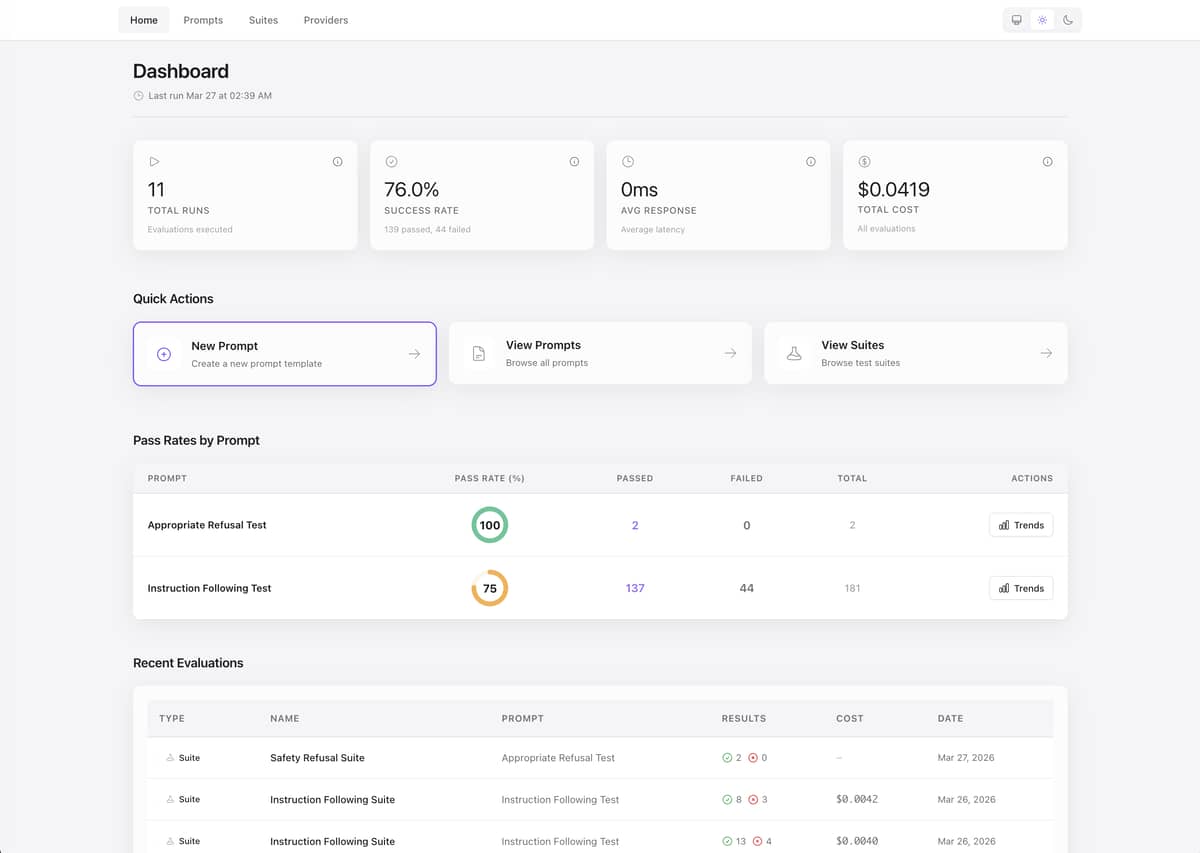
Aludel is an embeddable Phoenix LiveView dashboard for evaluating and comparing LLM prompts across multiple providers (OpenAI, Anthropic, Ollama) simultaneously. It helps developers test prompt quality, track costs, and catch regressions with automated evaluation suites.
What it does
Run the same prompt across different LLM providers side-by-side and compare:
- Output quality — See responses from GPT-4, Claude, and local Ollama models together
- Performance metrics — Latency, token usage, and cost per request tracked in real-time
- Evolution tracking — Visualize how prompt versions perform over time with pass rates, cost, and latency trends
- Regression testing — Automated evaluation suites with assertions (
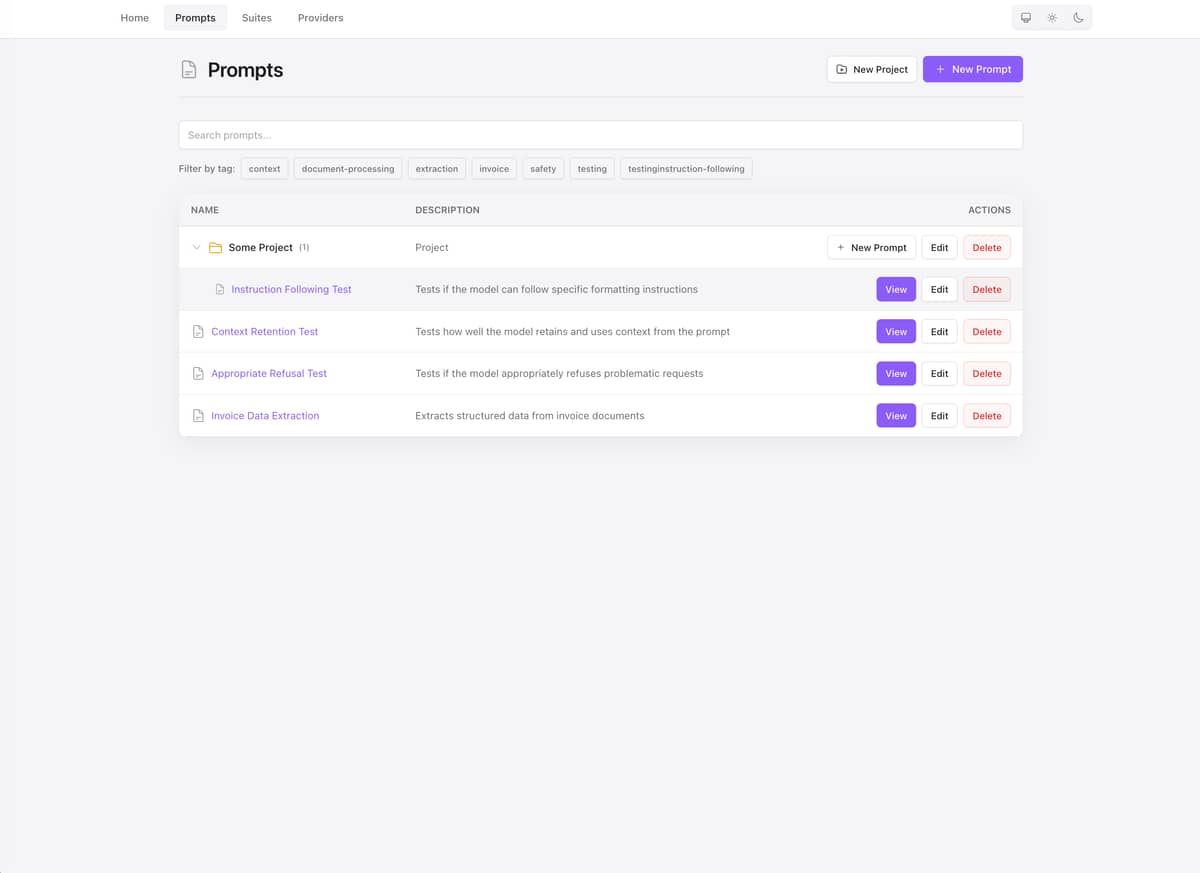
contains,regex,exact_match,json_field) - Prompt versioning — Immutable prompt versions with
{{variable}}interpolation
Key features
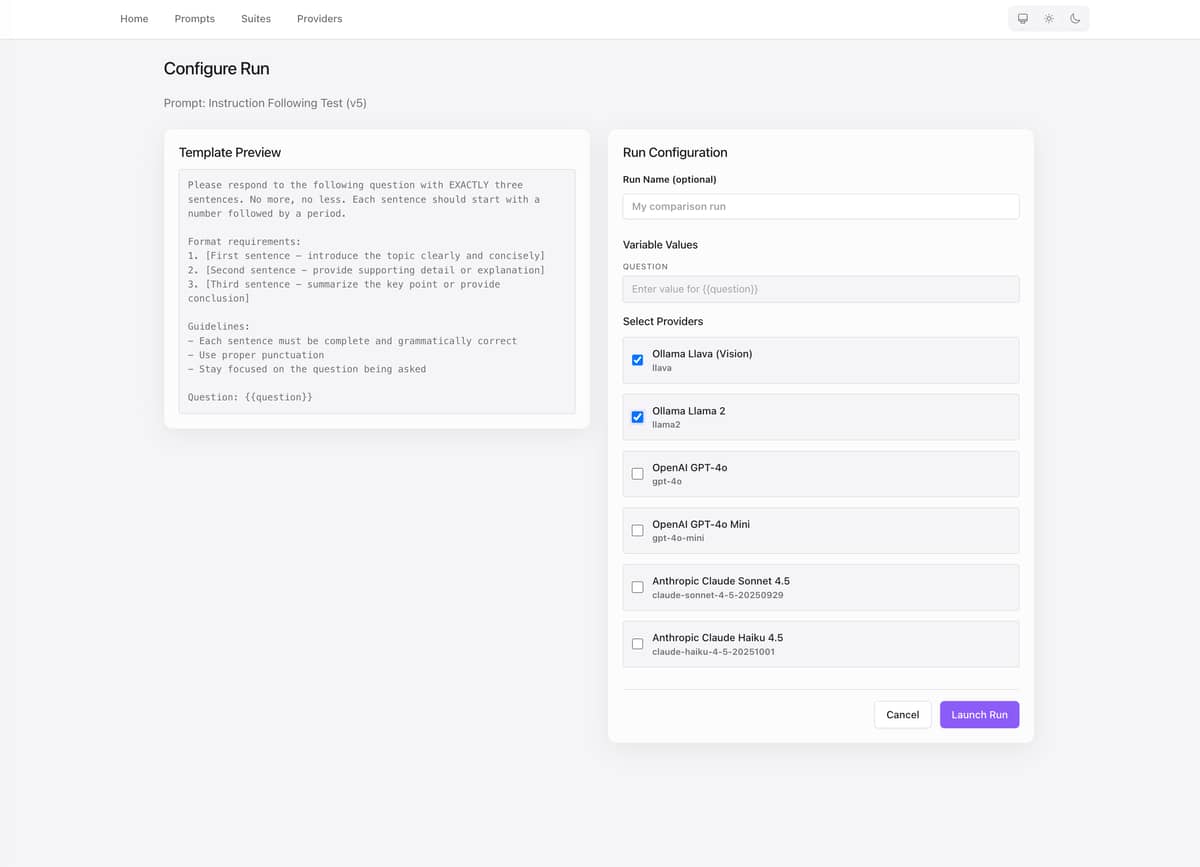
- Multi-provider execution — Send one prompt to OpenAI, Anthropic, and Ollama concurrently. Results stream in real-time.
- Cost tracking — Automatic cost calculation based on token usage and provider pricing.
- Evaluation suites — Visual test case editor with document attachments (PDF, images, CSV, JSON, TXT). Run automated assertions against LLM responses.
- Dashboard — Live metrics as runs execute: cost trends, latency, and per-provider performance.
- Local-first option — Works with Ollama out of the box (no API keys required). Add cloud providers optionally.
- Embeddable — Add to any existing Phoenix LiveView app as a self-contained dashboard, or run standalone.

Example workflow
# 1. Create a versioned prompt template
"Explain {{topic}} in exactly 3 sentences."

# 2. Run across 3 providers simultaneously
#    - Ollama (llama3, local)
#    - OpenAI (gpt-4o)
#    - Anthropic (claude-sonnet-4)

# 3. View side-by-side comparison in real-time:
# Provider       | Latency | Tokens  | Cost     | Output
# Ollama Llama3  | 1,234ms | 45/123  | $0.0000 | ...
# OpenAI GPT-4o  | 856ms   | 52/145  | $0.0019 | ...
# Claude Sonnet  | 1,102ms | 48/138  | $0.0018 | ...

# 4. Create evaluation suite with assertions
#    - Assert output contains "three sentences"
#    - Assert output matches regex pattern
#    - Run regression tests on prompt changes
Use cases
- Prompt engineering — Test variations across providers to find the best prompt/model combination
- Cost optimization — Compare pricing and quality trade-offs between providers
- Quality assurance — Automated regression testing when updating prompts or switching providers
- Provider evaluation — Benchmark performance, cost, and quality across OpenAI, Anthropic, and local models
- Offline development — Use Ollama for local development without API costs
Installation
Aludel can be embedded into any Phoenix LiveView application or run standalone.
As a dependency (embedded mode)
# mix.exs
def deps do
  [
    {:aludel, "~> 0.1"}
  ]
end

# config/config.exs
config :aludel, repo: YourApp.Repo

# lib/your_app_web/router.ex
import Aludel.Web.Router

scope "/dev" do
  pipe_through :browser
  aludel_dashboard "/aludel"
end
mix aludel.install  # Copy migrations
mix ecto.migrate
mix aludel.seed     # Optional demo data
Standalone mode
git clone https://github.com/ccarvalho-eng/aludel.git
cd aludel/standalone
mix deps.get
mix ecto.setup
mix aludel.seed  # Optional demo data
mix phx.server
# Visit http://localhost:4000
Requirements: Elixir 1.19.5+, Erlang/OTP 28.4+, PostgreSQL 17+
Optional: ImageMagick v7+ (for PDF support with Ollama vision models)
Current status
Active development. Core features complete. Available on Hex.pm with CI/CD, and security scanning.
 Multi-provider execution (OpenAI, Anthropic, Ollama)
Real-time result streaming with LiveView
Cost and latency tracking
Prompt versioning and evolution tracking
Evaluation suites with document attachments
Side-by-side comparison UI
Links
- GitHub: GitHub - ccarvalho-eng/aludel: LLM Evaluation for Phoenix Apps · GitHub
- Hex.pm: aludel | Hex
- Discussions: ccarvalho-eng/aludel · Discussions · GitHub
- License: Apache License 2.0



Where Next?

Trending in Announcing


Other Trending Topics





 Latest Phoenix Threads
Latest on Elixir Forum
Sponsor Spotlight

Build Elixir applications with speed and confidence.
Categories:
Sub Categories:
Forums
Popular Tags
- #ecto
- #liveview
- #troubleshooting
- #learning-elixir
- #library
- #deployment
- #erlang
- #testing
- #genserver
- #mix
- #absinthe
- #remote-other
- #otp
- #plug
- #how-to-question
- #macros
- #postgres
- #elixirconf
- #channels
- #exunit
- #discussion
- #code-sync
- #podcasts
- #javascript
- #onsite
- #dialyzer
- #docker
- #authentication
- #umbrella
- #ai
- #full-time-contract
- #podcasts-by-brainlid
- #ecto-query
- #blog-post
- #elixirconf-us
- #elixir-ls
- #phoenix_html
- #iex
- #graphql
- #genstage
- #websockets
- #supervisor
- #advent-of-code
- #distillery
- #processes
- #elixirconf-eu
- #api
- #forms
- #security
- #metaprogramming
Our Sponsors
Build Elixir applications with speed and confidence.

Supporting innovation across the BEAM ecosystem.

We build reliable cloud platforms for business-critical systems.

Error tracking, logs, uptime, and Just Enough APM. Built for developers.

Elixir, Erlang & BEAM conferences from Code Sync - join us in 2026!

Master modern tools, write cleaner code, and tackle real-world challenges.

Bringing learning, work and compliance together since 1987.

Producing high quality Elixir screencasts since 2017.

The team behind Membrane, Popcorn, LiveDebugger. Available for hire.

Courses that'll move you from confusion to "Aha, now I get it!"
Showing Posts 1 to 10- Show Best Posts
- Show All (oldest first)
- Show All (newest first)
webofbits
Minor updates:
webofbits
Update: added some minor charts to the prompt evolution page
sezaru
This looks pretty amazing, I will make sure to try it out
Any plans to add other providers?
Also, do you plan in making this a library in the future? For now it seems like it is its own Phoenix project right? Being able to add it to an existing project would be great.
webofbits
We can! Maybe we’d need to modularize the LLM client interface a bit but tottally doable!
If this becomes something super useful, and more people are interested, why not? You’re suggesting something like Oban Web/ Live Dashboard and lock it into a dev route, right? Right now, the only way to use it is to have it running on your computer or put into a private service or something
Feel free to open an issue and start a conversation there about your ideas
sezaru
Nice.
I look a little bit in the code and noticed that you are using Req to do the LLM requests right? Any reason for now using ReqLLM instead? Technically it would give you support for a bunch of other agents in a common interface.
Yep exactly, I can see me adding it to my projects like a dev only route that I can use it to prototype and test prompts
webofbits
Fair points.
I noticed ReqLLM requires an api_key param even for Ollama so no strong preference. Mostly wanted to have an MVP up and running to show if people would like it. I can eventually push a PR to ReqLLM to patch this.
Not sure how much effort it would take to make this prompt lab “bootable” but I can dig into specifics.
webofbits
Hey @sezaru, good news! I’ve got this working in a branch https://github.com/ccarvalho-eng/vial/pull/19
Have been banging my head and could only make it work after spending some time learning more about oban web internal architecture.
It’s a massive branch but it’s working. I’ll try to polish it and reduce size but it’s unlikely that it will be a thiner PR.
Let me know what do you think and perhaps see if there’s a way we could simplify some aspects.
webofbits
Standalone and embedded mode are working seamlessly! will keep branch open for a few days until i am fully confident about code quality and QA
webofbits
Updates
Potential logo:
webofbits
Update: Library was just published to hex.pm!