
JakeBecker
ElixirLS - the Elixir Language Server
TL;DR: I’ve just released an implementation of Microsoft’s IDE-independent Language Server Protocol for Elixir. It adds language support and debugger integration to VS Code, and can (in theory) be used by other IDEs, too. Cross-posting this from my new blog here.
I’ve been spoiled by good IDEs. Once you’ve gotten used to an IDE like RubyMine or IntelliJ IDEA, it’s hard to go back to just using text editors.
Elixir has an open-source IntelliJ plugin, IntelliJ Elixir, and it’s quite good. A few months ago, I started contributing to its development, adding ExUnit test support and debugger integration. It was fun to work on, but I got a bit frustrated with having to write Java. The IntelliJ Elixir codebase is all Java and it’s quite large — it includes an Elixir lexer and parser written in Java, among other code intelligence features.
There’s another approach that other editors are using — write the code insight logic in Elixir, and run a server in separate process that communicates with the editor or IDE. The original Elixir editor plugin that used this approach was Alchemist for Emacs, and the author published the Elixir code powering it as Alchemist Server. Another developer built upon Alchemist Server and created Elixir Sense which is being used in Atom and VS Code. With respect to IntelliJ Elixir, I’m convinced that the “language server” approach is the way to go because of the code reuse it enables.
It turns out, Microsoft has embraced this approach. They’ve published a JSON-based standard they’re calling the Language Server Protocol for IDE-agnostic language support, and it’s the standard way to write language plugins for VS Code. Red Hat is also backing the protocol and has added support for it to Eclipse Che. Microsoft also published a spec for a similar protocol for debugger integration, the VS Code debug protocol.
I’ve just released an early alpha of ElixirLS, a language server implementing these protocols for Elixir. It’s got debugger integration supporting line breakpoints, plus most of the standard editor features such as autocompletion and go-to-definition. It also reports build warnings and errors immediately as you type.
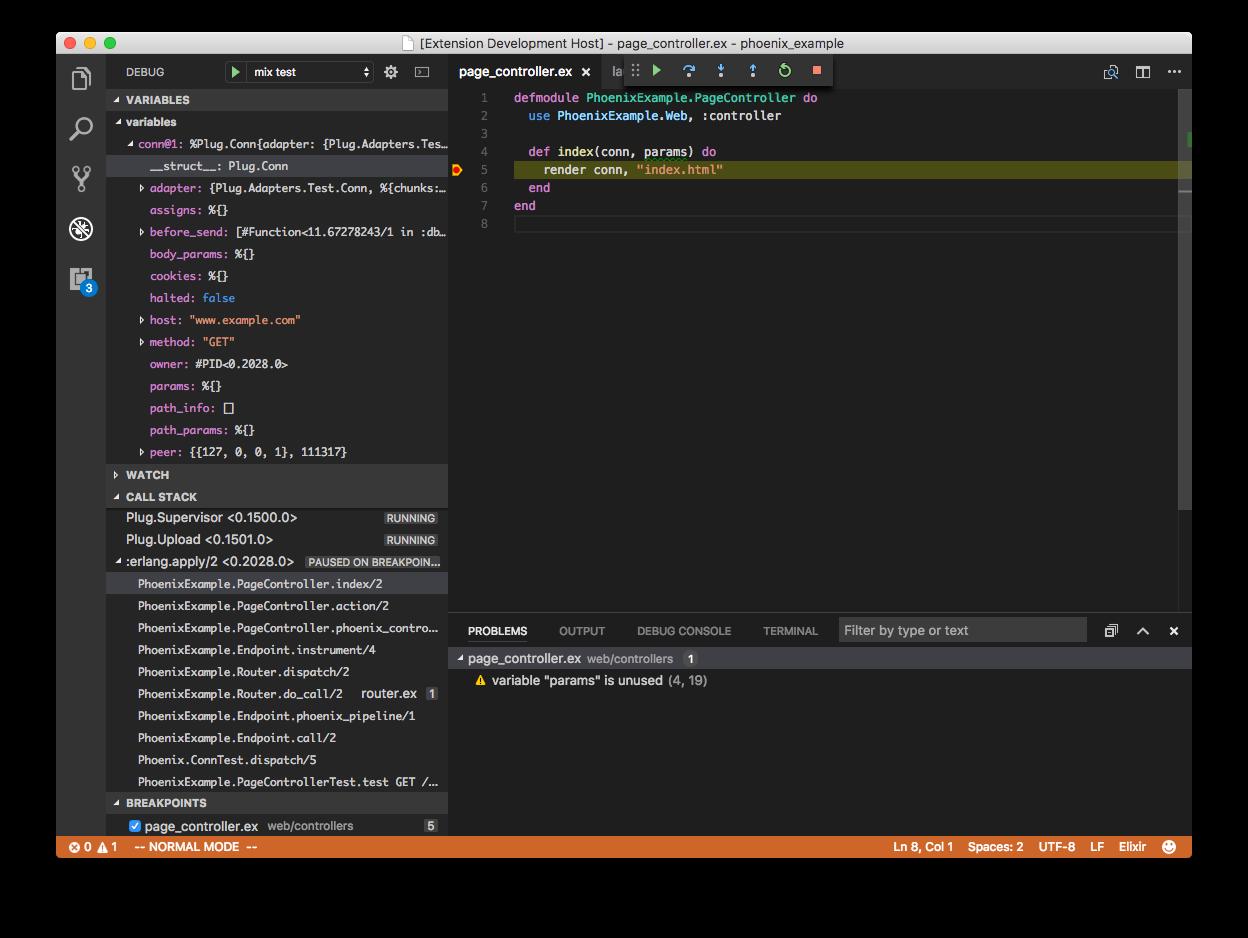
The server code is available here, and the associated VS Code extension is here.
I want to be clear that this is a very rough release. I’ve only tested it on OSX using Elixir 1.4, and it has significant known bugs. (The extension won’t even launch with Elixir 1.3, and most features don’t work properly for umbrella projects, for example.) I’m hoping to iron out the kinks in the coming versions, but right now, it can’t be considered stable. I’m hoping that the Elixir community might have some good ideas on how to improve it. If all you want is a stable editor for Elixir, stick with whatever you’re using now.
The best thing about having a standard protocol for IDE support is that it’s super easy to contribute to. You don’t have to know anything about VS Code or any other IDE. The spec is simple and well-documented — if you can write Elixir, you can contribute! If you’re interested in more of how it works, I’ve written a couple more blog posts on debugging Elixir in VS Code and on some of the compiler hacks I needed to enable reporting build warnings and errors as you type.
I hope other Elixir developers find it useful, or at least interesting. Give it a try, and happy coding!
Most Liked

axelson
Version 0.4.0 was released today! 
(Note that there are some potentially breaking changes for VSCode users)
(Note: if you’re using the “ElixirLS Fork” version of the VSCode plugin you should switch back to ElixirLS)
Here are the highlights:
General:
Major changes:
- Add autocompletion of struct fields on a binding when we know for sure what type of struct it is. (thanks Łukasz Samson) #202
- For details see the Code Completion section of the readme
- This is a great help and can give you completions like:

- Normalize compiler warnings and associate them with templates (thanks Marlus Saraiva) #241
- This makes compiler warnings much more readable (especially for deeply nested files):
- There’s also plenty more screenshots (including before/after) in the PR
- This makes compiler warnings much more readable (especially for deeply nested files):

Changes:
- Add all core elixir apps to the Dialyzer PLT. (thanks Eric Entin) #225
- Change “did not receive workspace/didChangeConfiguration” log level from warning to info (thanks Jason Axelson) #222
- Automatically create a
.gitignorefile inside the.elixir-lsdir so that users do not need to manually add it to their gitignore (thanks Thanabodee Charoenpiriyakij) #232 - Load all modules after first build (thanks Akash Hiremath) #227
- This means that dialyzer is no longer needed for workspace symbol support

- This means that dialyzer is no longer needed for workspace symbol support
Bug Fixes:
- Don’t return snippets to clients that don’t declare
snippetSupport(such as vim) (thanks Jeffrey Xiao) #223
VSCode:
- Better phoenix templates support (thanks Marlus Saraiva) #93
- Add basic support for
.html.leexfiles for Phoenix LiveView (thanks oskarkook) #82 - Add filetype and watcher for
.html.leexfiles for Phoenix LiveView (thanks Byron Hambly) #83
VSCode potentially breaking changes:
- Change language id to be lowercase kebab-case in accordance with VSCode guidelines. This also fixes an issue displaying the elixir logo for html.eex files. (thanks Matt Furden) #87
- This changes the language id’s
EEx→eexandHTML (EEx)→html-eex - If you have customized your emmet configuration configuration then you need to update it:
- Open VSCode and hit
Ctrl+Shift+PorCmd+Shift+Pand type"Preference: Open Settings (JSON)" - Add or edit your
emmet.includedLanguagesto include the new Language Id:"emmet.includeLanguages": { "html-eex": "html" }
- This changes the language id’s
I want to give a huge thanks to all the contributors to this release!  As you can see from the changelog there are quite a few!
axelson
Version 0.5.0 was released today!
Here are the highlights:
General:
Major changes:
-
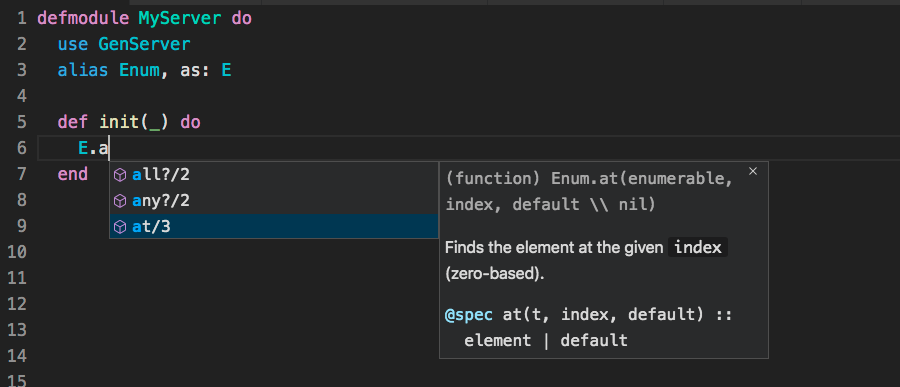
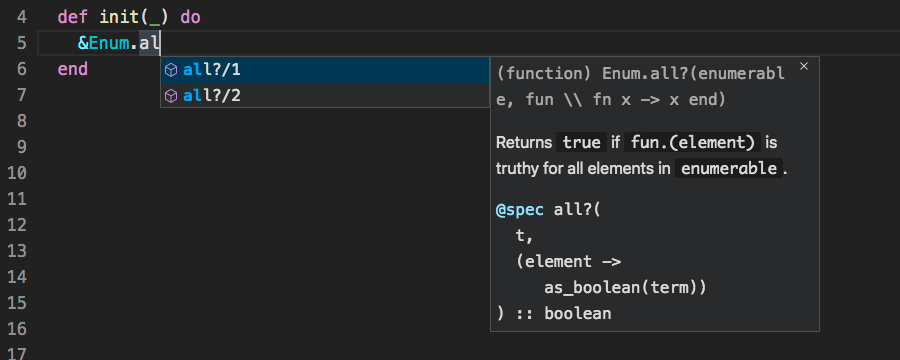
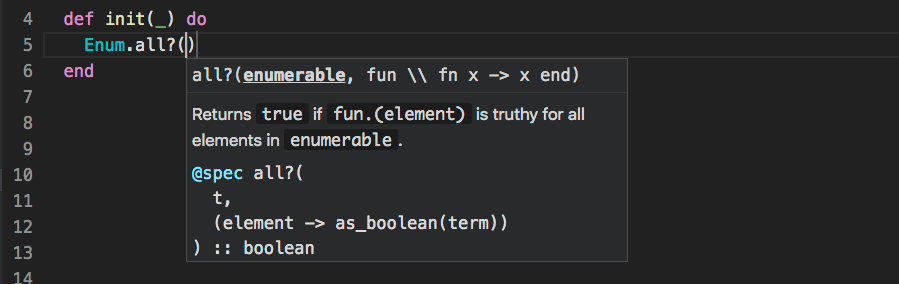
Improve autocomplete and signature help (thanks Marlus Saraiva) #273 (see also #300)
- Don’t insert arguments when completing a function call (almost always had to be deleted)
- Autocomplete triggers signature help instead of injecting the arguments (since those would almost always have to be removed)
- Don’t insert a
()around the function call if the formatter configuration does not require it.
When completing only the highest arity is shown by default:
When capturing a function all arities are shown (and the completion includes the/1)
Signature help is shown automatically after selecting a completion
Changes:
- Support WorkspaceSymbols (go to symbol in workspace) without dialyzer being enabled (thanks Jason Axelson) #263
- Add completions for
@moduledoc falseand@doc false(thanks Jason Axelson) #288 - No longer always return a static list of keywords for completion (thanks Jason Axelson) #259
Bug Fixes:
- Formatting was returning invalid floating point number (caused issues on vim and emacs) (thanks Thanabodee Charoenpiriyakij) #250
- Debugger doesn’t fail when modules cannot be interpretted (thanks Łukasz Samson) (such as nifs) #283
- Only call DocumentSymbols (outline pane) for .ex and .exs files (thanks Marlus Saraiva) #262
- Fix detection of empty hover hints (thanks Dmitry Gutov) #279
Also numerous GitHub - elixir-lsp/elixir_sense: Provides context-aware information for code completion, documentation, go/jump to definition, signature info and more changes, improvements, and bug fixes
VSCode Changes
Updating to the latest release should happen automatically
- Major improvement: Support workspaces with multiple elixir projects (especially those where the Elixir project is not part in the root) (thanks Alessandro Tagliapietra) #70
- Major improvement: Improved support for phoenix templates (thanks Marlus Saraiva) #93
- Shows errors in
.eexand.leexfiles (instead of associated.exfile)
- Shows errors in
- Improve syntax highlighting following pipes (thanks Dusty Pomerleau) #81
- Activate extension whenever workspace contains elixir files (thanks Jason Axelson) #107
- Make heredocs and most sigils auto-close when used with quotes and triple quotes (thanks Jarrod Davis) #101
- Improve syntax highlighting following pipes (thanks Dusty Pomerleau) #81
- Make
%a dedicated punctuation scope in elixir syntax file (thanks Dusty Pomerleau) #72
I want to give a huge thanks to all the contributors to this release! As you can see from the changelog there are quite a few!
(Note: if you’re using the “ElixirLS Fork” version of the VSCode plugin you should switch back to ElixirLS)
JakeBecker
Hi everyone! Long time no see!
If you’ve been using ElixirLS, you may have noticed that I haven’t really maintained it in a year or so. All my work for a while has been on hardware that doesn’t run Elixir, mainly 2x4s and drywall, and I told myself ElixirLS was on the backburner because I didn’t want to think of it as “abandoned”. But after a year of neglect, I’m ready to admit that I’m not going to be working on it in the near future.
I have excellent news though: While I’ve been away, a few proactive volunteers from the Elixir community started a fork and have put major work into actively maintaining it. I had long since routed my Github notifications somewhere they wouldn’t bother me, so I didn’t really realize how much work they’d been doing in my absence, and @axelson, @lukaszsamson, and other contributors have my gratitude and respect.
I’m retiring my Github repo in favor of theirs over at elixir-lsp/elixir-ls. They’ll continue publishing to the original VS Code extension, so if you’re using the original ElixirLS for VS Code, you can keep using it. If you’ve been using their fork, you can switch back to the original extension. Any issues or PRs should happen on the new repo. Starting an open-source project is more fun than maintaining one, so if you file an issue over on that repo, make sure to say thanks for their hard work.
I do hope to go back to coding Elixir at some point once my house has walls and toilets and everything. In the meantime, I’m happy the project is in good hands. Thanks for using ElixirLS!
Popular in Discussions







Other popular topics







Latest on Elixir Forum
Sponsor Spotlight

Catch errors, track performance, monitor hosts and more.
Categories:
Sub Categories:
Forums
Our Sponsors

Build Elixir applications with speed and confidence.

Supporting innovation across the BEAM ecosystem.

We build reliable cloud platforms for business-critical systems.
Catch errors, track performance, monitor hosts and more.

Producing high quality Elixir screencasts since 2017.

Enabling companies to succeed by building software people love.

The deployment platform built for Elixir: PaaS ease, VPS control.

Courses that'll move you from confusion to "Aha, now I get it!"